Excel's HYPERLINK Function Not Working 😕
Learn why the HYPERLINK function breaks with the dynamic array engine and how to fix it in Excel.

Andrew Moss
1.7K views • May 15, 2025
About this video
The HYPERLINK function has been broken for as long as the dynamic array engine has been around.
I’ll tell you why…
I tried the exact same example in the Windows, macOS, and web versions of Excel — and got three different results.
𝗘𝗫𝗔𝗠𝗣𝗟𝗘
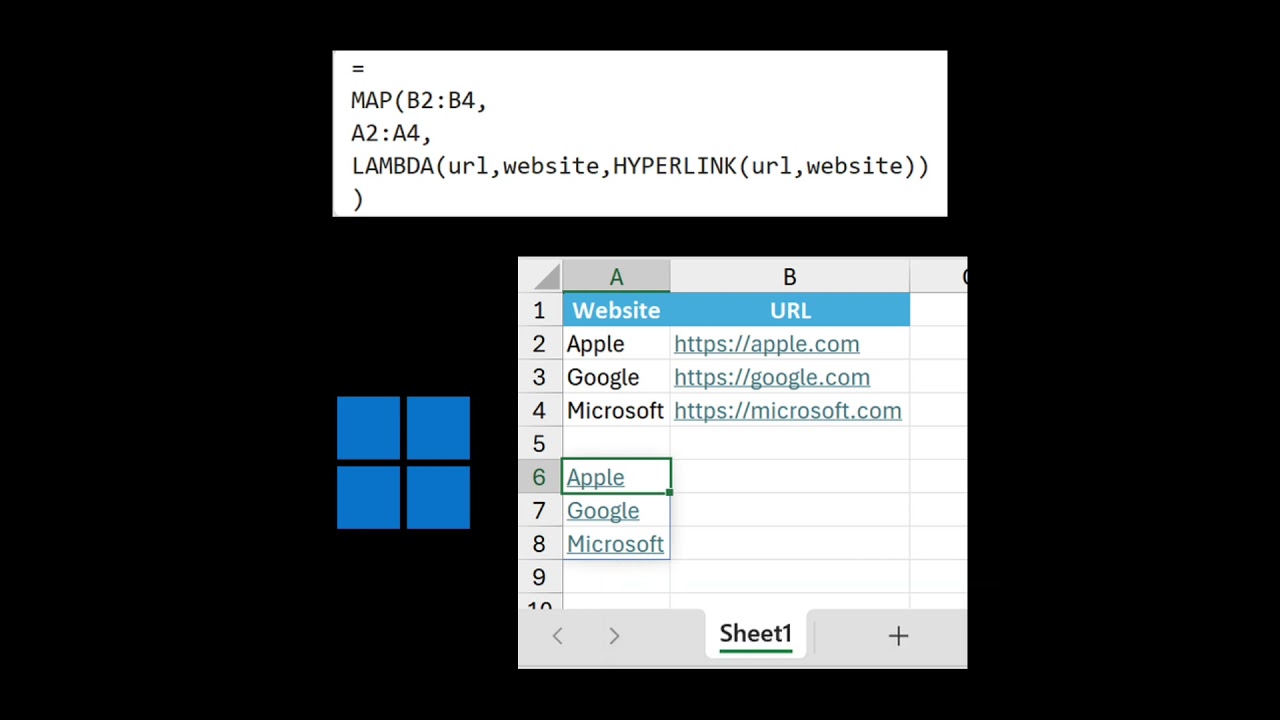
"Apple", "Google", and "Microsoft" are featured in A2:A4 with their corresponding URLs in B2:B4.
To return the hyperlinks as friendly names, forget about using =HYPERLINK(B2:B4,A2:A4), as that repeats the first value for the entire spilled range (e.g. "Apple";"Apple";"Apple").
You really have to go out of your way to correct it:
=
MAP(B2:B4,
A2:A4,
LAMBDA(url,website,HYPERLINK(url,website))
)
However, even then, how this formula performs varies depending on the platform you’re using.
I hovered over each result in A6:A8, and here’s what happened:
𝗪𝗜𝗡𝗗𝗢𝗪𝗦
A tooltip appeared with Apple’s website in it, even for Google’s and Microsoft’s.
𝗠𝗔𝗖𝗢𝗦
Absolutely nothing. The hyperlinks didn't even work.
𝗪𝗘𝗕
Each website name displayed a pop-up containing the correct URL.
Strange, eh?
Excel for the web was the only platform to successfully do what I wanted, but it still has the spill issue the others are affected by, meaning I couldn’t use HYPERLINK on its own.
This isn’t exactly a difficult bug to find. I’ve brought it up a few times since 2023, but nothing’s ever been done about it.
Too busy prioritising Copilot, I guess…
---
Where to find me:
Website — https://andrewmoss.me
LinkedIn — https://www.linkedin.com/in/andrewcharlesmoss
Medium — https://andrewcharlesmoss.medium.com
GitHub — https://github.com/andrewcharlesmoss
Twitter — https://twitter.com/andrew_c_moss
Facebook — https://www.facebook.com/andrewcharlesmoss
Threads — https://www.threads.net/@andrewcharlesmoss
Donations:
PayPal — https://www.paypal.com/donate/?hosted_button_id=39JH3GVDXGKM6
Buy Me a Coffee — https://www.buymeacoffee.com/andrewmoss
I’ll tell you why…
I tried the exact same example in the Windows, macOS, and web versions of Excel — and got three different results.
𝗘𝗫𝗔𝗠𝗣𝗟𝗘
"Apple", "Google", and "Microsoft" are featured in A2:A4 with their corresponding URLs in B2:B4.
To return the hyperlinks as friendly names, forget about using =HYPERLINK(B2:B4,A2:A4), as that repeats the first value for the entire spilled range (e.g. "Apple";"Apple";"Apple").
You really have to go out of your way to correct it:
=
MAP(B2:B4,
A2:A4,
LAMBDA(url,website,HYPERLINK(url,website))
)
However, even then, how this formula performs varies depending on the platform you’re using.
I hovered over each result in A6:A8, and here’s what happened:
𝗪𝗜𝗡𝗗𝗢𝗪𝗦
A tooltip appeared with Apple’s website in it, even for Google’s and Microsoft’s.
𝗠𝗔𝗖𝗢𝗦
Absolutely nothing. The hyperlinks didn't even work.
𝗪𝗘𝗕
Each website name displayed a pop-up containing the correct URL.
Strange, eh?
Excel for the web was the only platform to successfully do what I wanted, but it still has the spill issue the others are affected by, meaning I couldn’t use HYPERLINK on its own.
This isn’t exactly a difficult bug to find. I’ve brought it up a few times since 2023, but nothing’s ever been done about it.
Too busy prioritising Copilot, I guess…
---
Where to find me:
Website — https://andrewmoss.me
LinkedIn — https://www.linkedin.com/in/andrewcharlesmoss
Medium — https://andrewcharlesmoss.medium.com
GitHub — https://github.com/andrewcharlesmoss
Twitter — https://twitter.com/andrew_c_moss
Facebook — https://www.facebook.com/andrewcharlesmoss
Threads — https://www.threads.net/@andrewcharlesmoss
Donations:
PayPal — https://www.paypal.com/donate/?hosted_button_id=39JH3GVDXGKM6
Buy Me a Coffee — https://www.buymeacoffee.com/andrewmoss
Tags and Topics
Browse our collection to discover more content in these categories.
Video Information
Views
1.7K
Likes
2
Duration
0:22
Published
May 15, 2025
User Reviews
3.8
(1) Related Trending Topics
LIVE TRENDSRelated trending topics. Click any trend to explore more videos.
No specific trending topics match this video yet.
Explore All Trends