Transform Any Room with Stunning AI Video Animations | Real Estate Tutorial 🏡
Discover how to create eye-catching AI-powered room transformations for real estate listings. Follow our step-by-step tutorial and try OpusClip today with exclusive discount code OPUSCLIP25! 🚀

Van Beek Films
14.6K views • Nov 3, 2025
About this video
🔥Try OpusClip Today! Use Code: OPUSCLIP25
https://clip.opus.pro/dashboard?coupon_code=OPUSCLIP25
🔥 Motion Blur 👉🏻 https://payhip.com/VanBeekFilms
🔥 Practice Footage 👉🏻 https://payhip.com/b/feBm6
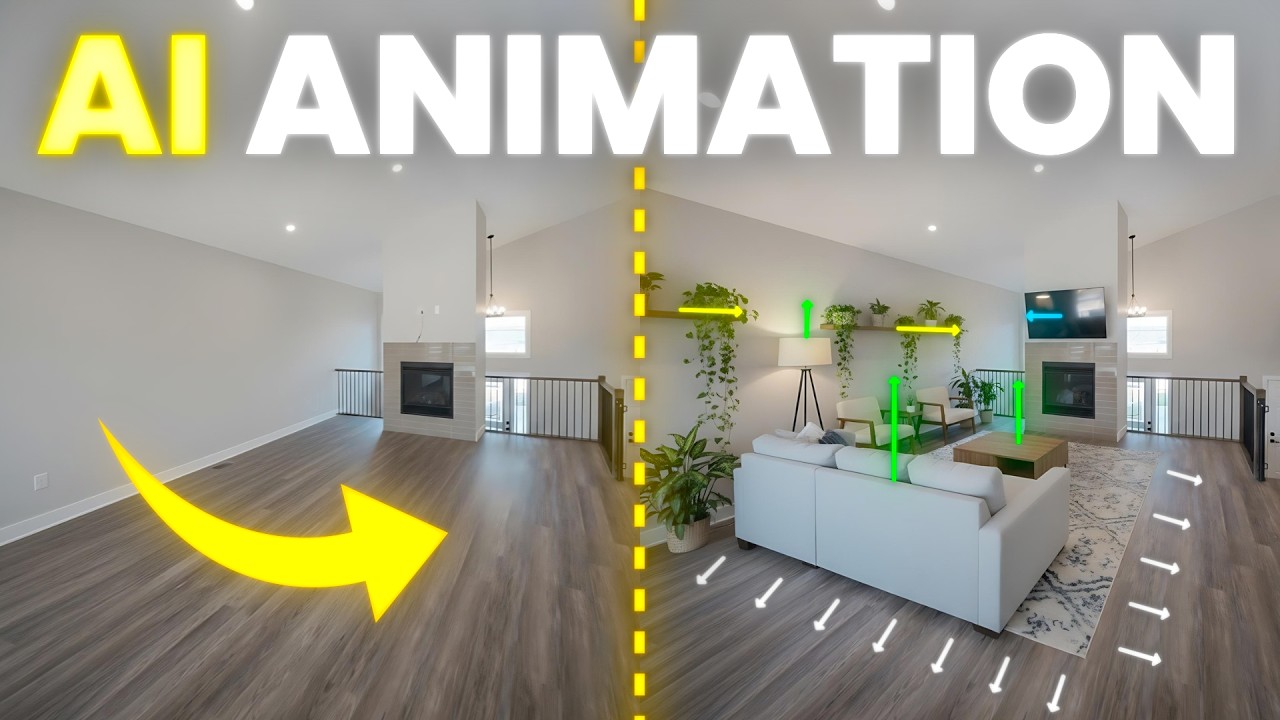
Create stunning AI-powered real estate videos that bring empty rooms to life! In this tutorial, I’ll show you how to make an AI room makeover animation using tools like NanoBanana to generate realistic end frames and Kling AI to transform still images into smooth, moving video sequences. Then we’ll jump into DaVinci Resolve to polish the look, enhance motion, and use its AI editing tools to create seamless transitions and cinematic flow. Whether you’re editing in DaVinci Resolve, Premiere Pro, or Final Cut Pro, this workflow will help you design professional AI home renovation videos that feel natural, dynamic, and perfect for real estate marketing or viral content. Learn how to blend AI video generation with real-world editing to make every property transformation look like magic.
🔥 Get 70% OFF 1 Year of AUDIIO (use code VANBEEK)
https://audiio.com/vanbeekfilms
My Gear
Camera (Lumix S5II) - [https://amzn.to/437bskO]
Tight Lens (Sigma 28-70) - [https://amzn.to/3ELx7F3]
Wide Lens (TTartisan 11) - [https://amzn.to/4k8IzKU]
Microphone (Deity D3) - [https://amzn.to/4k2cJj3]
Key Light (Amaran 60x) - [https://amzn.to/3Xa1z1I]
Gimbal (DJI RS4) - [https://amzn.to/4i7gSAp]
Drone (Mini 4 Pro) - [https://amzn.to/4hMkBUh]
Lav Microphone (DJI Mic 2) - [https://amzn.to/41cBuQO]
Field Monitor (Portkey PT6) - [https://amzn.to/4hJCnrl]
B-Camera (Lumix G7) - [https://amzn.to/4kar251]
Tight Lens (Lumix 25) - [https://amzn.to/4k4Zhe5]
Want me to review your product? Brands & companies can reach out at [joel@vanbeekfilms.ca]
💬 Connect with me:
Instagram: @vanbeekfilms
Facebook: @vanbeekfilms
Website: vanbeekfilms.ca
CHAPTERS
00:00 Intro
00:44 Grabbing Frames
01:43 Generating End Frames
04:02 Generating Animated Video
05:49 Retiming In Davinci Resolve
06:17 Speedramping
08:05 Generating End Frames & Video
09:00 Blending In Davinci Resolve
11:36 OpusClip
13:10 Renovating A Room
16:13 Speedramping
19:04 Motion Blur
19:29 AI Tips & Tricks #1
20:08 AI Tips & Tricks #2
20:34 AI Tips & Tricks #3
21:18 AI Tips & Tricks #4
22:11 AI Tips & Tricks #5
23:11 AI Tips & Tricks #6
23:57 AI Tips & Tricks #7
24:45 Outro
#ai #realestate #davinciresolve
https://clip.opus.pro/dashboard?coupon_code=OPUSCLIP25
🔥 Motion Blur 👉🏻 https://payhip.com/VanBeekFilms
🔥 Practice Footage 👉🏻 https://payhip.com/b/feBm6
Create stunning AI-powered real estate videos that bring empty rooms to life! In this tutorial, I’ll show you how to make an AI room makeover animation using tools like NanoBanana to generate realistic end frames and Kling AI to transform still images into smooth, moving video sequences. Then we’ll jump into DaVinci Resolve to polish the look, enhance motion, and use its AI editing tools to create seamless transitions and cinematic flow. Whether you’re editing in DaVinci Resolve, Premiere Pro, or Final Cut Pro, this workflow will help you design professional AI home renovation videos that feel natural, dynamic, and perfect for real estate marketing or viral content. Learn how to blend AI video generation with real-world editing to make every property transformation look like magic.
🔥 Get 70% OFF 1 Year of AUDIIO (use code VANBEEK)
https://audiio.com/vanbeekfilms
My Gear
Camera (Lumix S5II) - [https://amzn.to/437bskO]
Tight Lens (Sigma 28-70) - [https://amzn.to/3ELx7F3]
Wide Lens (TTartisan 11) - [https://amzn.to/4k8IzKU]
Microphone (Deity D3) - [https://amzn.to/4k2cJj3]
Key Light (Amaran 60x) - [https://amzn.to/3Xa1z1I]
Gimbal (DJI RS4) - [https://amzn.to/4i7gSAp]
Drone (Mini 4 Pro) - [https://amzn.to/4hMkBUh]
Lav Microphone (DJI Mic 2) - [https://amzn.to/41cBuQO]
Field Monitor (Portkey PT6) - [https://amzn.to/4hJCnrl]
B-Camera (Lumix G7) - [https://amzn.to/4kar251]
Tight Lens (Lumix 25) - [https://amzn.to/4k4Zhe5]
Want me to review your product? Brands & companies can reach out at [joel@vanbeekfilms.ca]
💬 Connect with me:
Instagram: @vanbeekfilms
Facebook: @vanbeekfilms
Website: vanbeekfilms.ca
CHAPTERS
00:00 Intro
00:44 Grabbing Frames
01:43 Generating End Frames
04:02 Generating Animated Video
05:49 Retiming In Davinci Resolve
06:17 Speedramping
08:05 Generating End Frames & Video
09:00 Blending In Davinci Resolve
11:36 OpusClip
13:10 Renovating A Room
16:13 Speedramping
19:04 Motion Blur
19:29 AI Tips & Tricks #1
20:08 AI Tips & Tricks #2
20:34 AI Tips & Tricks #3
21:18 AI Tips & Tricks #4
22:11 AI Tips & Tricks #5
23:11 AI Tips & Tricks #6
23:57 AI Tips & Tricks #7
24:45 Outro
#ai #realestate #davinciresolve
Video Information
Views
14.6K
Likes
1.2K
Duration
25:09
Published
Nov 3, 2025
User Reviews
4.6
(2) Related Trending Topics
LIVE TRENDSRelated trending topics. Click any trend to explore more videos.
No specific trending topics match this video yet.
Explore All Trends