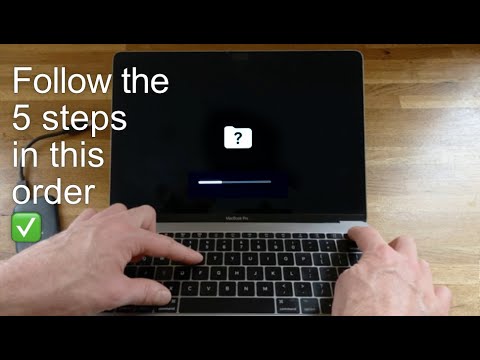
Fix Grey Flashing Folder & Question Mark on Mac 🚀
Learn quick steps to fix the grey flashing folder and question mark during Mac startup. Subscribe for more tips! 👍🏻

Smart Photo Vault
1.6M views • Dec 16, 2021
About this video
All the steps to fix the Grey Screen Flashing Question Mark folder during mac startup...
Remember to…
✔️ Subscribe for more
👍🏻 Like the video
💭 Leave a comment
📤 Share with a friend
............
SEE MY OTHER VIDEO 'How to replace your SSD' here: https://youtu.be/Ve4IjPr4oYY
............
AS MENTIONED IN THE VIDEO:
The Fast External Hard Drive I used to Run the OS:
US 🇺🇸 - https://amzn.to/3pTvhH2
UK 🇬🇧 - https://amzn.to/30riQcB
_____________________
OTHER PRODUCTS I USE
(AMAZON LINKS):
G-drive ruggedized long-term backup storage:
US 🇺🇸 - https://amzn.to/36fRUve
UK 🇬🇧 - https://amzn.to/32kDKrQ
The portable video editing drives I use:
US 🇺🇸 - https://amzn.to/3n0yvG1
UK 🇬🇧 - https://amzn.to/2VWnHwB
Fast & affordable memory cards (video & stills):
US 🇺🇸 - https://amzn.to/2IbfIbk
UK 🇬🇧 - https://amzn.to/32mnB4V
Voice Over Mic:
US 🇺🇸 - https://amzn.to/3KsSlVE
UK 🇬🇧 - https://amzn.to/3pYqEfA
My main tripod:
US 🇺🇸 - https://amzn.to/36oJwdY
UK 🇬🇧 - https://amzn.to/2YBuptr
The camera bag I've owned for years:
US 🇺🇸 - https://amzn.to/3mXBY7I
UK 🇬🇧 - https://amzn.to/354yp9G
My main mirrorless camera:
US 🇺🇸 - https://amzn.to/2I2tq0F
UK 🇬🇧 - https://amzn.to/3p35yur
Vlog camera:
US 🇺🇸 - https://amzn.to/355lT9P
UK 🇬🇧 - https://amzn.to/2TYxXDF
New Rode video mic II:
US 🇺🇸 - https://amzn.to/3GhHVcB
UK 🇬🇧 - https://amzn.to/3ECq2DW
My screen calibration tool (SpyderX Pro):
US 🇺🇸 - https://amzn.to/3n26spA
UK 🇬🇧 - https://amzn.to/3gw5bo5
Noise-Canceling Headphones for travel:
US 🇺🇸 - https://amzn.to/2McuXTM
UK 🇬🇧 - https://amzn.to/3pM35nc
_____________________
TIMESTAMPS:
0:00 Intro
0:50 Basic Check Screen Brightness
1:05 Reset PRAM NVRAM
1:57 Check Bootable Drive
3:00 Repair Your Hard Drive HD
3:51 Recovery Mode + Time Machine Drive
4:09 Disk Utility
5:07 Re-Install Mac OS
7:08 MUST DO Final Tip - Closing thoughts
_____________________
TAGS:
#Macbook #Imac #FlashingFolder
_____________________
LEGAL:
Buying through the above links helps support this channel at no extra cost to yourself.
We are a participant in the Amazon Services LLC Associates Program, an affiliate advertising program designed to provide a means for sites to earn advertising fees by advertising and linking to Amazon.com
DISCLAIMER:
All opinions mentioned are my own, I AM NOT A MAC EXPERT. The views mentioned are based on my personal knowledge/understanding. Try the methods at your own risk. The video opinions are open to friendly debate. Any sponsorship will be acknowledged in the video, or added below. This channel is for Educational and entertainment purposes only.
SPONSOR DISCLAIMER:
This video is Sponsored by 'iBoysoft Data Recovery for Mac'. I may, or may not have used the product personally. Use any sponsored links at your own risk. This channel is not liable for any actions you may take.
Remember to…
✔️ Subscribe for more
👍🏻 Like the video
💭 Leave a comment
📤 Share with a friend
............
SEE MY OTHER VIDEO 'How to replace your SSD' here: https://youtu.be/Ve4IjPr4oYY
............
AS MENTIONED IN THE VIDEO:
The Fast External Hard Drive I used to Run the OS:
US 🇺🇸 - https://amzn.to/3pTvhH2
UK 🇬🇧 - https://amzn.to/30riQcB
_____________________
OTHER PRODUCTS I USE
(AMAZON LINKS):
G-drive ruggedized long-term backup storage:
US 🇺🇸 - https://amzn.to/36fRUve
UK 🇬🇧 - https://amzn.to/32kDKrQ
The portable video editing drives I use:
US 🇺🇸 - https://amzn.to/3n0yvG1
UK 🇬🇧 - https://amzn.to/2VWnHwB
Fast & affordable memory cards (video & stills):
US 🇺🇸 - https://amzn.to/2IbfIbk
UK 🇬🇧 - https://amzn.to/32mnB4V
Voice Over Mic:
US 🇺🇸 - https://amzn.to/3KsSlVE
UK 🇬🇧 - https://amzn.to/3pYqEfA
My main tripod:
US 🇺🇸 - https://amzn.to/36oJwdY
UK 🇬🇧 - https://amzn.to/2YBuptr
The camera bag I've owned for years:
US 🇺🇸 - https://amzn.to/3mXBY7I
UK 🇬🇧 - https://amzn.to/354yp9G
My main mirrorless camera:
US 🇺🇸 - https://amzn.to/2I2tq0F
UK 🇬🇧 - https://amzn.to/3p35yur
Vlog camera:
US 🇺🇸 - https://amzn.to/355lT9P
UK 🇬🇧 - https://amzn.to/2TYxXDF
New Rode video mic II:
US 🇺🇸 - https://amzn.to/3GhHVcB
UK 🇬🇧 - https://amzn.to/3ECq2DW
My screen calibration tool (SpyderX Pro):
US 🇺🇸 - https://amzn.to/3n26spA
UK 🇬🇧 - https://amzn.to/3gw5bo5
Noise-Canceling Headphones for travel:
US 🇺🇸 - https://amzn.to/2McuXTM
UK 🇬🇧 - https://amzn.to/3pM35nc
_____________________
TIMESTAMPS:
0:00 Intro
0:50 Basic Check Screen Brightness
1:05 Reset PRAM NVRAM
1:57 Check Bootable Drive
3:00 Repair Your Hard Drive HD
3:51 Recovery Mode + Time Machine Drive
4:09 Disk Utility
5:07 Re-Install Mac OS
7:08 MUST DO Final Tip - Closing thoughts
_____________________
TAGS:
#Macbook #Imac #FlashingFolder
_____________________
LEGAL:
Buying through the above links helps support this channel at no extra cost to yourself.
We are a participant in the Amazon Services LLC Associates Program, an affiliate advertising program designed to provide a means for sites to earn advertising fees by advertising and linking to Amazon.com
DISCLAIMER:
All opinions mentioned are my own, I AM NOT A MAC EXPERT. The views mentioned are based on my personal knowledge/understanding. Try the methods at your own risk. The video opinions are open to friendly debate. Any sponsorship will be acknowledged in the video, or added below. This channel is for Educational and entertainment purposes only.
SPONSOR DISCLAIMER:
This video is Sponsored by 'iBoysoft Data Recovery for Mac'. I may, or may not have used the product personally. Use any sponsored links at your own risk. This channel is not liable for any actions you may take.
Tags and Topics
Browse our collection to discover more content in these categories.
Video Information
Views
1.6M
Likes
11.6K
Duration
8:38
Published
Dec 16, 2021
User Reviews
4.4
(320) Related Trending Topics
LIVE TRENDSRelated trending topics. Click any trend to explore more videos.
No specific trending topics match this video yet.
Explore All Trends