Mastering Worksheet Visibility in Excel 2010: Hide & Unhide Made Easy 📊
Learn simple steps to hide and unhide worksheets in Excel 2010. Enhance your spreadsheet management skills with this quick tutorial!

Excel, Word and PowerPoint Tutorials from Howtech
109.7K views • Sep 11, 2013
About this video
This tutorial will show you how to hide and unhide worksheets in MS Excel 2010.
Don't forget to check out our site http://howtech.tv/ for more free how-to videos!
http://youtube.com/ithowtovids - our feed
http://www.Facebook.com/howtechtv - join us on Facebook
https://plus.google.com/103440382717658277879 - our group in Google+
In this tutorial you are going to learn how to hide and unhide worksheet in Excel. This tutorial has been made on Excel 2010 and applies to this versions, as well as 2007.
Step # 1 -- Navigating to the Sheet you Want to Hide
As you can see here we have a spreadsheet open with the default three sheets available that can be accessed from the bottom. First you need to click on the one that you want to hide, here we are choosing "Sheet 2". You will be taken to that sheet.
Step # 2 -- Hiding the Sheet
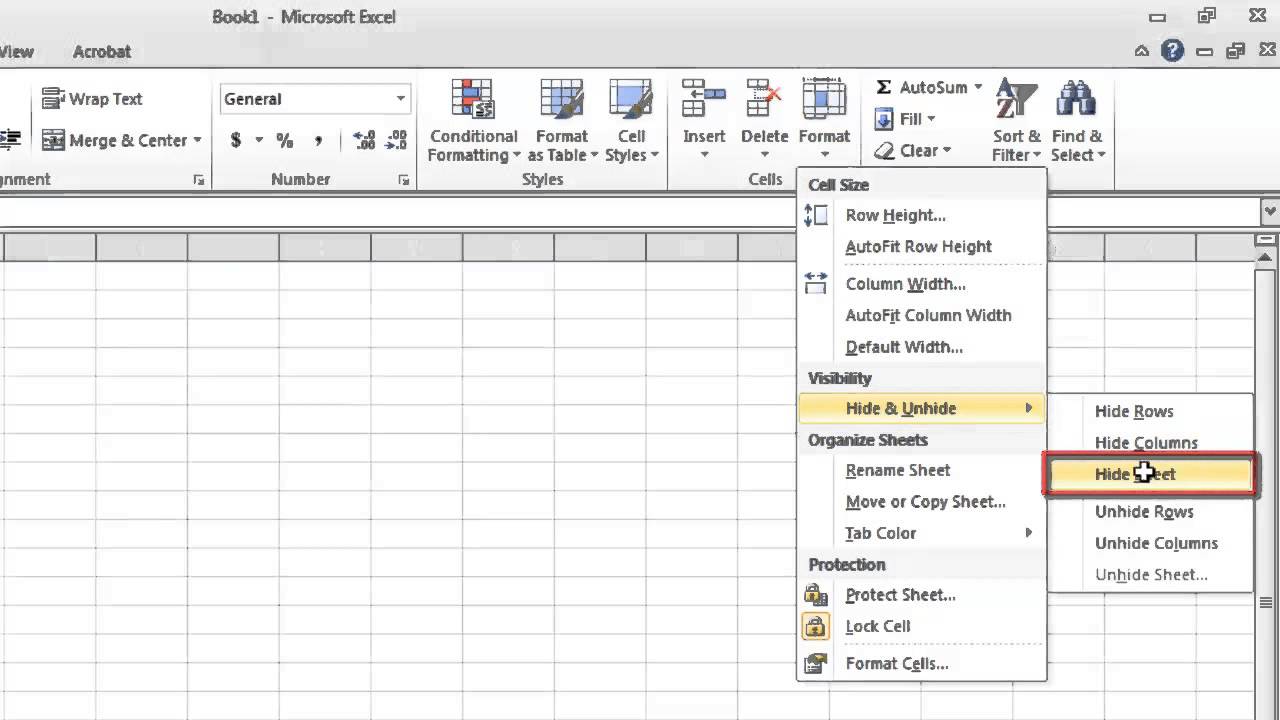
Now, make sure that you are in the "Home" tab from the options at the top. In the "Cells" area below this click on the "Format" icon. A menu will appear and you need to navigate to "Hide & Unhide". Click the "Hide Sheet" option to hide the current sheet. It will disappear from the spreadsheet and you will be moved onto the next available sheet, in this case that is "Sheet 3".
Step # 3 -- Making the Sheet Visible Again
Now we are going to look at how to make the sheet visible again. Click the "Format" icon again and go back to "Hide & Unhide". This time click the "Unhide Sheet" option. A dialog box will appear and it will list any sheets that you have hidden, here we can see that that is "Sheet 2". Click "OK" and the sheet will once again be visible in your spreadsheet and that is how to hide worksheet Excel and then make it visible again.
Don't forget to check out our site http://howtech.tv/ for more free how-to videos!
http://youtube.com/ithowtovids - our feed
http://www.Facebook.com/howtechtv - join us on Facebook
https://plus.google.com/103440382717658277879 - our group in Google+
In this tutorial you are going to learn how to hide and unhide worksheet in Excel. This tutorial has been made on Excel 2010 and applies to this versions, as well as 2007.
Step # 1 -- Navigating to the Sheet you Want to Hide
As you can see here we have a spreadsheet open with the default three sheets available that can be accessed from the bottom. First you need to click on the one that you want to hide, here we are choosing "Sheet 2". You will be taken to that sheet.
Step # 2 -- Hiding the Sheet
Now, make sure that you are in the "Home" tab from the options at the top. In the "Cells" area below this click on the "Format" icon. A menu will appear and you need to navigate to "Hide & Unhide". Click the "Hide Sheet" option to hide the current sheet. It will disappear from the spreadsheet and you will be moved onto the next available sheet, in this case that is "Sheet 3".
Step # 3 -- Making the Sheet Visible Again
Now we are going to look at how to make the sheet visible again. Click the "Format" icon again and go back to "Hide & Unhide". This time click the "Unhide Sheet" option. A dialog box will appear and it will list any sheets that you have hidden, here we can see that that is "Sheet 2". Click "OK" and the sheet will once again be visible in your spreadsheet and that is how to hide worksheet Excel and then make it visible again.
Tags and Topics
Browse our collection to discover more content in these categories.
Video Information
Views
109.7K
Likes
128
Duration
1:09
Published
Sep 11, 2013
User Reviews
4.0
(21) Related Trending Topics
LIVE TRENDSRelated trending topics. Click any trend to explore more videos.
Trending Now