Master Digital Image Steganography & Watermarking with MATLAB | LSB Technique Explained 🎥
Learn how to implement LSB-based steganography and watermarking in digital images using MATLAB. This comprehensive video lecture covers key techniques in digital image processing. Watch now!
Study with Dr. Dafda
2.1K views • Mar 4, 2024
About this video
Video lecture series on Digital Image Processing, Lecture: 79,
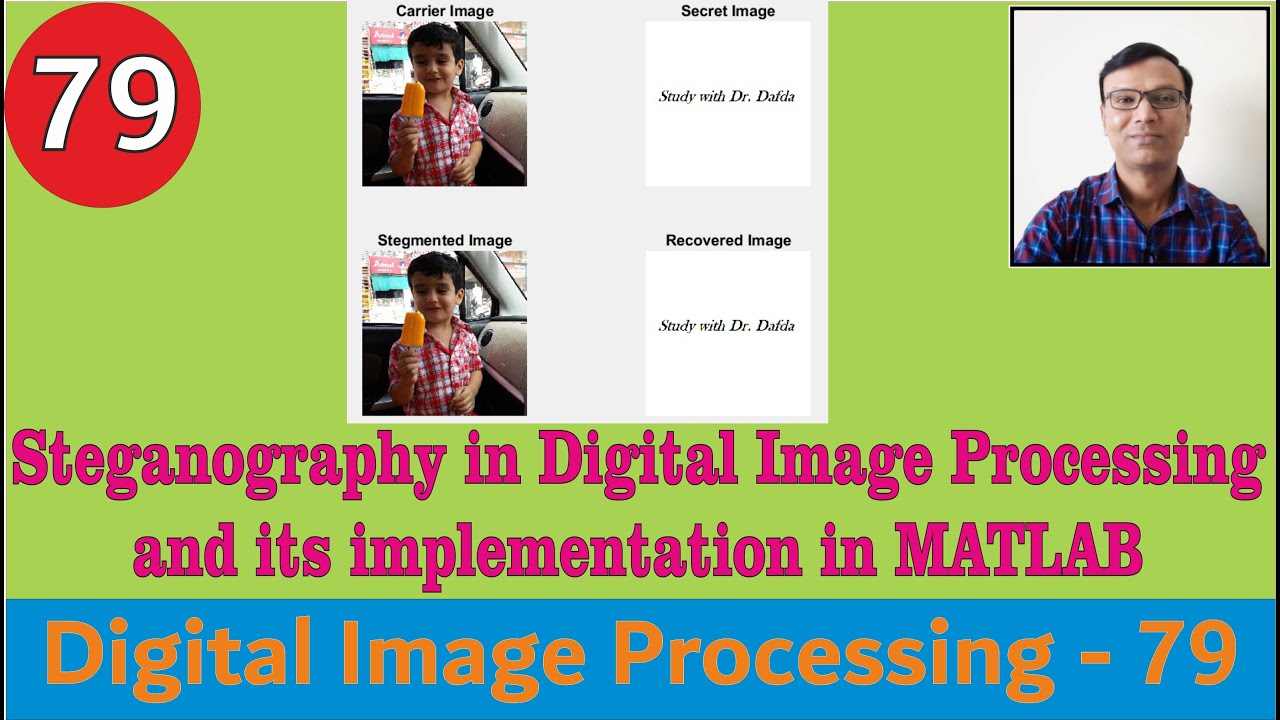
Steganography in Digital Image Processing & its implementation in MATLAB || LSB based ||Watermarking
Implementation of grayscale and color image steganography in MATLAB
Link to download ppts/lecture notes:
https://drive.google.com/drive/folders/1AtR1eq6ZvQf-5vjXEMUPXNj2S0d9rAMZ?usp=share_link
#DIP
#DIPwithMATLAB
#DigitalImageProcessingUsingMATLAB
#digitalimageprocessing
#digitalimageprocessinglecturesin4K
#studywithdrdafda
The MATLAB codes used in the video is given below:
% Steganography grayscale image
clc
close all
clear all
original = imread('cameraman.tif');
original = double(original);
[row col] = size(original);
secret = imread('testpat1.png');
secret = double(secret);
for x = 1:1:row
for y = 1:1:col
temp1 = dec2bin(original(x,y),8);
temp2 = dec2bin(secret(x,y),8);
temp1(8) = temp2(1); % Replacing the LSB with the MSB
temp1(7) = temp2(2); % If we replace more than 1 bit
temp1(6) = temp2(3); % we start getting the watermark
temp1(5) = temp2(4);
%temp1(4) = temp2(5);
stego(x,y) = bin2dec(temp1);
end
end
stego = uint8(stego);
imwrite(stego,'C:\Users\alpes\Documents\MATLAB\newimage.tif');
% above line will create image in our existing folder
subplot(2,2,1)
imshow(uint8(original))
title('Carrier Image');
subplot(2,2,2)
imshow(uint8(secret))
title('Secret Image');
subplot(2,2,3)
imshow(uint8(stego))
title('Stego Image');
%%% Retrieval of Secret Data
image = imread('C:\Users\alpes\Documents\MATLAB\newimage.tif');
image = double(image);
[row col] = size(image);
for x = 1:1:row
for y = 1:1:col
temp = dec2bin(image(x,y),8);% This gives a character value
if (temp(8)=='0')
temp='00000000';
secret_data(x,y)=bin2dec(temp);
else
temp='11111111'
secret_data(x,y) = bin2dec(temp);
end
end
end
subplot(2,2,4)
imshow(secret_data)
title('Retrieved Image');
% Steganography color image
clc;
clear;
close all;
% Step 1: Read the Carrier (Cover) Image and Secret Image
a = imread('Maulik.png');
subplot(2,2,1);
imshow(a);
title('Carrier Image');
x = imread('DD.png');
subplot(2,2,2);
imshow(x);
title('Secret Image');
% Step 2: Resize the Secret Image to Match the Carrier Image
[r, c, ~] = size(a);
x = imresize(x, [r, c]);
% Step 3: Extract RGB Channels from the Images
ra = a(:,:,1);
ga = a(:,:,2);
ba = a(:,:,3);
rx = x(:,:,1);
gx = x(:,:,2);
bx = x(:,:,3);
% Step 4: Embed Secret Image into the Carrier Image (LSB Embedding)
embedLSB = @(carrier, secret) bitand(carrier, 254) + bitand(secret, 128)/128;
redsteg = zeros(r, c);
for i = 1:r
for j = 1:c
redsteg(i,j) = embedLSB(ra(i,j), rx(i,j));
end
end
greensteg = zeros(r, c);
for i = 1:r
for j = 1:c
greensteg(i,j) = embedLSB(ga(i,j), gx(i,j));
end
end
bluesteg = zeros(r, c);
for i = 1:r
for j = 1:c
bluesteg(i,j) = embedLSB(ba(i,j), bx(i,j));
end
end
% Step 5: Combine the Modified Channels to Create the Stego Image
finalsteg = cat(3, redsteg, greensteg, bluesteg);
finalsteg = finalsteg ./ max(finalsteg(:)); % Normalize to 0-1 range
subplot(2,2,3);
imshow(finalsteg);
title('Stegmented Image');
% Step 6: Extract Secret Image from the Stego Image (LSB Extraction)
extractLSB = @(stego) bitand(stego, 1) * 128;
recoveredr = zeros(r, c);
for i = 1:r
for j = 1:c
recoveredr(i,j) = extractLSB(redsteg(i,j));
end
end
recoveredg = zeros(r, c);
for i = 1:r
for j = 1:c
recoveredg(i,j) = extractLSB(greensteg(i,j));
end
end
recoveredb = zeros(r, c);
for i = 1:r
for j = 1:c
recoveredb(i,j) = extractLSB(bluesteg(i,j));
end
end
% Step 7: Combine the Recovered Channels to Reconstruct the Secret Image
output = cat(3, recoveredr, recoveredg, recoveredb);
subplot(2,2,4);
imshow(output);
title('Recovered Image');
Steganography in Digital Image Processing & its implementation in MATLAB || LSB based ||Watermarking
Implementation of grayscale and color image steganography in MATLAB
Link to download ppts/lecture notes:
https://drive.google.com/drive/folders/1AtR1eq6ZvQf-5vjXEMUPXNj2S0d9rAMZ?usp=share_link
#DIP
#DIPwithMATLAB
#DigitalImageProcessingUsingMATLAB
#digitalimageprocessing
#digitalimageprocessinglecturesin4K
#studywithdrdafda
The MATLAB codes used in the video is given below:
% Steganography grayscale image
clc
close all
clear all
original = imread('cameraman.tif');
original = double(original);
[row col] = size(original);
secret = imread('testpat1.png');
secret = double(secret);
for x = 1:1:row
for y = 1:1:col
temp1 = dec2bin(original(x,y),8);
temp2 = dec2bin(secret(x,y),8);
temp1(8) = temp2(1); % Replacing the LSB with the MSB
temp1(7) = temp2(2); % If we replace more than 1 bit
temp1(6) = temp2(3); % we start getting the watermark
temp1(5) = temp2(4);
%temp1(4) = temp2(5);
stego(x,y) = bin2dec(temp1);
end
end
stego = uint8(stego);
imwrite(stego,'C:\Users\alpes\Documents\MATLAB\newimage.tif');
% above line will create image in our existing folder
subplot(2,2,1)
imshow(uint8(original))
title('Carrier Image');
subplot(2,2,2)
imshow(uint8(secret))
title('Secret Image');
subplot(2,2,3)
imshow(uint8(stego))
title('Stego Image');
%%% Retrieval of Secret Data
image = imread('C:\Users\alpes\Documents\MATLAB\newimage.tif');
image = double(image);
[row col] = size(image);
for x = 1:1:row
for y = 1:1:col
temp = dec2bin(image(x,y),8);% This gives a character value
if (temp(8)=='0')
temp='00000000';
secret_data(x,y)=bin2dec(temp);
else
temp='11111111'
secret_data(x,y) = bin2dec(temp);
end
end
end
subplot(2,2,4)
imshow(secret_data)
title('Retrieved Image');
% Steganography color image
clc;
clear;
close all;
% Step 1: Read the Carrier (Cover) Image and Secret Image
a = imread('Maulik.png');
subplot(2,2,1);
imshow(a);
title('Carrier Image');
x = imread('DD.png');
subplot(2,2,2);
imshow(x);
title('Secret Image');
% Step 2: Resize the Secret Image to Match the Carrier Image
[r, c, ~] = size(a);
x = imresize(x, [r, c]);
% Step 3: Extract RGB Channels from the Images
ra = a(:,:,1);
ga = a(:,:,2);
ba = a(:,:,3);
rx = x(:,:,1);
gx = x(:,:,2);
bx = x(:,:,3);
% Step 4: Embed Secret Image into the Carrier Image (LSB Embedding)
embedLSB = @(carrier, secret) bitand(carrier, 254) + bitand(secret, 128)/128;
redsteg = zeros(r, c);
for i = 1:r
for j = 1:c
redsteg(i,j) = embedLSB(ra(i,j), rx(i,j));
end
end
greensteg = zeros(r, c);
for i = 1:r
for j = 1:c
greensteg(i,j) = embedLSB(ga(i,j), gx(i,j));
end
end
bluesteg = zeros(r, c);
for i = 1:r
for j = 1:c
bluesteg(i,j) = embedLSB(ba(i,j), bx(i,j));
end
end
% Step 5: Combine the Modified Channels to Create the Stego Image
finalsteg = cat(3, redsteg, greensteg, bluesteg);
finalsteg = finalsteg ./ max(finalsteg(:)); % Normalize to 0-1 range
subplot(2,2,3);
imshow(finalsteg);
title('Stegmented Image');
% Step 6: Extract Secret Image from the Stego Image (LSB Extraction)
extractLSB = @(stego) bitand(stego, 1) * 128;
recoveredr = zeros(r, c);
for i = 1:r
for j = 1:c
recoveredr(i,j) = extractLSB(redsteg(i,j));
end
end
recoveredg = zeros(r, c);
for i = 1:r
for j = 1:c
recoveredg(i,j) = extractLSB(greensteg(i,j));
end
end
recoveredb = zeros(r, c);
for i = 1:r
for j = 1:c
recoveredb(i,j) = extractLSB(bluesteg(i,j));
end
end
% Step 7: Combine the Recovered Channels to Reconstruct the Secret Image
output = cat(3, recoveredr, recoveredg, recoveredb);
subplot(2,2,4);
imshow(output);
title('Recovered Image');
Tags and Topics
Browse our collection to discover more content in these categories.
Video Information
Views
2.1K
Likes
12
Duration
8:04
Published
Mar 4, 2024
User Reviews
4.0
(2) Related Trending Topics
LIVE TRENDSRelated trending topics. Click any trend to explore more videos.
Trending Now