Excel: How to Move or Swap Columns Easily
Learn simple steps to move or swap columns in Excel to organize your data efficiently. 🔄

SAAR Technosoft
246.5K views • Dec 19, 2022
About this video
If you extensively use Excel tables in your daily work, you know that whatever logical and well thought-out a table's structure is, you have to reorder the columns every now and then. For example, you might need to swap a couple of columns to view their data side-by-side. Of course, you can try to hide the neighboring columns for a while, however this is not always the best approach because you may need to see data in those columns as well.
Surprisingly, Microsoft Excel does not provide a straightforward way to perform this common operation. If you try to simply drag a column name, which appears to be the most obvious way to move columns, you might be confused to find that it does not work.
Steps:
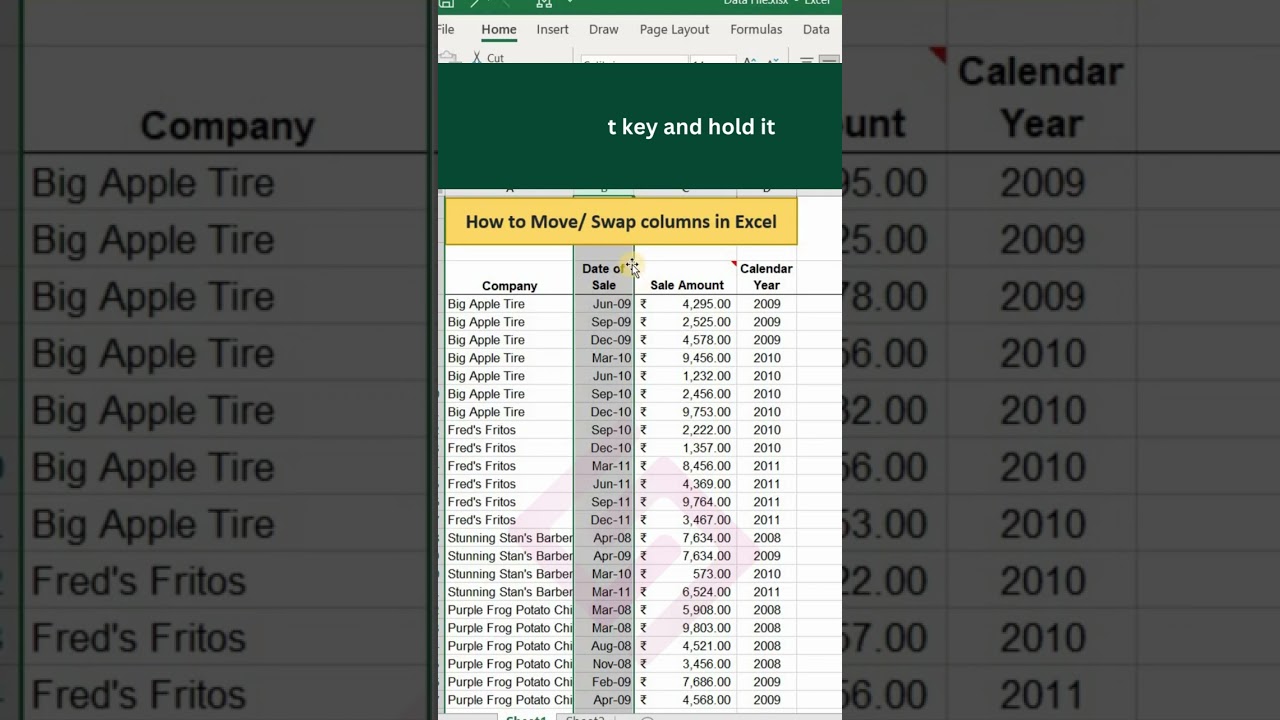
👉Select the column you want to move.
👉Put the mouse pointer to the edge of the selection until it changes from a regular cross to a 4-sided arrow cursor. You'd better not do this anywhere around the column heading because the cursor can have too many different shapes in that area. But it works just fine on the right or left edge of the selected column, as shown in the video.
👉Press and hold the Shift key, and then drag the column to a new location. You will see a faint "I" bar along the entire length of the column and a box indicating where the new column will be moved.
👉That's it! Release the mouse button, then leave the Shift key and find the column moved to a new position.
Watch, "How to Move/Swap Columns in Excel | MS Excel Moving Columns | Swaping Columns" and know more!
#saartechnosoft #excel #shorts #msexcel #moving #movingcolumns #swap #swapping #columns #rows #domain #domainnames #email #viralinstagram #exceltips #exceltricks #excelshortcuts #excelhacks #excelmagics #excelformulas #excelfunctions #right #function #advanceexceltraining #exceltutorial #excelfilter #trending #dailytips #smartwork #howto #pro #computerknowledge #microsoft #creator
Watch more trending videos:
✅Become a MS Excel expert for FREE: https://youtube.com/playlist?list=PLJF4W9Hrq2o725McbUEdCcRxQYSdzL4sm
✅Watch our FREE Webinar Series here: https://youtube.com/playlist?list=PLJF4W9Hrq2o4ZShWjGrkSLvLiGXGoFzE5
✅Top Internships Available for Computer Science Students: https://youtu.be/-e_Pa1QG_fs
✅Let's go to Canada: https://youtube.com/playlist?list=PLJF4W9Hrq2o5SiRYN0TZzsNsRrfn_vifK
✅We were live that day: https://youtube.com/playlist?list=PLJF4W9Hrq2o4Gv-MKtGP3CuL78V6vii1T
✅Become a Digital Marketing Expert for FREE: https://youtube.com/playlist?list=PLJF4W9Hrq2o77_mM4eYYxdxQ6wN-17Ss7
❓Want to conduct training for your employees or yourself or looking for development services?
Call now: +91 9996938062, 9728617551
Explore certification courses and other services from SAAR Technosoft 👉: https://www.saartechnosoft.com
For more updates on courses and tips follow us on:
🤩Facebook: https://www.facebook.com/technosoft.saar
🤩Twitter: https://www.twitter.com/TechnosoftSaar
🤩LinkedIn: https://www.linkedin.com/company/saartechnosoft
🤩Instagram: https://www.instagram.com/saartechnosoft
👉🏻Original Content by SAAR Technosoft Pvt. Ltd.
*Background music - Mixkit
Surprisingly, Microsoft Excel does not provide a straightforward way to perform this common operation. If you try to simply drag a column name, which appears to be the most obvious way to move columns, you might be confused to find that it does not work.
Steps:
👉Select the column you want to move.
👉Put the mouse pointer to the edge of the selection until it changes from a regular cross to a 4-sided arrow cursor. You'd better not do this anywhere around the column heading because the cursor can have too many different shapes in that area. But it works just fine on the right or left edge of the selected column, as shown in the video.
👉Press and hold the Shift key, and then drag the column to a new location. You will see a faint "I" bar along the entire length of the column and a box indicating where the new column will be moved.
👉That's it! Release the mouse button, then leave the Shift key and find the column moved to a new position.
Watch, "How to Move/Swap Columns in Excel | MS Excel Moving Columns | Swaping Columns" and know more!
#saartechnosoft #excel #shorts #msexcel #moving #movingcolumns #swap #swapping #columns #rows #domain #domainnames #email #viralinstagram #exceltips #exceltricks #excelshortcuts #excelhacks #excelmagics #excelformulas #excelfunctions #right #function #advanceexceltraining #exceltutorial #excelfilter #trending #dailytips #smartwork #howto #pro #computerknowledge #microsoft #creator
Watch more trending videos:
✅Become a MS Excel expert for FREE: https://youtube.com/playlist?list=PLJF4W9Hrq2o725McbUEdCcRxQYSdzL4sm
✅Watch our FREE Webinar Series here: https://youtube.com/playlist?list=PLJF4W9Hrq2o4ZShWjGrkSLvLiGXGoFzE5
✅Top Internships Available for Computer Science Students: https://youtu.be/-e_Pa1QG_fs
✅Let's go to Canada: https://youtube.com/playlist?list=PLJF4W9Hrq2o5SiRYN0TZzsNsRrfn_vifK
✅We were live that day: https://youtube.com/playlist?list=PLJF4W9Hrq2o4Gv-MKtGP3CuL78V6vii1T
✅Become a Digital Marketing Expert for FREE: https://youtube.com/playlist?list=PLJF4W9Hrq2o77_mM4eYYxdxQ6wN-17Ss7
❓Want to conduct training for your employees or yourself or looking for development services?
Call now: +91 9996938062, 9728617551
Explore certification courses and other services from SAAR Technosoft 👉: https://www.saartechnosoft.com
For more updates on courses and tips follow us on:
🤩Facebook: https://www.facebook.com/technosoft.saar
🤩Twitter: https://www.twitter.com/TechnosoftSaar
🤩LinkedIn: https://www.linkedin.com/company/saartechnosoft
🤩Instagram: https://www.instagram.com/saartechnosoft
👉🏻Original Content by SAAR Technosoft Pvt. Ltd.
*Background music - Mixkit
Tags and Topics
Browse our collection to discover more content in these categories.
Video Information
Views
246.5K
Likes
1.7K
Duration
0:41
Published
Dec 19, 2022
User Reviews
4.3
(49) Related Trending Topics
LIVE TRENDSRelated trending topics. Click any trend to explore more videos.
No specific trending topics match this video yet.
Explore All Trends