Quick Fix for 'Activation Failed' Error in Excel 🔧 | Easy Microsoft Excel Troubleshooting
Learn simple steps to resolve the 'Activation Failed' error in Microsoft Excel. Follow this quick tutorial to get Excel activated and back to work seamlessly!

iCals Digital Solutions
1.4M views • Sep 19, 2024
About this video
In this tutorial, we’ll show you how to fix the "Activation Failed" error in Microsoft Excel. If you’re encountering issues activating Excel, follow these simple steps to resolve it quickly. We’ll guide you through the process of locating the OSPPREARM file in your Microsoft Office installation folder, running it as an administrator three times, and how this action will fix the activation issue. This method works for Office 16 or other corresponding versions.
Steps Covered:
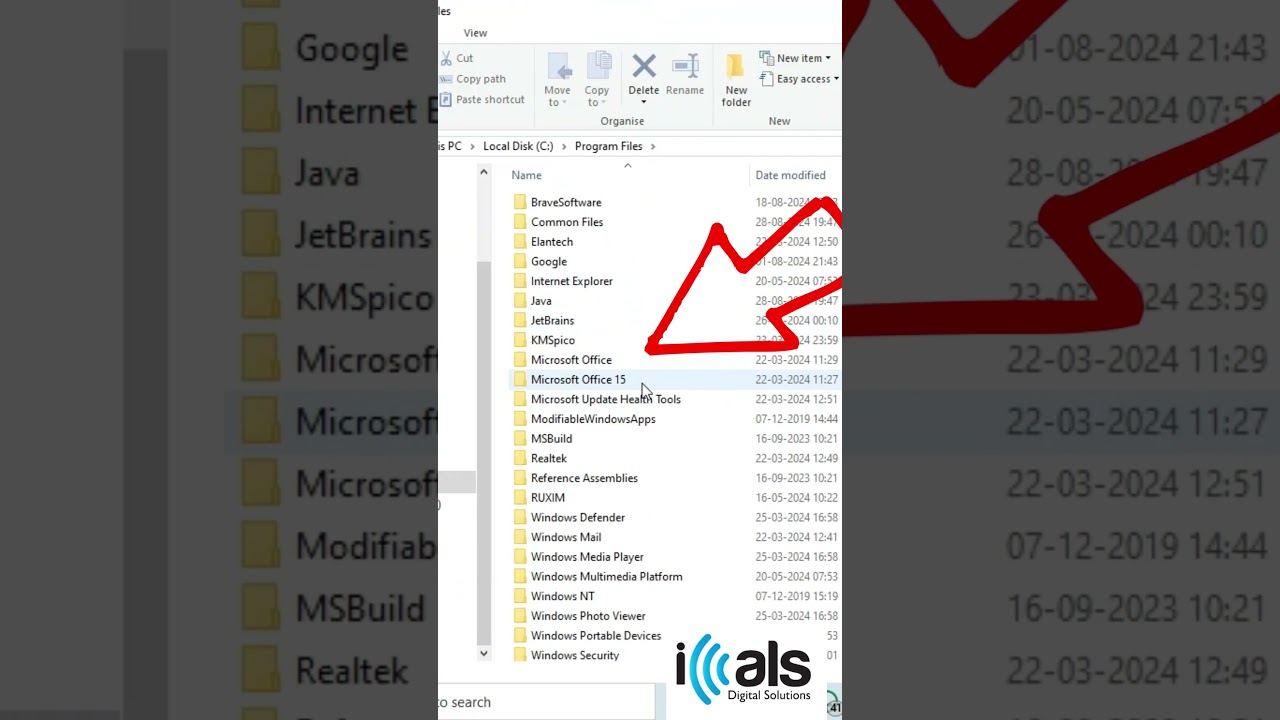
1. Open "This PC" and go to Local Disk C.
2. Navigate to Program Files then to Microsoft Office then to Office 16.
3. Locate the file named "OSPPREARM."
4. Right-click on the file, select "Run as Administrator," and repeat the process three times.
5. Close all open MS Office products, then reopen Excel to see the issue resolved.
This solution should help you resolve Excel activation errors and get your application running without further issues. If you found this video helpful, make sure to like and subscribe for more quick Excel fixes.
Steps Covered:
1. Open "This PC" and go to Local Disk C.
2. Navigate to Program Files then to Microsoft Office then to Office 16.
3. Locate the file named "OSPPREARM."
4. Right-click on the file, select "Run as Administrator," and repeat the process three times.
5. Close all open MS Office products, then reopen Excel to see the issue resolved.
This solution should help you resolve Excel activation errors and get your application running without further issues. If you found this video helpful, make sure to like and subscribe for more quick Excel fixes.
Tags and Topics
Browse our collection to discover more content in these categories.
Video Information
Views
1.4M
Likes
39.9K
Duration
0:38
Published
Sep 19, 2024
User Reviews
4.8
(283) Related Trending Topics
LIVE TRENDSRelated trending topics. Click any trend to explore more videos.