Fix Premiere Pro Movie Compile & Render Errors 🎬
Learn tips to fix common Premiere Pro compilation and rendering errors for smooth video editing.
Bhupinder Tube
23.7K views • May 30, 2020
About this video
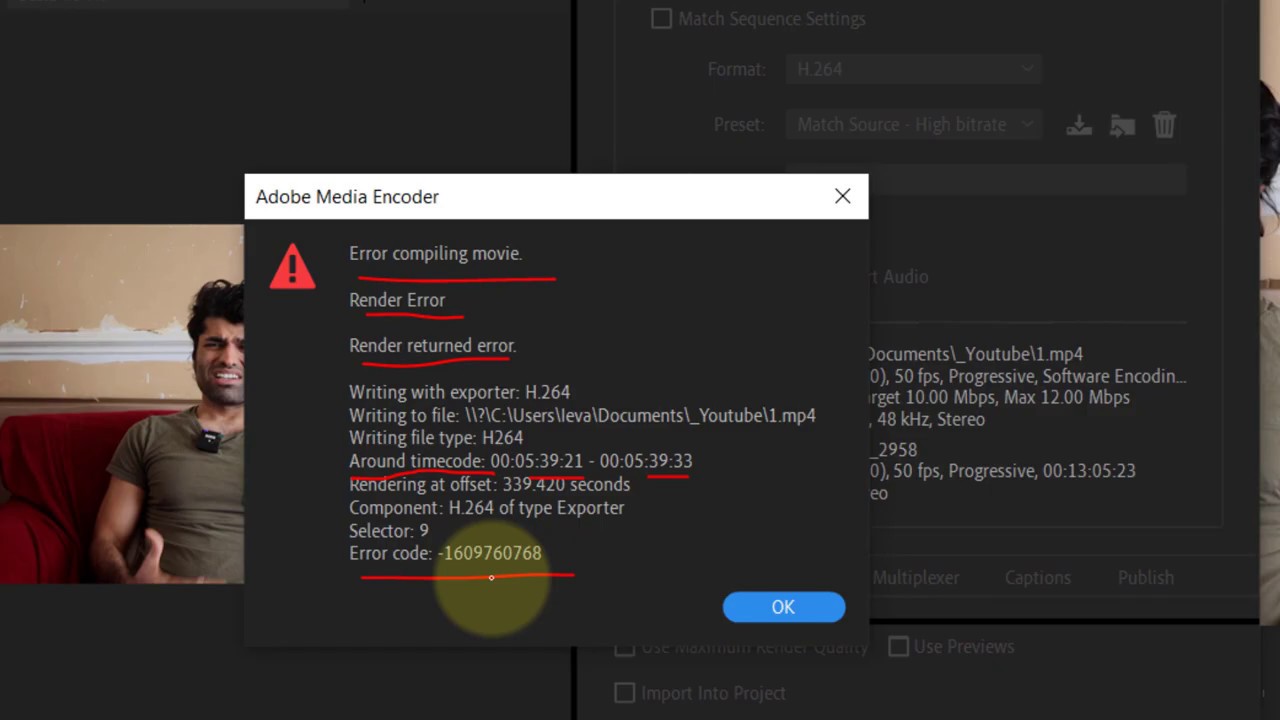
Once you learn tips and tricks on Premiere Pro, it's the best video editing software. But every now and then, you'll face some errors. In this video, I'll show you how to get rid of the error when you're trying to export the media. The error I get is "error compiling movie" and "Render Error". I also get a timestamp where the possible error could be. Usually, these types of errors occur because of a type of effect that's applied. In order to fix the error in this video, I've deleted the effect. You could try to delete and reapply again. Or change the sequence settings editing mode. Or just close and reopen premiere pro. Or restart your PC. Or use the Export queue for which you'd need adobe encoder.
If you have any questions, please let me know in the comments below 😊
👉More Videos👇
👉 Premiere Pro Tutorials - https://tinyurl.com/yxddnnxw
👉 How to Use FULL SCREEN in Premiere Pro - https://youtu.be/3NdfNKM7bhA
👉 Transition Insufficient Media Repeated Frames Error in Premiere Pro Fix - https://youtu.be/V9pOgDCw9J8
👉 How to SYNC Audio and Video in Premiere Pro - https://youtu.be/Kilt1vB8VEM
👉 Measuring time In Adobe Premiere Pro - https://youtu.be/6_pv1h28Vt0
👉 How To Make An Animated Countdown in Premiere Pro - https://youtu.be/CqZm7stuErQ
👉 How to Draw Animated Circle & Used It in Premiere Pro - https://youtu.be/4KwRz4AoTfs
👉 How to Draw REVERSED Animated Circle using Clock Wipe in Premiere Pro - https://youtu.be/thhUauBFgA8
👉 How to slowly increase music volume in Premiere Pro - https://youtu.be/uy7mQ42xrVI
👉 How to move panels in Premiere Pro - https://youtu.be/E-mthnH-2Rc
👉 How to copy mask in Premiere Pro - https://youtu.be/U3Lseg2sQ1M
👉 How to apply default transition in Premiere Pro - https://youtu.be/vl2hL1B6N5M
👉 How to keep the shape of a mask rectangular when resizing in Premiere Pro - https://youtu.be/gHX6BaGLYHE
👉 How to export with transparent background in Premiere Pro - https://youtu.be/ibH1IK2PlRI
👉 How to check if your background is transparent in Premiere Pro - https://youtu.be/rFI4u_KsVD8
👉 Shortcut key for switching panels in Premiere Pro - https://youtu.be/72ZM0LrtUaQ
👉 Shortcut key for audio hardware Premiere Pro - https://youtu.be/2qivA_d9hMk
👉 How do I move a clip from one project to another in Premiere Pro - https://youtu.be/GNxUN_osaq8
#BhupinderTube #premierepro #howto #fix #error
If you have any questions, please let me know in the comments below 😊
👉More Videos👇
👉 Premiere Pro Tutorials - https://tinyurl.com/yxddnnxw
👉 How to Use FULL SCREEN in Premiere Pro - https://youtu.be/3NdfNKM7bhA
👉 Transition Insufficient Media Repeated Frames Error in Premiere Pro Fix - https://youtu.be/V9pOgDCw9J8
👉 How to SYNC Audio and Video in Premiere Pro - https://youtu.be/Kilt1vB8VEM
👉 Measuring time In Adobe Premiere Pro - https://youtu.be/6_pv1h28Vt0
👉 How To Make An Animated Countdown in Premiere Pro - https://youtu.be/CqZm7stuErQ
👉 How to Draw Animated Circle & Used It in Premiere Pro - https://youtu.be/4KwRz4AoTfs
👉 How to Draw REVERSED Animated Circle using Clock Wipe in Premiere Pro - https://youtu.be/thhUauBFgA8
👉 How to slowly increase music volume in Premiere Pro - https://youtu.be/uy7mQ42xrVI
👉 How to move panels in Premiere Pro - https://youtu.be/E-mthnH-2Rc
👉 How to copy mask in Premiere Pro - https://youtu.be/U3Lseg2sQ1M
👉 How to apply default transition in Premiere Pro - https://youtu.be/vl2hL1B6N5M
👉 How to keep the shape of a mask rectangular when resizing in Premiere Pro - https://youtu.be/gHX6BaGLYHE
👉 How to export with transparent background in Premiere Pro - https://youtu.be/ibH1IK2PlRI
👉 How to check if your background is transparent in Premiere Pro - https://youtu.be/rFI4u_KsVD8
👉 Shortcut key for switching panels in Premiere Pro - https://youtu.be/72ZM0LrtUaQ
👉 Shortcut key for audio hardware Premiere Pro - https://youtu.be/2qivA_d9hMk
👉 How do I move a clip from one project to another in Premiere Pro - https://youtu.be/GNxUN_osaq8
#BhupinderTube #premierepro #howto #fix #error
Video Information
Views
23.7K
Likes
144
Duration
3:58
Published
May 30, 2020
User Reviews
4.1
(4) Related Trending Topics
LIVE TRENDSRelated trending topics. Click any trend to explore more videos.
No specific trending topics match this video yet.
Explore All Trends