Create a Barcode in Excel in 30 Seconds 🤯
Learn how to quickly generate scannable barcodes in Excel for inventory, procurement, and warehousing tasks. #shorts

Simple Sheets
388.5K views • Mar 31, 2023
About this video
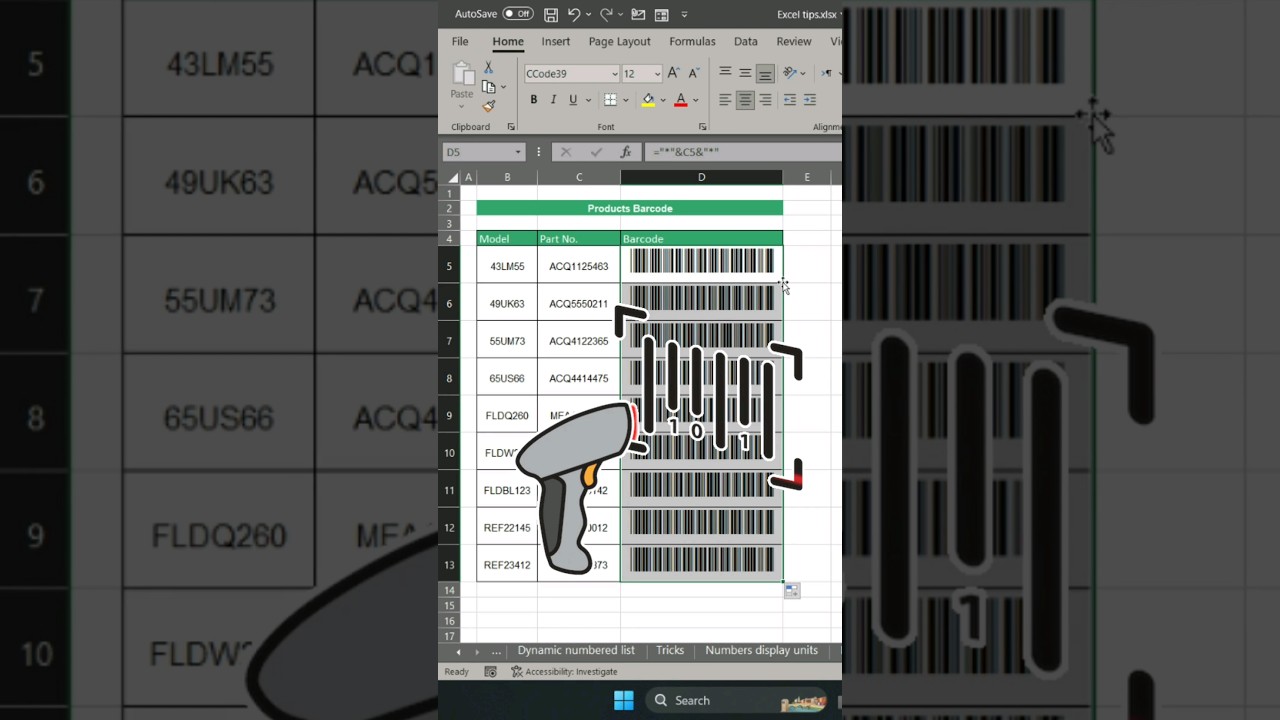
Want to create a scannable bar code in Excel? This can be an awesome feature for spreadsheets related to inventory management, procurement, warehousing, etc.,
Here's how!
1. Add your unique identifier or Part No. with the star symbol before the first and after the last letter.
2. Drag your formula down for all cells you want to create a unique bar code for.
3. Select Font CCode39. You can get this font at dafont.com
4. You can now use bar codes to help manage inventory, logistics, and warehousing.
Just like that, you can have barcode generator for Excel.
Want more amazing tools for your supply chain needs? Check out our library of Excel & Google Sheets templates.
🔗 https://www.simplesheets.co/supply-chain
#barcode #scannerinexcel #barcodeinexcel
...
GET ACCESS TO 100+ Dynamic Excel Spreadsheet Templates
🔗 https://www.simplesheets.co/
Project Management 📰
Marketing 📊
Supply Chain and Operations 🚚
Small Business 🦾
Human Resources 👨🏾🤝👨🏼
Data Analysis 👨🔬
Accounting 🧐
Finance 💵
These templates empower you to use Excel to streamline all your personal and business needs.
🦄 Customizable
🧨 Dynamic
🎨 Designed
🏭 Formatted
👩🏫 Instructions and Videos
📈 Reporting Visuals
Get 5 FREE Templates When You Sign Up 👇
🔗 https://www.simplesheets.co/kanban
🔗 https://www.simplesheets.co/plan-do-c...
🔗 https://www.simplesheets.co/gantt-chart
🔗 https://www.simplesheets.co/saas-metr...
Want to 🔐 new skills that improve your income, marketability, and expertise?
Our Excel University has 48+ lectures to help you master Microsoft Excel.
🔗 https://www.simplesheets.co/excel-uni...
We'll walk you through everything you need to know to be an Excel Expert 🏆
🔎 Lookups
🔨 Functions
🧪 Formulas
📊 Charts and Graphs
🔢 Dashboards
Here's how!
1. Add your unique identifier or Part No. with the star symbol before the first and after the last letter.
2. Drag your formula down for all cells you want to create a unique bar code for.
3. Select Font CCode39. You can get this font at dafont.com
4. You can now use bar codes to help manage inventory, logistics, and warehousing.
Just like that, you can have barcode generator for Excel.
Want more amazing tools for your supply chain needs? Check out our library of Excel & Google Sheets templates.
🔗 https://www.simplesheets.co/supply-chain
#barcode #scannerinexcel #barcodeinexcel
...
GET ACCESS TO 100+ Dynamic Excel Spreadsheet Templates
🔗 https://www.simplesheets.co/
Project Management 📰
Marketing 📊
Supply Chain and Operations 🚚
Small Business 🦾
Human Resources 👨🏾🤝👨🏼
Data Analysis 👨🔬
Accounting 🧐
Finance 💵
These templates empower you to use Excel to streamline all your personal and business needs.
🦄 Customizable
🧨 Dynamic
🎨 Designed
🏭 Formatted
👩🏫 Instructions and Videos
📈 Reporting Visuals
Get 5 FREE Templates When You Sign Up 👇
🔗 https://www.simplesheets.co/kanban
🔗 https://www.simplesheets.co/plan-do-c...
🔗 https://www.simplesheets.co/gantt-chart
🔗 https://www.simplesheets.co/saas-metr...
Want to 🔐 new skills that improve your income, marketability, and expertise?
Our Excel University has 48+ lectures to help you master Microsoft Excel.
🔗 https://www.simplesheets.co/excel-uni...
We'll walk you through everything you need to know to be an Excel Expert 🏆
🔎 Lookups
🔨 Functions
🧪 Formulas
📊 Charts and Graphs
🔢 Dashboards
Tags and Topics
Browse our collection to discover more content in these categories.
Video Information
Views
388.5K
Likes
11.9K
Duration
0:36
Published
Mar 31, 2023
User Reviews
4.8
(77) Related Trending Topics
LIVE TRENDSRelated trending topics. Click any trend to explore more videos.
No specific trending topics match this video yet.
Explore All Trends