WP WishList Member - Sequential Upgrades Tutorial
This tutorial provides detailed instructions on how to create sequential upgrades using WP WishList Member, with additional resources available at http://WordpressVideos.TV.
wordpress_videos
327 views • May 12, 2010
About this video
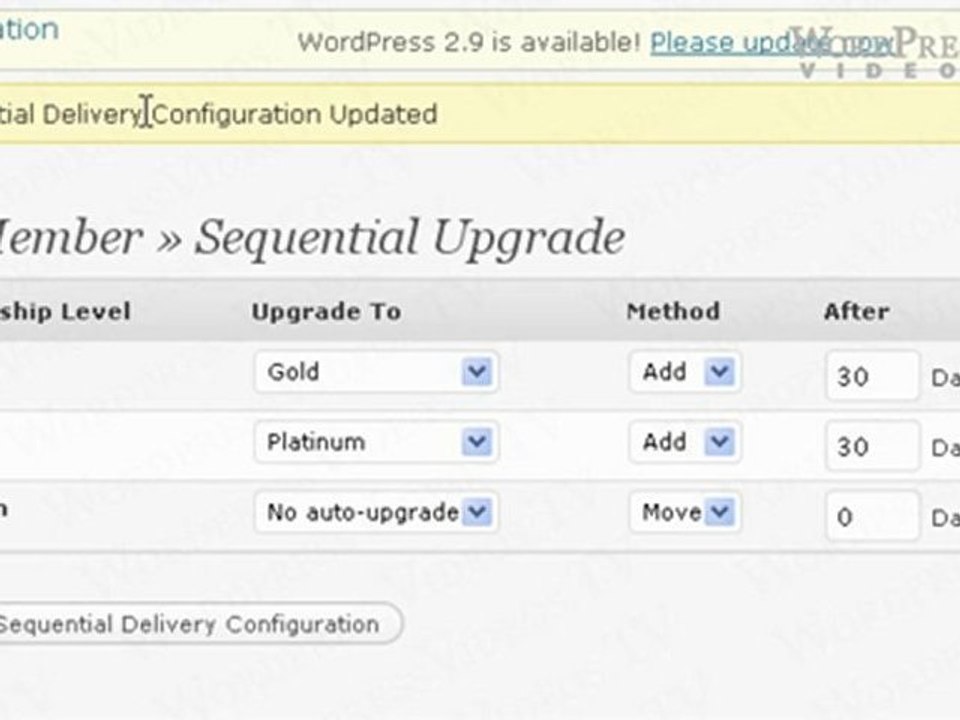
This tutorial is continued with full written instructions at http://WordpressVideos.TV <br /><br />In this video, Im going to show you how to create sequential upgrades using the WishList Member WordPress Plugin. Now, before you go along with this video, make sure that you have created at least two or three different membership levels. In the example here, I have created three membership levels Silver, Gold, and Platinum. So basically, using the sequential upgrade feature, you can automatically move or upgrade members from one membership level to the other. <br /><br />So to do that, just click on the Sequential Upgrade link. So, in this example, for all Silver members, I can auto-upgrade them to go Platinum. So assuming that Silver is the lowest membership level or the cheapest membership level, followed by Gold and Platinum, so I may want to upgrade member from Silver to Gold automatically, and then I can choose the method. I can either Move them or Add. The difference is, if I choose to move member
Video Information
Views
327
Duration
8:42
Published
May 12, 2010
Related Trending Topics
LIVE TRENDSRelated trending topics. Click any trend to explore more videos.
No specific trending topics match this video yet.
Explore All Trends