Tutorial: Creating a Wireless Minecraft Note Block Song
In this video tutorial, we guide you through the process of making a wireless note block song in Minecraft. For optimal viewing and listening experience, please switch to 1080 HD quality!
Heju
66 views • Sep 16, 2017
About this video
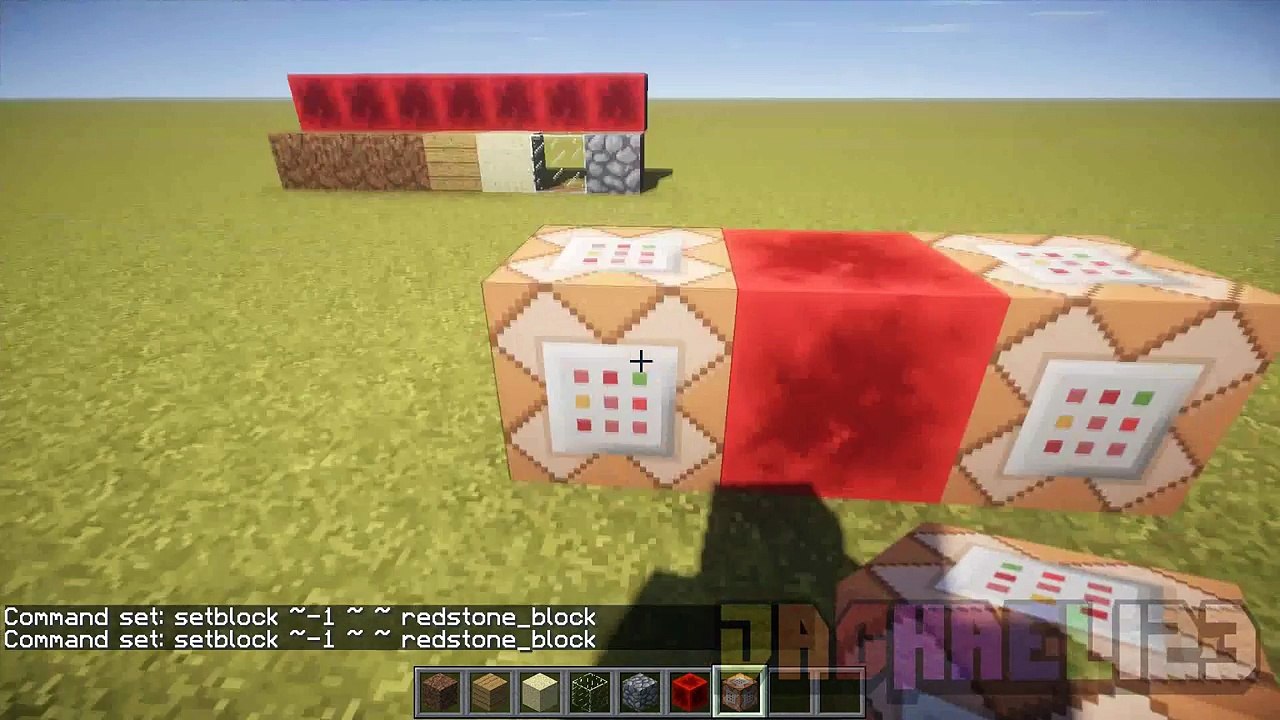
GO TO 1080 HD QUALITY FOR THE BEST VIDEO AND AUDIO QUALITY POSSIBLE!!!\r<br>\r<br>Hey Everyone!\r<br>\r<br>There have been a lot of you asking how we make our wireless note block creations. It wasnt until now that we decided to show you. Just watch this video and enjoy!! :D\r<br>\r<br>Video script:\r<br>\r<br>1. Hey everyone. Today we will be showing you how to make a wireless Minecraft note block song like this:\r<br>\r<br>(MINECRAFT)\r<br>2. Firstly, lay out the blocks underneath the note blocks to give them the correct sound.\r<br>\r<br>3. Place a row of redstone blocks behind where you want the note blocks to be. This will power the note blocks.\r<br>\r<br>4. Next, record the coordinates of the blocks in front of the note blocks. This is where the barriers will be.\r<br>\r<br>5. Give yourself a command block by typing in this command: /give (Your Player Name) command_block 1\r<br>\r<br>6. Set-up a fast command block clock like so: (setblock ~-1 ~ ~ redstone_block) and opposite it (setblock ~1 ~ ~ air)\r<br>\r<br>7. Stop the spam by typing in this command: /gamerule commandBlockOutput false\r<br>\r<br>8. On either side of the redstone block, write these commands in, but with your coordinates that you recorded earlier: (fill -520 57 -15 -514 57 -15 barrier) and (fill -520 57 -15 -514 57 -15 air)\r<br>\r<br>9. Now the note blocks will instantly get updated and play when they are spawned in.\r<br>\r<br>\r<br>(MINECRAFT NOTE BLOCK STUDIO)\r<br>10. This is Minecraft note block studio. It is a program which allows you to make note block songs easily. (Download link below)\r<br>\r<br>11. If you want a full tutorial on this program, leave a comment below saying so.\r<br>\r<br>12. This is the simple note block song you heard earlier.\r<br>\r<br>13. As you can see, the layers on the left line up with the note block structure in Minecraft.\r<br>\r<br>14. Before you export the song into Minecraft, you must make some custom instruments.\r<br>\r<br>15. Go to SettingsInstrumentsInstrument settings.\r<br>\r<br>16. Click Add to insert new instruments. Highlight the names to rename them.\r<br>\r<br>17. Choose harp.ogg for piano.\r<br>\r<br>18. Change your specific layers to have their custom instruments by clicking on the dotted square, right-click, Change instrument., and your specific custom instrument.\r<br>\r<br>19. Next, go to FileExport as Schematic. Click yes at the pop up window.\r<br>\r<br>20. The layout is completely your choice, but well choose the Circular walkway for now.\r<br>\r<br>21. Go to Blocks, and choose your desired blocks to be placed under your custom instruments.\r<br>\r<br>22. You can also customise the walkway, circuitry, and ground.\r<br>\r<br>23. Click export and save it to your computer.\r<br>\r<br>\r<br>(MCEDIT)\r<br>24. This is MCEdit. It is a program which allows you to edit your Minecraft world easily.\r<br>\r<br>25. Choose your world by going to Quick LoadYour WorldLoad.\r<br>\r<br>26. Import your note block schematic by clicking Import and locating the file.\r<br>\r<br>27. Place it anywhere you want, preferably behind where you will be standing.\r<br>\r<br>28. Note down the coordinates of your note blocks by holding Alt while pointing at them.\r<br>\r<br>29. Click Filter and select OddWhirled Minecrafts Noteblock to Setblock filter. (Download link below).\r<br>\r<br>30. Place in the coordinates of each note block that you recorded eariler.\r<br>\r<br>31. Next, select the correct block under each note block that you selected before in Minecraft note block studio.\r<br>\r<br>32. Note: MAKE SURE THEY ARE CORRECT UNLESS IT WONT WORK PROPERLY.\r<br>\r<br>33. Click Filter.\r<br>\r<br>\r<br>(MINECRAFT)\r<br>34. Back in Minecraft, record the coordinates of the block behind the button of the redstone contraption.\r<br>\r<br>35. Next to your wireless masterpiece, create a command block with this command, but using your coordinates: setblock -520 65 1 redstone_block.\r<br>\r<br>36. Create another command block three spaces apart, using the same command expect spawning air.\r<br>\r<br>37. Connect the two together with 3 repeaters on the 4th tick.\r<br>\r<br>38. Now your wireless Minecraft note block creation is done! Click the button and enjoy!!\r<br>\r<br>--------------------------------------------\r<br>SUBSCRIBE TO SEE MORE!\r<br>--------------------------------------------\r<br>\r<br>OddWhirled Minecrafts video with filter link in description: \r<br>\r<br>Subscribe: \r<br>\r<br>Facebook: \r<br>\r<br>Twitter: \r<br>\r<br>Merch: \r<br>\r<br>Bonus Channel: \r<br>\r<br>Intro: \r<br>\r<br>Minecraft: \r<br>\r<br>Minecraft Note Block Studio: \r<br>\r<br>MCEdit: \r<br>\r<br>Fraps: \r<br>\r<br>Sony Vegas Pro: \r<br>\r<br>GLSL Shaders Mod: \r<br>\r<br>Music:\r<br>Kevin Macleod ~ Cipher\r<br>\r<br>Stay tuned for an amazing new game every week!
Video Information
Views
66
Duration
4:59
Published
Sep 16, 2017
Related Trending Topics
LIVE TRENDSRelated trending topics. Click any trend to explore more videos.
No specific trending topics match this video yet.
Explore All Trends