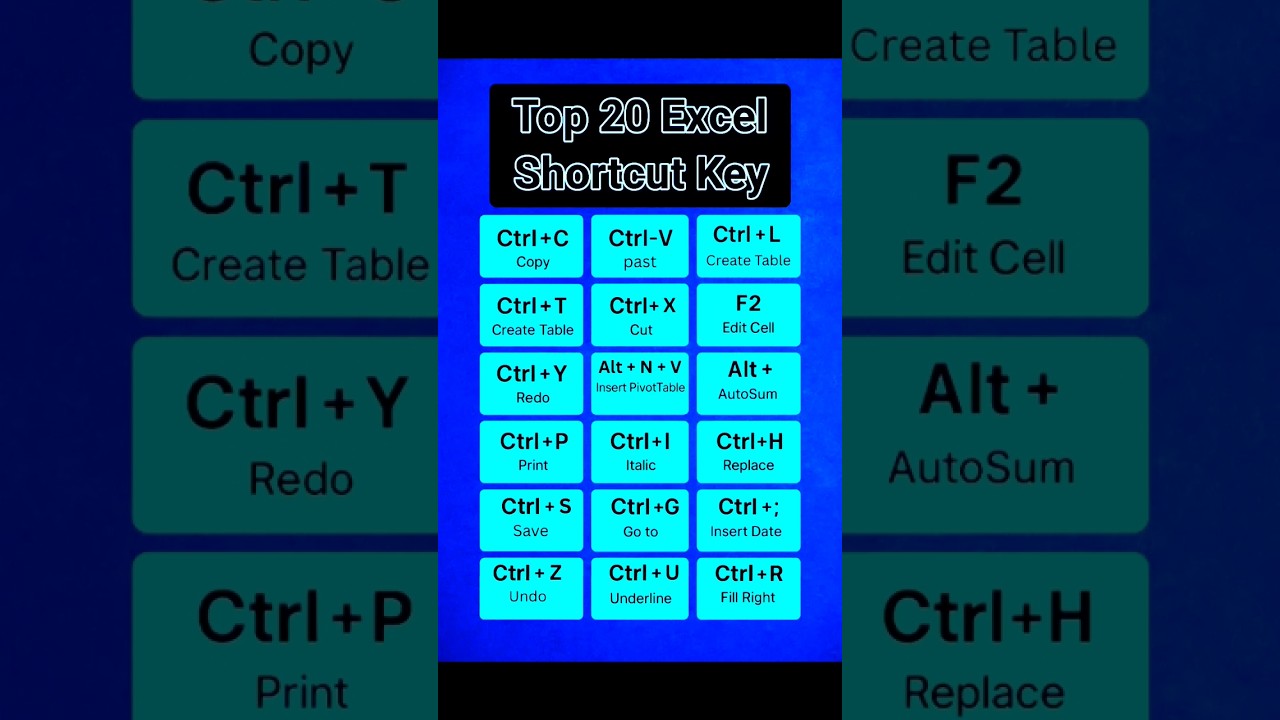
Top 20 Must-Know Excel Shortcut Keys ⚡
Learn the 20 essential Excel shortcuts to boost your productivity and work faster! 💻 #excelshortcutkeys

Najim Excel 2.0
42.6K views • Jul 7, 2025
About this video
⚡ Top 20 Excel Shortcut Keys You NEED To Master! 💻 #excelshortcutkeys #excel
Welcome to our exciting video all about the Top 20 Excel Shortcut Keys You NEED To Master! In this dynamic guide for both beginners and seasoned Excel users, we’re revealing powerful keyboard shortcuts that will save you time, boost your efficiency, and help you work smarter with your spreadsheets. Whether you’re crunching data, preparing complex reports, or just exploring Excel’s features, knowing these shortcuts will completely transform how you work!
Excel is one of the most versatile tools for data handling, analysis, and reporting. Yet, so many users miss out on its hidden speed boosts — keyboard shortcuts. Using shortcuts means less mouse-clicking and faster results, making you look like an Excel pro in no time. If you’ve ever felt stuck doing repetitive tasks or want to impress your team with your speed, this video is made for you!
In this engaging short video, we’ll show you popular Excel shortcuts and a few hidden gems that can make a huge difference in your workflow. From basic tasks like copy and paste to advanced commands for data manipulation and navigation, these shortcuts are essential for every Excel user.
Here’s a quick preview of what you’ll discover:
Ctrl + C, Ctrl + V: Speed up your copy-paste workflow and boost productivity.
Ctrl + Z: Instantly undo mistakes without stress.
Ctrl + S: Save your workbook quickly and avoid losing your hard work.
Alt + E, S, V: Master advanced Paste Special tricks.
Ctrl + Arrow Keys: Jump through large datasets with ease.
Shift + Space: Select entire rows instantly.
Ctrl + Space: Highlight entire columns in a second.
F2: Quickly edit any cell without reaching for your mouse.
Ctrl + F: Find any value in seconds.
Ctrl + A: Select all data in your sheet in one go.
These are just a few of the 20 incredible shortcuts we’ll explore in the video. Each one is designed to help you finish tasks faster and work more precisely. Whether you’re dealing with formulas, charts, or large datasets, these shortcuts will become your new best friends in Excel!
If you’re ready to level up your Excel skills and become the go-to person in your office for all things spreadsheets, this video is your perfect starting point. It’s not just about memorizing shortcuts — it’s about transforming how you handle your work and gaining the confidence to tackle any Excel challenge.
👉 Don’t forget to watch the video till the end, and practice the shortcuts alongside us for the best results. Let’s make Excel easy and fun!
If you find this video helpful and want more Excel secrets, make sure to subscribe to our channel! Hit like, and share this video with friends and colleagues who could use these powerful Excel tips. Together, let’s become Excel experts and work smarter every day!
Join our Excel journey and discover how simple it can be to boost your speed and productivity. Watch, learn, and apply these tips, and soon you’ll be the Excel guru everyone looks up to in your team!
Let’s connect and keep learning together!
#Excel #ExcelShortcuts #ExcelHacks #Productivity #ExcelTips #DataAnalysis #MicrosoftExcel #ExcelTraining #LearnExcel #BoostEfficiency #Spreadsheets #ExcelSkills2025
Subscribe for more shortcuts, tutorials, and secrets to help you master Excel and handle your data like a pro!
Welcome to our exciting video all about the Top 20 Excel Shortcut Keys You NEED To Master! In this dynamic guide for both beginners and seasoned Excel users, we’re revealing powerful keyboard shortcuts that will save you time, boost your efficiency, and help you work smarter with your spreadsheets. Whether you’re crunching data, preparing complex reports, or just exploring Excel’s features, knowing these shortcuts will completely transform how you work!
Excel is one of the most versatile tools for data handling, analysis, and reporting. Yet, so many users miss out on its hidden speed boosts — keyboard shortcuts. Using shortcuts means less mouse-clicking and faster results, making you look like an Excel pro in no time. If you’ve ever felt stuck doing repetitive tasks or want to impress your team with your speed, this video is made for you!
In this engaging short video, we’ll show you popular Excel shortcuts and a few hidden gems that can make a huge difference in your workflow. From basic tasks like copy and paste to advanced commands for data manipulation and navigation, these shortcuts are essential for every Excel user.
Here’s a quick preview of what you’ll discover:
Ctrl + C, Ctrl + V: Speed up your copy-paste workflow and boost productivity.
Ctrl + Z: Instantly undo mistakes without stress.
Ctrl + S: Save your workbook quickly and avoid losing your hard work.
Alt + E, S, V: Master advanced Paste Special tricks.
Ctrl + Arrow Keys: Jump through large datasets with ease.
Shift + Space: Select entire rows instantly.
Ctrl + Space: Highlight entire columns in a second.
F2: Quickly edit any cell without reaching for your mouse.
Ctrl + F: Find any value in seconds.
Ctrl + A: Select all data in your sheet in one go.
These are just a few of the 20 incredible shortcuts we’ll explore in the video. Each one is designed to help you finish tasks faster and work more precisely. Whether you’re dealing with formulas, charts, or large datasets, these shortcuts will become your new best friends in Excel!
If you’re ready to level up your Excel skills and become the go-to person in your office for all things spreadsheets, this video is your perfect starting point. It’s not just about memorizing shortcuts — it’s about transforming how you handle your work and gaining the confidence to tackle any Excel challenge.
👉 Don’t forget to watch the video till the end, and practice the shortcuts alongside us for the best results. Let’s make Excel easy and fun!
If you find this video helpful and want more Excel secrets, make sure to subscribe to our channel! Hit like, and share this video with friends and colleagues who could use these powerful Excel tips. Together, let’s become Excel experts and work smarter every day!
Join our Excel journey and discover how simple it can be to boost your speed and productivity. Watch, learn, and apply these tips, and soon you’ll be the Excel guru everyone looks up to in your team!
Let’s connect and keep learning together!
#Excel #ExcelShortcuts #ExcelHacks #Productivity #ExcelTips #DataAnalysis #MicrosoftExcel #ExcelTraining #LearnExcel #BoostEfficiency #Spreadsheets #ExcelSkills2025
Subscribe for more shortcuts, tutorials, and secrets to help you master Excel and handle your data like a pro!
Tags and Topics
Browse our collection to discover more content in these categories.
Video Information
Views
42.6K
Likes
557
Duration
0:09
Published
Jul 7, 2025
User Reviews
4.5
(8) Related Trending Topics
LIVE TRENDSRelated trending topics. Click any trend to explore more videos.
Trending Now