Secure Communication: Combining Cryptography & Steganography in MATLAB 🛡️
Discover how to enhance data security by integrating cryptography and steganography techniques using MATLAB. Learn to hide and encrypt messages seamlessly for safer communication.

Knowledge Amplifier
3.2K views • May 1, 2021
About this video
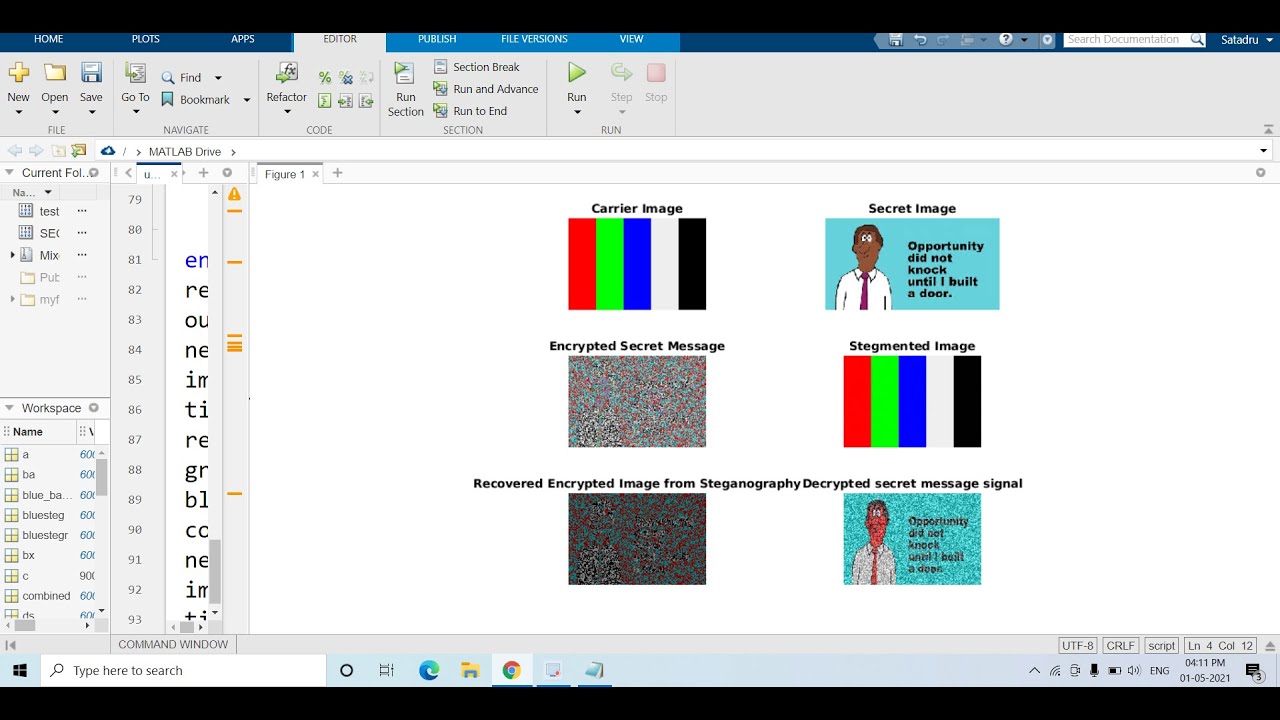
Steganography is an art of hiding secret information into another cover medium like image, audio, video, etc.
Cryptography is an art of converting plain data into unreadable format.
Steganography can be integrated with Cryptography in order to enhance the security of data.
Code:
clc
clear all
close all
warning off
a=imread('testimage.png');
nexttile;
imshow(a);
title('Carrier Image');
x=imread('SECRET.jpg');
nexttile;
imshow(x);
title('Secret Image');
[r c g]=size(a);
x=imresize(x,[r c]);
ra=a(:,:,1);
ga=a(:,:,2);
ba=a(:,:,3);
rx=x(:,:,1);
gx=x(:,:,2);
bx=x(:,:,3);
sk=uint8(rand(r,c)*255);%Secret key
rx=bitxor(rx,sk);
gx=bitxor(gx,sk);
bx=bitxor(bx,sk);
nexttile;
imshow(cat(3,rx,gx,bx));
title('Encrypted Secret Message');
for i=1:r
for j=1:c
nc(i,j)= bitand(ra(i,j),254);
ns(i,j)= bitand(rx(i,j),128);
ds(i,j)=ns(i,j)/128;
fr(i,j)=nc(i,j)+ds(i,j);
end
end
redsteg=fr;
for i=1:r
for j=1:c
nc(i,j)= bitand(ga(i,j),254);
ns(i,j)= bitand(gx(i,j),128);
ds(i,j)=ns(i,j)/128;
fr(i,j)=nc(i,j)+ds(i,j);
end
end
greensteg=fr;
for i=1:r
for j=1:c
nc(i,j)= bitand(ba(i,j),254);
ns(i,j)= bitand(bx(i,j),128);
ds(i,j)=ns(i,j)/128;
fr(i,j)=nc(i,j)+ds(i,j);
end
end
bluesteg=fr;
finalsteg=cat(3,redsteg,greensteg,bluesteg);
redstegr=finalsteg(:,:,1);
greenstegr=finalsteg(:,:,2);
bluestegr=finalsteg(:,:,3);
nexttile;
imshow(finalsteg);
title('Stegmented Image');
for i=1:r
for j=1:c
nc(i,j)=bitand(redstegr(i,j),1);
ms(i,j)=nc(i,j)*128;
end
end
recoveredr=ms;
for i=1:r
for j=1:c
nc(i,j)=bitand(greenstegr(i,j),1);
ms(i,j)=nc(i,j)*128;
end
end
recoveredg=ms;
for i=1:r
for j=1:c
nc(i,j)=bitand(bluestegr(i,j),1);
ms(i,j)=nc(i,j)*128;
end
end
recoveredb=ms;
output=cat(3,recoveredr,recoveredg,recoveredb);
nexttile;
imshow(output);
title('Recovered Encrypted Image from Steganography');
red_band=bitxor(output(:,:,1),sk);
green_band=bitxor(output(:,:,2),sk);
blue_band=bitxor(output(:,:,3),sk);
combined=cat(3,red_band,green_band,blue_band);
nexttile;
imshow(combined);
title('Decrypted secret message signal');
Prerequisite:
Secrets Hidden in Images (LSB based Steganography) | MATLAB
https://youtu.be/ZXfNhSlXT0w
nexttile documentation link--
https://in.mathworks.com/help/matlab/ref/nexttile.html
Learn Complete Machine Learning & Data Science using MATLAB:
https://www.youtube.com/playlist?list=PLjfRmoYoxpNoaZmR2OTVrh-72YzLZBlJ2
Learn Digital Signal Processing using MATLAB:
https://www.youtube.com/playlist?list=PLjfRmoYoxpNr3w6baU91ZM6QL0obULPig
Learn Complete Image Processing & Computer Vision using MATLAB:
https://www.youtube.com/playlist?list=PLjfRmoYoxpNostbIaNSpzJr06mDb6qAJ0
🙏🙏🙏🙏🙏🙏🙏🙏
YOU JUST NEED TO DO
3 THINGS to support my channel
LIKE
SHARE
&
SUBSCRIBE
TO MY YOUTUBE CHANNEL
#DigitalImageProcessing #MATLAB #ComputerVision #Cryptography
Cryptography is an art of converting plain data into unreadable format.
Steganography can be integrated with Cryptography in order to enhance the security of data.
Code:
clc
clear all
close all
warning off
a=imread('testimage.png');
nexttile;
imshow(a);
title('Carrier Image');
x=imread('SECRET.jpg');
nexttile;
imshow(x);
title('Secret Image');
[r c g]=size(a);
x=imresize(x,[r c]);
ra=a(:,:,1);
ga=a(:,:,2);
ba=a(:,:,3);
rx=x(:,:,1);
gx=x(:,:,2);
bx=x(:,:,3);
sk=uint8(rand(r,c)*255);%Secret key
rx=bitxor(rx,sk);
gx=bitxor(gx,sk);
bx=bitxor(bx,sk);
nexttile;
imshow(cat(3,rx,gx,bx));
title('Encrypted Secret Message');
for i=1:r
for j=1:c
nc(i,j)= bitand(ra(i,j),254);
ns(i,j)= bitand(rx(i,j),128);
ds(i,j)=ns(i,j)/128;
fr(i,j)=nc(i,j)+ds(i,j);
end
end
redsteg=fr;
for i=1:r
for j=1:c
nc(i,j)= bitand(ga(i,j),254);
ns(i,j)= bitand(gx(i,j),128);
ds(i,j)=ns(i,j)/128;
fr(i,j)=nc(i,j)+ds(i,j);
end
end
greensteg=fr;
for i=1:r
for j=1:c
nc(i,j)= bitand(ba(i,j),254);
ns(i,j)= bitand(bx(i,j),128);
ds(i,j)=ns(i,j)/128;
fr(i,j)=nc(i,j)+ds(i,j);
end
end
bluesteg=fr;
finalsteg=cat(3,redsteg,greensteg,bluesteg);
redstegr=finalsteg(:,:,1);
greenstegr=finalsteg(:,:,2);
bluestegr=finalsteg(:,:,3);
nexttile;
imshow(finalsteg);
title('Stegmented Image');
for i=1:r
for j=1:c
nc(i,j)=bitand(redstegr(i,j),1);
ms(i,j)=nc(i,j)*128;
end
end
recoveredr=ms;
for i=1:r
for j=1:c
nc(i,j)=bitand(greenstegr(i,j),1);
ms(i,j)=nc(i,j)*128;
end
end
recoveredg=ms;
for i=1:r
for j=1:c
nc(i,j)=bitand(bluestegr(i,j),1);
ms(i,j)=nc(i,j)*128;
end
end
recoveredb=ms;
output=cat(3,recoveredr,recoveredg,recoveredb);
nexttile;
imshow(output);
title('Recovered Encrypted Image from Steganography');
red_band=bitxor(output(:,:,1),sk);
green_band=bitxor(output(:,:,2),sk);
blue_band=bitxor(output(:,:,3),sk);
combined=cat(3,red_band,green_band,blue_band);
nexttile;
imshow(combined);
title('Decrypted secret message signal');
Prerequisite:
Secrets Hidden in Images (LSB based Steganography) | MATLAB
https://youtu.be/ZXfNhSlXT0w
nexttile documentation link--
https://in.mathworks.com/help/matlab/ref/nexttile.html
Learn Complete Machine Learning & Data Science using MATLAB:
https://www.youtube.com/playlist?list=PLjfRmoYoxpNoaZmR2OTVrh-72YzLZBlJ2
Learn Digital Signal Processing using MATLAB:
https://www.youtube.com/playlist?list=PLjfRmoYoxpNr3w6baU91ZM6QL0obULPig
Learn Complete Image Processing & Computer Vision using MATLAB:
https://www.youtube.com/playlist?list=PLjfRmoYoxpNostbIaNSpzJr06mDb6qAJ0
🙏🙏🙏🙏🙏🙏🙏🙏
YOU JUST NEED TO DO
3 THINGS to support my channel
LIKE
SHARE
&
SUBSCRIBE
TO MY YOUTUBE CHANNEL
#DigitalImageProcessing #MATLAB #ComputerVision #Cryptography
Tags and Topics
Browse our collection to discover more content in these categories.
Video Information
Views
3.2K
Likes
70
Duration
18:27
Published
May 1, 2021
User Reviews
4.6
(3) Related Trending Topics
LIVE TRENDSRelated trending topics. Click any trend to explore more videos.
No specific trending topics match this video yet.
Explore All Trends