Protect Your Privacy: Disable These Hidden Android Settings
In this second part, we reveal three hidden settings on your Android device that may be compromising your privacy. Learn how to turn them off immediately to safeguard your personal data.

Computer Geeks
3.6M views • Aug 9, 2025
About this video
🚨 PART 2: Your Android is SECRETLY sharing your data! These 3 hidden settings are putting your privacy at risk RIGHT NOW.
Turn these OFF immediately to protect yourself! 👇
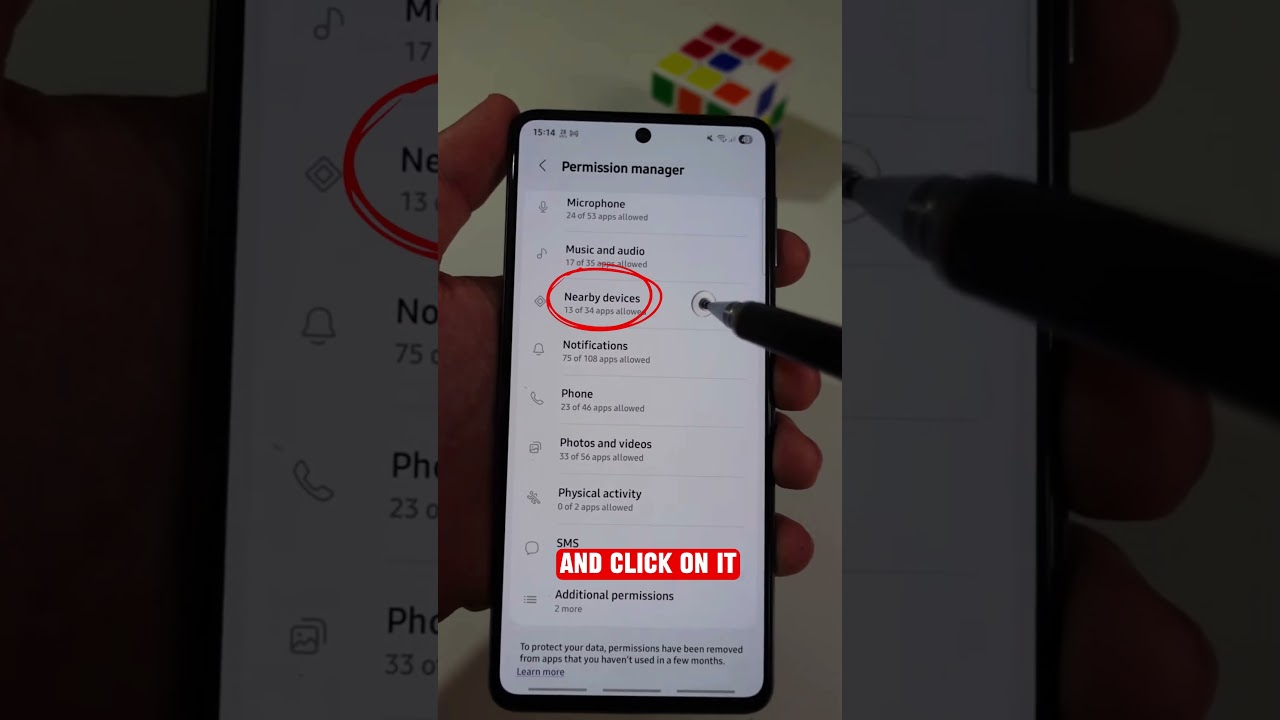
Disable Dangerous "Nearby Devices" Permissions:
1️⃣ Open Settings
2️⃣ Tap "Apps"
3️⃣ Tap three dots (⋮) in top right corner
4️⃣ Select "Permission Manager"
5️⃣ Find and tap "Nearby Devices"
6️⃣ Tap three dots (⋮) again
7️⃣ Select "Show System"
Now disable these 3 DANGEROUS apps:
🔴 Personal Data Intelligence
→ Tap it → Select "Don't Allow" → Go Back
🔴 Android Setup
→ Tap it → Select "Don't Allow" → Go Back
🔴 Android System Intelligence
→ Tap it → Change to "Don't Allow"
✅ Works especially for Samsung devices!
Your phone was sharing your personal data without you knowing! Share this to help others protect their privacy 🔒
Drop a 🛡️ if you turned these off!
Follow for more hidden privacy tips!
#AndroidPrivacy #PhonePrivacy #AndroidSettings #PrivacySettings #AndroidSecurity #PhoneSafety #TechTips #PrivacyTips #AndroidTips #DataPrivacy #PhoneSettings #MobilePrivacy #SamsungTips #AndroidHacks #PrivacyAlert #CyberSecurity #TechSafety #MobileSecurity #DigitalPrivacy #OnlinePrivacy #Privacy #AndroidGuide #PhoneHacks #PrivacyMatters #TechAwareness #DataProtection #MobileSettings #PrivacyFirst #AndroidUsers #SmartphonePrivacy
Turn these OFF immediately to protect yourself! 👇
Disable Dangerous "Nearby Devices" Permissions:
1️⃣ Open Settings
2️⃣ Tap "Apps"
3️⃣ Tap three dots (⋮) in top right corner
4️⃣ Select "Permission Manager"
5️⃣ Find and tap "Nearby Devices"
6️⃣ Tap three dots (⋮) again
7️⃣ Select "Show System"
Now disable these 3 DANGEROUS apps:
🔴 Personal Data Intelligence
→ Tap it → Select "Don't Allow" → Go Back
🔴 Android Setup
→ Tap it → Select "Don't Allow" → Go Back
🔴 Android System Intelligence
→ Tap it → Change to "Don't Allow"
✅ Works especially for Samsung devices!
Your phone was sharing your personal data without you knowing! Share this to help others protect their privacy 🔒
Drop a 🛡️ if you turned these off!
Follow for more hidden privacy tips!
#AndroidPrivacy #PhonePrivacy #AndroidSettings #PrivacySettings #AndroidSecurity #PhoneSafety #TechTips #PrivacyTips #AndroidTips #DataPrivacy #PhoneSettings #MobilePrivacy #SamsungTips #AndroidHacks #PrivacyAlert #CyberSecurity #TechSafety #MobileSecurity #DigitalPrivacy #OnlinePrivacy #Privacy #AndroidGuide #PhoneHacks #PrivacyMatters #TechAwareness #DataProtection #MobileSettings #PrivacyFirst #AndroidUsers #SmartphonePrivacy
Video Information
Views
3.6M
Likes
42.1K
Duration
0:43
Published
Aug 9, 2025
User Reviews
4.6
(724) Related Trending Topics
LIVE TRENDSRelated trending topics. Click any trend to explore more videos.
No specific trending topics match this video yet.
Explore All Trends