Automate PostgreSQL Backup for Data Safety
Learn why automating PostgreSQL backups is essential to protect your data and ensure quick recovery when needed. 🔧

SimpleBackups
3.9K views • Dec 11, 2023
About this video
Why do you need a PostgreSQL database backup?
One might think why backup is necessary for my database? The answer is simple, backup creates a copy of your physical, logical, and operational data. Which you can store at any safe place such as Amazon S3. This copy comes into use if the running database gets corrupted. Database backup can include files like control files, datafiles, and archived redo logs.
Written article: https://simplebackups.com/blog/the-ultimate-postgresql-database-backup-script/
If you're looking for a no-code, hastle free solution to setup and automated your PostgreSQL database backed up, have a look at SimpleBackups.
What are we going to do cover this article?
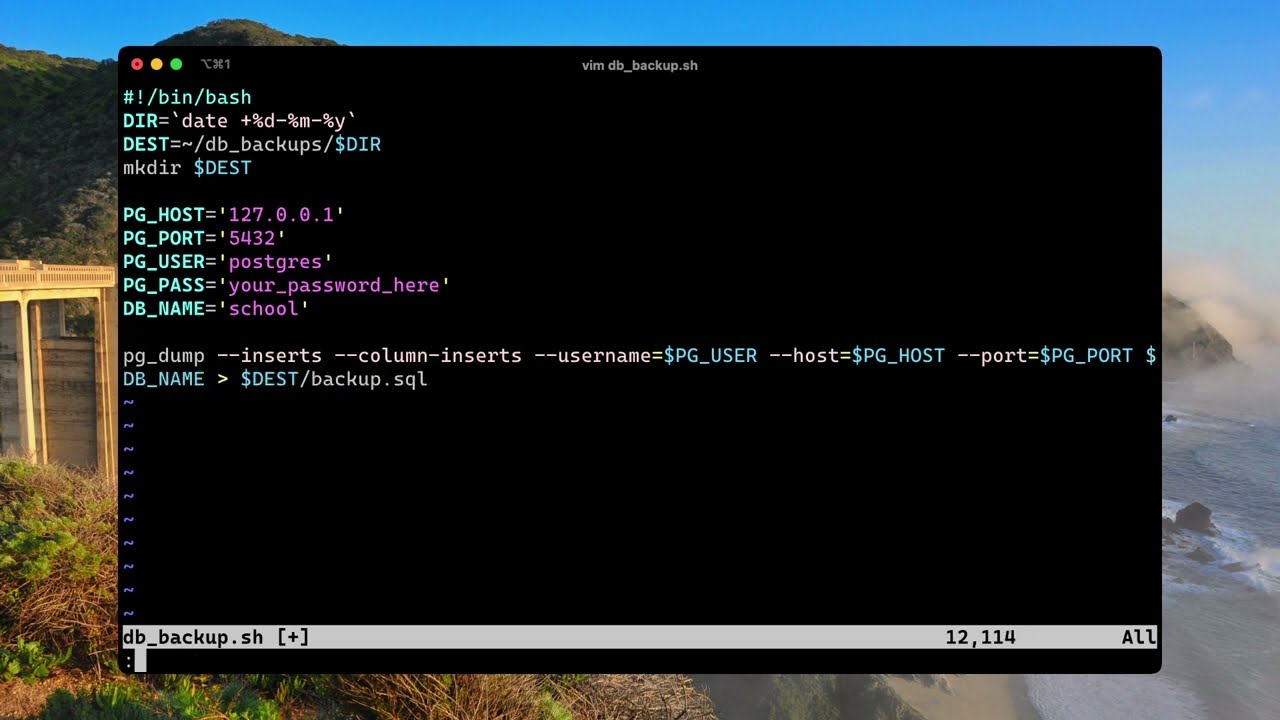
We're going to write a simple script that backup your PostgreSQL database and store it on your Amazon S3 bucket. We will also automate the process using Cron.
Few points to explain before we start:
Why Amazon S3?
For this tutorial, we have chosen Amazon S3 as it is a very common choice.
You can do the same thing if you would like to use another cloud storage provider. The instructions won’t differ a lot as long as the cloud provider is S3-compatible.
What is Cron?
Cron is a software utility that offers time-based job scheduling. It supports Unix computer operating systems. To set up software environments, the developer uses Cron. He/she schedules commands or shell scripts so that they run at chosen times. It could be daily, once a week, or any interval as desired.
What is Chmod?
The chmod a short command of ‘change mode’ enables the admin to set rules for file handling. In other words, with the help of a “chmod” system call. An administrator can change the access permissions of file system objects.
One might think why backup is necessary for my database? The answer is simple, backup creates a copy of your physical, logical, and operational data. Which you can store at any safe place such as Amazon S3. This copy comes into use if the running database gets corrupted. Database backup can include files like control files, datafiles, and archived redo logs.
Written article: https://simplebackups.com/blog/the-ultimate-postgresql-database-backup-script/
If you're looking for a no-code, hastle free solution to setup and automated your PostgreSQL database backed up, have a look at SimpleBackups.
What are we going to do cover this article?
We're going to write a simple script that backup your PostgreSQL database and store it on your Amazon S3 bucket. We will also automate the process using Cron.
Few points to explain before we start:
Why Amazon S3?
For this tutorial, we have chosen Amazon S3 as it is a very common choice.
You can do the same thing if you would like to use another cloud storage provider. The instructions won’t differ a lot as long as the cloud provider is S3-compatible.
What is Cron?
Cron is a software utility that offers time-based job scheduling. It supports Unix computer operating systems. To set up software environments, the developer uses Cron. He/she schedules commands or shell scripts so that they run at chosen times. It could be daily, once a week, or any interval as desired.
What is Chmod?
The chmod a short command of ‘change mode’ enables the admin to set rules for file handling. In other words, with the help of a “chmod” system call. An administrator can change the access permissions of file system objects.
Video Information
Views
3.9K
Likes
65
Duration
3:41
Published
Dec 11, 2023
User Reviews
4.6
(3) Related Trending Topics
LIVE TRENDSRelated trending topics. Click any trend to explore more videos.
No specific trending topics match this video yet.
Explore All Trends