PLCnext Beginner Tutorial: Starterkit Unboxing 📦
Learn what's inside the PLCnext Starterkit and get started with PLCnext Technology in this beginner-friendly guide.

RealPars
136.8K views • Feb 9, 2021
About this video
▶ C'mon over to https://bit.ly/44Vf06I where you can order this PLCnext Technology Starterkit directly from @phoenixcontact1923.
=============================
▶ Check out the full blog post over at
https://realpars.com/plcnext-starterkit
=============================
⌚Timestamps:
00:00 - Intro
01:15 - 1) AC plug
01:42 - 2) Ethernet cable
02:01 - 3) PLC panel
02:52 - Controller AXC F 2152
03:53 - AXL F BP SE4 module carrier
05:27 - Smart elements
06:54 - Starterkit field devices
=============================
This is the first of a series of easy-to-follow format videos about the Phoenix PLCnext Technology Starterkit - 1188165.
If you are interested in a powerful but inexpensive PLC, you might want to consider the PLCnext Starterkit.
Here are a few reasons to help you decide to get one.
1) The programming software is free! (You can download it here: https://bit.ly/3PRiy5X)
2) In addition to typical PLC programming languages such as ladder logic, function block diagram, and structured text, you can also use other PLC programming languages such as Python, C++, and Java amongst many others.
We’re going to identify all of the PLCnext Starterkit bits and pieces in the box that arrived at your door. We’re also going to familiarize you with everything in the box and discuss the purpose and function of each item.
1) The first thing you might notice is the 24 Volt power supply and a bag called AC plug-Mix.
The output male plug of the power supply plugs into the female connector at the bottom left corner of the panel.
2) Next out of the box is the Ethernet cable. https://bit.ly/3r99j7z
The Ethernet cable is the communication link between your computer and the PLC.
3) Let’s have a look at the PLC panel itself.
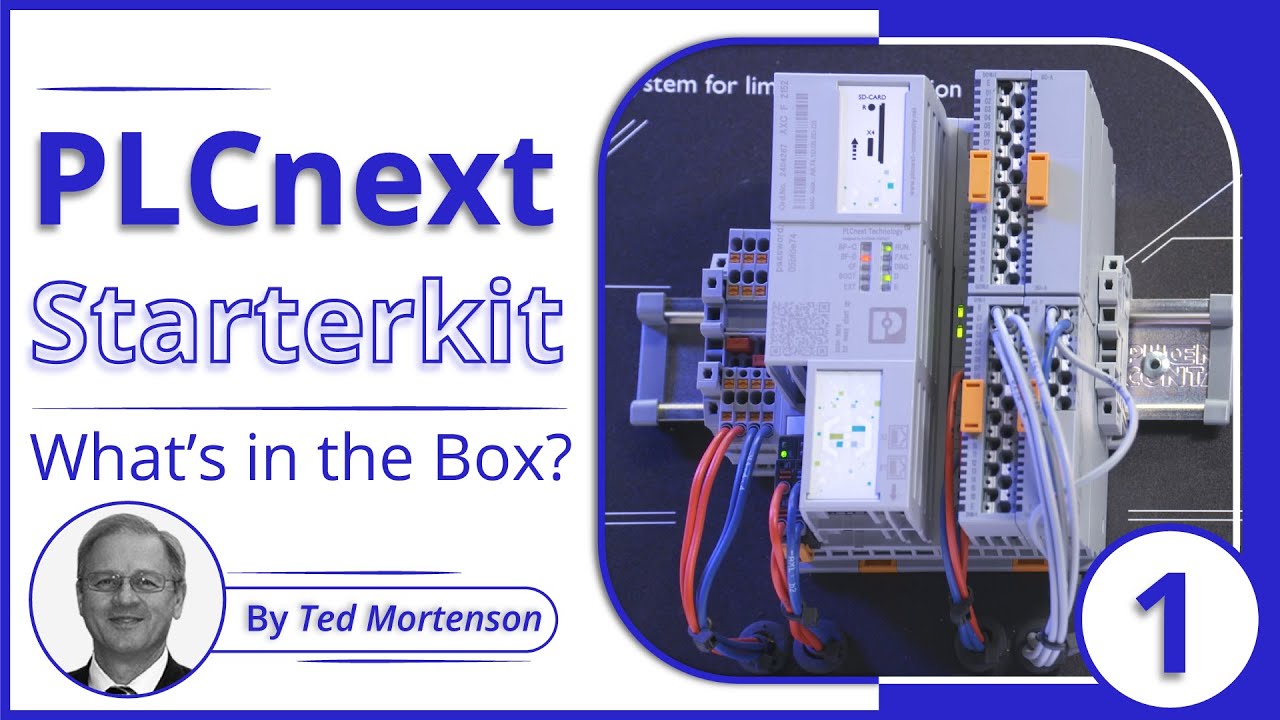
There’s lots of stuff on this panel. We will start by examining everything mounted on the DIN Rail.
Mounted on the far left side of the DIN Rail is a PT 1,5 Quattro terminal block.
There are 4 actual terminal blocks on the DIN Rail.
A terminal block allows multiple outgoing wires to connect to one singular incoming wire.
The Starterkit terminal blocks are currently used to distribute the 24 Volt power supply where needed on the panel.
The red wire is the positive side of the 24 volt supply and the blue wire is the negative side.
Located beside the terminal block is the brain of the operation: the controller itself. https://bit.ly/3sYukCo
There is a cluster of LEDs located in the middle of the controller.
These LEDs are there for Diagnostic and Status Indication.
At the bottom left of the controller is the Power Supply Connector.
And, underneath the controller, you will find 2 Ethernet ports.
Next on the panel is the AXL F BP SE4 Module Carrier (https://bit.ly/3sUR4mS) which is the backplane allowing connections between the individual I/O modules, the power supply, and the controller.
Four I/O modules can be inserted into the Module Carrier. Phoenix refers to the I/O modules as Smart Elements.
With this PLC, having the same number of I/O modules takes half the space compared to using a typical PLC.
The Module Carrier has 4 Smart Elements plugged into it.
Slot 1 has a Digital Output Module with 16 outputs. The Part number is AXL SE DO16/1. https://bit.ly/3PpeeJC
Slot 2 has a Digital Input Module with 16 inputs. The Part Number is AXL SE DI16/1. https://bit.ly/451uGVX
Slot 3 has a blank or a Smart Element Cover. The Part Number is Cover - AXL SE SC-A.
https://bit.ly/44ToJdW
Slot 4 has an analog input module with 4 voltage channels. The Part Number is AXL SE AI4 U 0-10.
https://bit.ly/3sOjGxR
Detailed specifications for each Smart Element can be found at https://www.phoenixcontact.com.
=============================
PLCnext Tutorial for Beginners - Part 2 | Create a New Project and Configure Ethernet Port
https://realpars.com/plcnext-engineer
PLCnext Tutorial for Beginners - Part 3 | Configure the I/O Modules https://realpars.com/phoenix-contact-plcnext
PLCnext Tutorial for Beginners - Part 4 | How to Easily Create Ladder Logic Programs https://realpars.com/plcnext-ladder-logic
=============================
Missed our most recent videos? Watch them here:
https://realpars.com/motor-starter
https://realpars.com/omron-plc
https://realpars.com/plc-output
=============================
To stay up to date with our last videos and more lessons, make sure to subscribe to this YouTube channel:
http://bit.ly/realpars
=============================
TWEET THIS VIDEO https://ctt.ac/8eB80
=============================
Follow us on Facebook: https://www.facebook.com/therealpars
Follow us on Twitter: https://twitter.com/realpars
Follow us on LinkedIn https://www.linkedin.com/company/realpars
Follow us on Instagram https://www.instagram.com/realparsdotcom
#RealPars #industry #PLC
=============================
▶ Check out the full blog post over at
https://realpars.com/plcnext-starterkit
=============================
⌚Timestamps:
00:00 - Intro
01:15 - 1) AC plug
01:42 - 2) Ethernet cable
02:01 - 3) PLC panel
02:52 - Controller AXC F 2152
03:53 - AXL F BP SE4 module carrier
05:27 - Smart elements
06:54 - Starterkit field devices
=============================
This is the first of a series of easy-to-follow format videos about the Phoenix PLCnext Technology Starterkit - 1188165.
If you are interested in a powerful but inexpensive PLC, you might want to consider the PLCnext Starterkit.
Here are a few reasons to help you decide to get one.
1) The programming software is free! (You can download it here: https://bit.ly/3PRiy5X)
2) In addition to typical PLC programming languages such as ladder logic, function block diagram, and structured text, you can also use other PLC programming languages such as Python, C++, and Java amongst many others.
We’re going to identify all of the PLCnext Starterkit bits and pieces in the box that arrived at your door. We’re also going to familiarize you with everything in the box and discuss the purpose and function of each item.
1) The first thing you might notice is the 24 Volt power supply and a bag called AC plug-Mix.
The output male plug of the power supply plugs into the female connector at the bottom left corner of the panel.
2) Next out of the box is the Ethernet cable. https://bit.ly/3r99j7z
The Ethernet cable is the communication link between your computer and the PLC.
3) Let’s have a look at the PLC panel itself.
There’s lots of stuff on this panel. We will start by examining everything mounted on the DIN Rail.
Mounted on the far left side of the DIN Rail is a PT 1,5 Quattro terminal block.
There are 4 actual terminal blocks on the DIN Rail.
A terminal block allows multiple outgoing wires to connect to one singular incoming wire.
The Starterkit terminal blocks are currently used to distribute the 24 Volt power supply where needed on the panel.
The red wire is the positive side of the 24 volt supply and the blue wire is the negative side.
Located beside the terminal block is the brain of the operation: the controller itself. https://bit.ly/3sYukCo
There is a cluster of LEDs located in the middle of the controller.
These LEDs are there for Diagnostic and Status Indication.
At the bottom left of the controller is the Power Supply Connector.
And, underneath the controller, you will find 2 Ethernet ports.
Next on the panel is the AXL F BP SE4 Module Carrier (https://bit.ly/3sUR4mS) which is the backplane allowing connections between the individual I/O modules, the power supply, and the controller.
Four I/O modules can be inserted into the Module Carrier. Phoenix refers to the I/O modules as Smart Elements.
With this PLC, having the same number of I/O modules takes half the space compared to using a typical PLC.
The Module Carrier has 4 Smart Elements plugged into it.
Slot 1 has a Digital Output Module with 16 outputs. The Part number is AXL SE DO16/1. https://bit.ly/3PpeeJC
Slot 2 has a Digital Input Module with 16 inputs. The Part Number is AXL SE DI16/1. https://bit.ly/451uGVX
Slot 3 has a blank or a Smart Element Cover. The Part Number is Cover - AXL SE SC-A.
https://bit.ly/44ToJdW
Slot 4 has an analog input module with 4 voltage channels. The Part Number is AXL SE AI4 U 0-10.
https://bit.ly/3sOjGxR
Detailed specifications for each Smart Element can be found at https://www.phoenixcontact.com.
=============================
PLCnext Tutorial for Beginners - Part 2 | Create a New Project and Configure Ethernet Port
https://realpars.com/plcnext-engineer
PLCnext Tutorial for Beginners - Part 3 | Configure the I/O Modules https://realpars.com/phoenix-contact-plcnext
PLCnext Tutorial for Beginners - Part 4 | How to Easily Create Ladder Logic Programs https://realpars.com/plcnext-ladder-logic
=============================
Missed our most recent videos? Watch them here:
https://realpars.com/motor-starter
https://realpars.com/omron-plc
https://realpars.com/plc-output
=============================
To stay up to date with our last videos and more lessons, make sure to subscribe to this YouTube channel:
http://bit.ly/realpars
=============================
TWEET THIS VIDEO https://ctt.ac/8eB80
=============================
Follow us on Facebook: https://www.facebook.com/therealpars
Follow us on Twitter: https://twitter.com/realpars
Follow us on LinkedIn https://www.linkedin.com/company/realpars
Follow us on Instagram https://www.instagram.com/realparsdotcom
#RealPars #industry #PLC
Tags and Topics
Browse our collection to discover more content in these categories.
Video Information
Views
136.8K
Likes
1.7K
Duration
10:19
Published
Feb 9, 2021
User Reviews
4.5
(27)