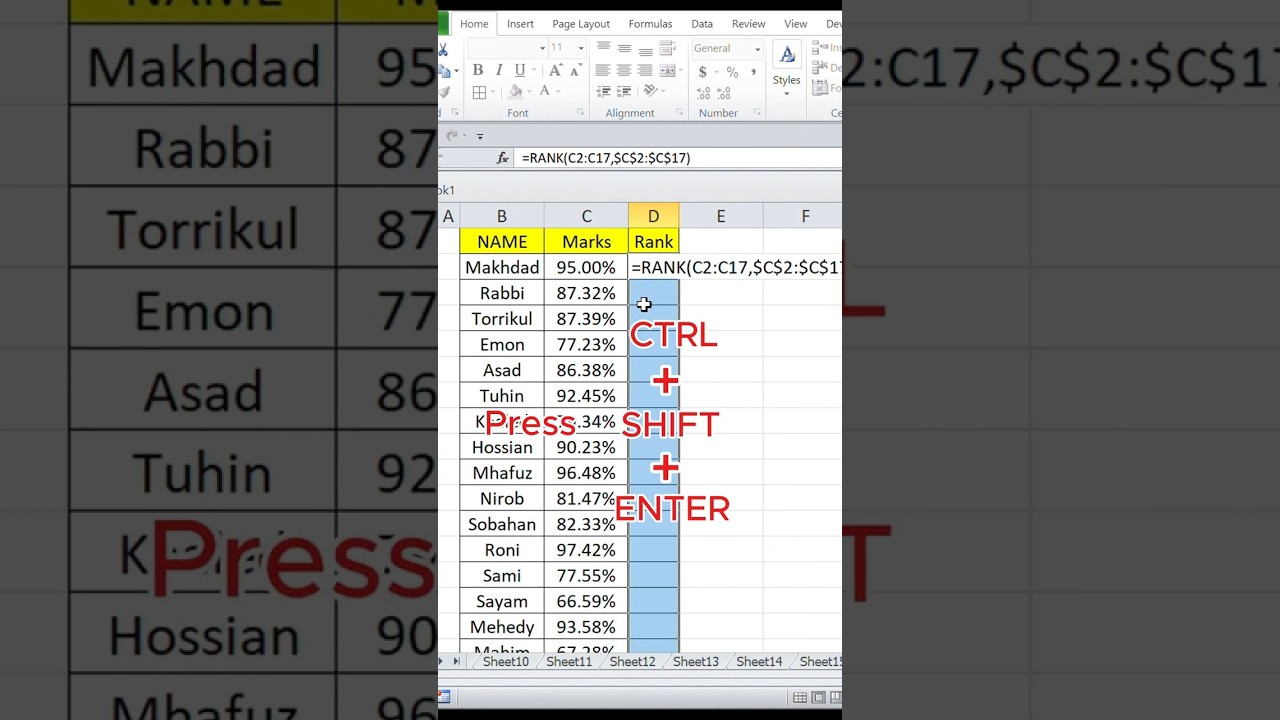
Master the RANK Function in Excel to Easily Rank Marks 📊
Learn how to use the RANK function in Excel to quickly and accurately rank students' marks. Perfect for students and teachers alike! Watch now for simple Excel tips and tricks. #ExcelTricks #DataModeling
EXCEL MAGIC
250.9K views • Dec 13, 2024
About this video
Hi,This is excel magic channel.In this channel we share different type of excel tips.In this video how to use rank function in excel.#exceldatamodeling #dataanalysis #exceltips #exceldatamodelingtutorial #datamanagement #dataanalysis #exceltips #exceldatamodelingtutorial #datamanagement #exceldatamanipulation #rank
The RANK function in Microsoft Excel determines the rank of a number in a list of numbers:
Purpose
Compares a number to others in a list, and can sort numbers in ascending or descending order
Use cases
Statistics, competitive analysis, and evaluating performance or outcomes relative to a group
Syntax
RANK(number, ref, [order])
Arguments
Number: Required, the number whose rank you want to find
Ref: Required, a reference to a list of numbers
Order: Optional, a number specifying how to rank the number
How it works
Excel does not skip ranks in the case of a tie, instead, it ensures each tied value receives the same rank
Here's an example of how to use the RANK function:
=RANK(A2, A$2:A$10, 0): Calculates the rank of the value in cell A2 within the range A2 to A10, ranking higher numbers with a lower rank number
The RANK function has been replaced with one or more new functions that may provide improved accuracy, but RANK still works in Excel 2016
Next video link
https://youtube.com/shorts/AMWD2ZeSJjA?si=WgRBYSvyJHZZ9l16
The RANK function in Microsoft Excel determines the rank of a number in a list of numbers:
Purpose
Compares a number to others in a list, and can sort numbers in ascending or descending order
Use cases
Statistics, competitive analysis, and evaluating performance or outcomes relative to a group
Syntax
RANK(number, ref, [order])
Arguments
Number: Required, the number whose rank you want to find
Ref: Required, a reference to a list of numbers
Order: Optional, a number specifying how to rank the number
How it works
Excel does not skip ranks in the case of a tie, instead, it ensures each tied value receives the same rank
Here's an example of how to use the RANK function:
=RANK(A2, A$2:A$10, 0): Calculates the rank of the value in cell A2 within the range A2 to A10, ranking higher numbers with a lower rank number
The RANK function has been replaced with one or more new functions that may provide improved accuracy, but RANK still works in Excel 2016
Next video link
https://youtube.com/shorts/AMWD2ZeSJjA?si=WgRBYSvyJHZZ9l16
Tags and Topics
Browse our collection to discover more content in these categories.
Video Information
Views
250.9K
Likes
1.9K
Duration
0:31
Published
Dec 13, 2024
User Reviews
4.3
(50) Related Trending Topics
LIVE TRENDSRelated trending topics. Click any trend to explore more videos.
Trending Now