Layering AI Video for Realistic Results 🎥
Exploring a new workflow by combining Runway’s Video-to-Video with Restyle Video for enhanced realism.

TechGuyver - Always be creating
4.3K views • Mar 17, 2025
About this video
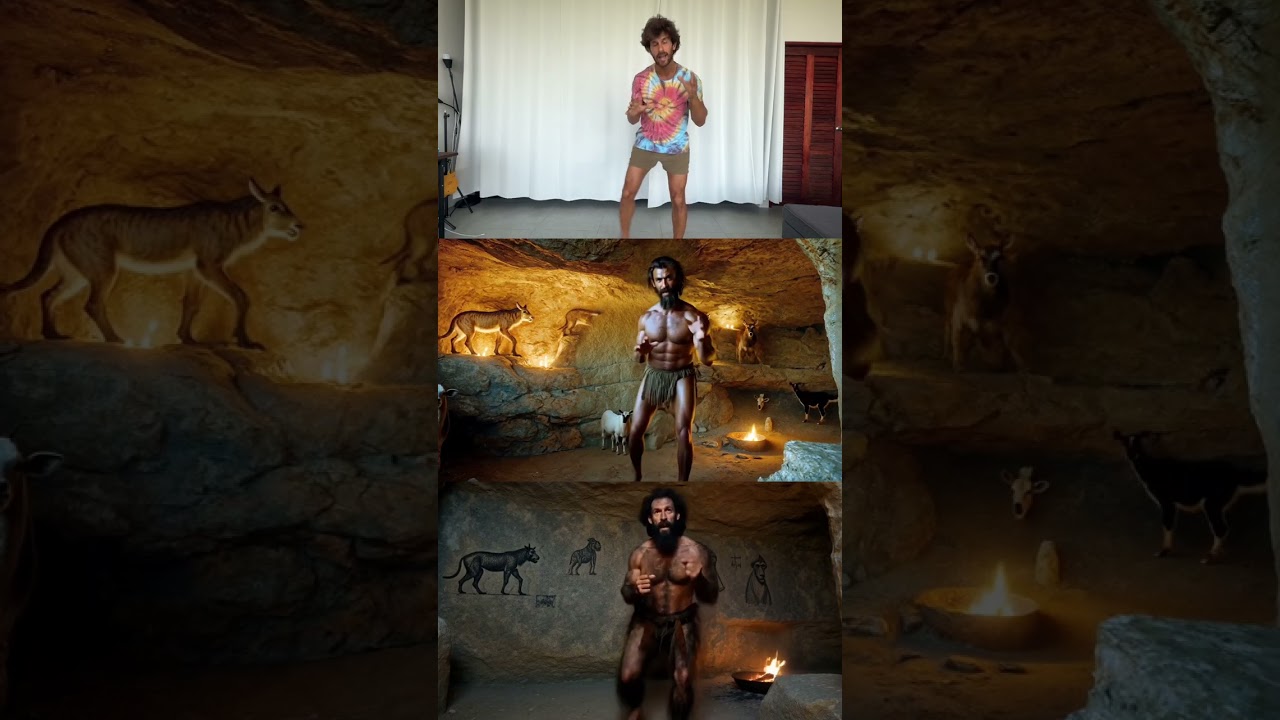
I had an idea... what if I could take **Runway’s Video-to-Video**, push it to its most **realistic** results, and then layer that with **Restyle Video and Magnific** to refine the output even further?
So I ran this test using a **three-step process**
1. **First pass through Runway Video-to-Video**
- Used the original video as input
- Entered a descriptive text prompt
- Set Structure Transformation to 10 for the most realistic results
2. **Refined the output using Magnific**
- Took the first frame of the Video 1 output
- Used *Mystic 2.5* with Structure Reference at 50 to maintain realism
- Upscaled the result for higher quality
3. **Ran the refined image through Runway Restyle Video**
- Used the upscaled frame as input
- Applied Restyle Video to transform specific elements while keeping the structure intact
The final setup had three versions of the video:
- **Top:** Original video
- **Bottom:** First Runway Video-to-Video pass (prompt + Structure Transformation at 10)
- **Middle:** The refined version using Magnific’s structure reference before applying Restyle Video (Structure Transformation at 3)
I also tested **Runway Act 1** for generating lip sync/face moveents, but it didn’t work on this output
Maybe too much movement? So I tried **Sync.so** instead
It’s not perfect, but it does a solid job and is super easy to use
### Key Takeaways
- Structure Transformation at 10 creates **crazy realistic results**
- Restyle Video lets you fine-tune and modify elements **without losing the original structure**
- Magnific’s Mystic 2.5 with Structure Reference at 50 is a great way to **lock in realism before upscaling**
This is what’s exciting about AI video
It’s not just about using one tool - it’s about stacking the right ones together to push creative possibilities further
PS: I’m testing AI workflows like this daily — follow for more inspo 🔥
So I ran this test using a **three-step process**
1. **First pass through Runway Video-to-Video**
- Used the original video as input
- Entered a descriptive text prompt
- Set Structure Transformation to 10 for the most realistic results
2. **Refined the output using Magnific**
- Took the first frame of the Video 1 output
- Used *Mystic 2.5* with Structure Reference at 50 to maintain realism
- Upscaled the result for higher quality
3. **Ran the refined image through Runway Restyle Video**
- Used the upscaled frame as input
- Applied Restyle Video to transform specific elements while keeping the structure intact
The final setup had three versions of the video:
- **Top:** Original video
- **Bottom:** First Runway Video-to-Video pass (prompt + Structure Transformation at 10)
- **Middle:** The refined version using Magnific’s structure reference before applying Restyle Video (Structure Transformation at 3)
I also tested **Runway Act 1** for generating lip sync/face moveents, but it didn’t work on this output
Maybe too much movement? So I tried **Sync.so** instead
It’s not perfect, but it does a solid job and is super easy to use
### Key Takeaways
- Structure Transformation at 10 creates **crazy realistic results**
- Restyle Video lets you fine-tune and modify elements **without losing the original structure**
- Magnific’s Mystic 2.5 with Structure Reference at 50 is a great way to **lock in realism before upscaling**
This is what’s exciting about AI video
It’s not just about using one tool - it’s about stacking the right ones together to push creative possibilities further
PS: I’m testing AI workflows like this daily — follow for more inspo 🔥
Video Information
Views
4.3K
Likes
75
Duration
0:16
Published
Mar 17, 2025
User Reviews
4.6
(4) Related Trending Topics
LIVE TRENDSRelated trending topics. Click any trend to explore more videos.
No specific trending topics match this video yet.
Explore All Trends