Create PDF in C# with Example Code 📄
Learn to generate PDFs in C# easily. Download the sample code from GitHub and check my Fiverr and Upwork profiles for services.

IT Core Soft
63 views • Apr 25, 2022
About this video
Download from these link: https://github.com/hamza3344/pdfgenerate
My fiverr link: https://www.fiverr.com/hamzakhalid178
My Upwork Profile: https://www.upwork.com/freelancers/~01cad71ccde3a7df56
Whatsapp Number: +923338672398
if you have any problem comment below. please like, share and subscribe the channel. Contact me on hamzahumzahamzah@gmail.com if you need any custom software, website and mobile Application.
code:
using iText.IO.Image;
using iText.Kernel.Colors;
using iText.Kernel.Pdf;
using iText.Kernel.Pdf.Action;
using iText.Kernel.Pdf.Canvas.Draw;
using iText.Layout;
using iText.Layout.Element;
using iText.Layout.Properties;
in form
string[] states = { "State", "New York", "New Jersey", "California" };
string[] capital = { "Capital", "Albany", "Trenton", "Sacramento" };
in form_load
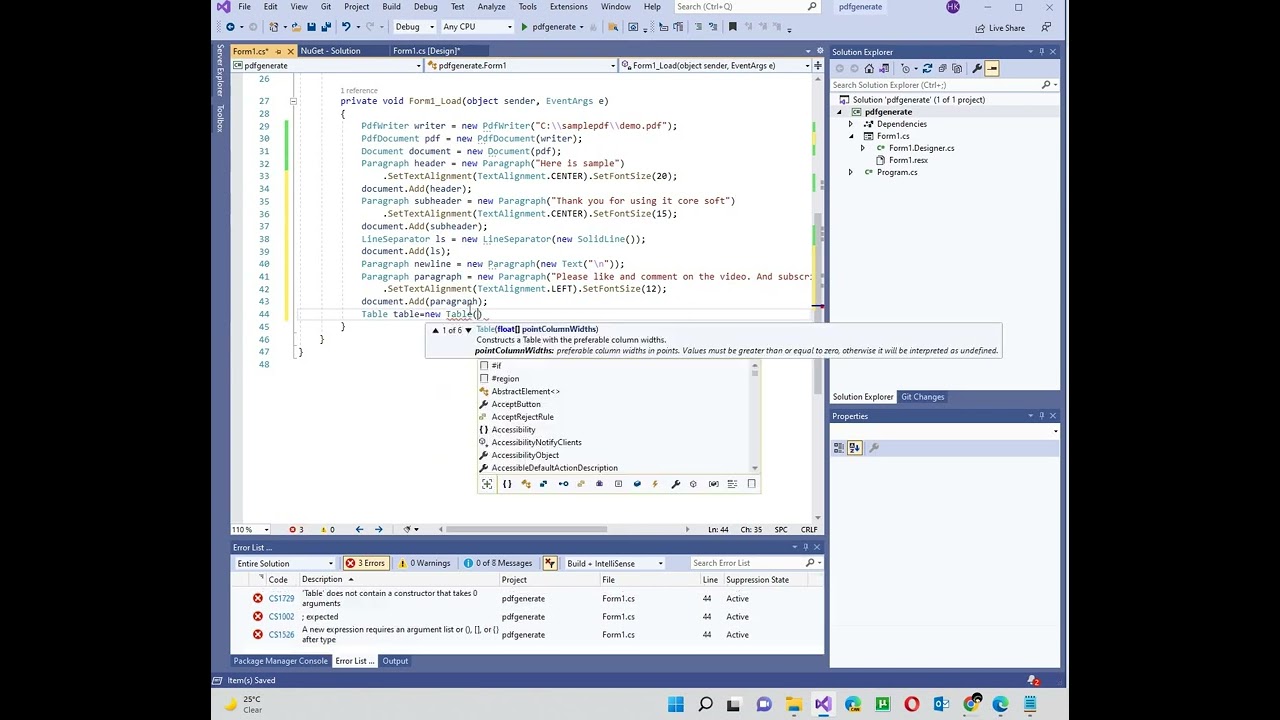
PdfWriter writer = new PdfWriter("C:\\samplepdf\\demo.pdf");
PdfDocument pdf = new PdfDocument(writer);
Document document = new Document(pdf);
Paragraph header = new Paragraph("Here is sample")
.SetTextAlignment(TextAlignment.CENTER).SetFontSize(20);
document.Add(header);
Paragraph subheader = new Paragraph("Thank you for using it core soft")
.SetTextAlignment(TextAlignment.CENTER).SetFontSize(15);
document.Add(subheader);
LineSeparator ls = new LineSeparator(new SolidLine());
document.Add(ls);
Paragraph newline = new Paragraph(new Text("\n"));
Paragraph paragraph = new Paragraph("Please like and comment on the video. And subscribe the channel")
.SetTextAlignment(TextAlignment.LEFT).SetFontSize(12);
document.Add(paragraph);
Table table = new Table(2/*number of columns in the table*/, false);
table.SetHorizontalAlignment(iText.Layout.Properties.HorizontalAlignment.CENTER);
int i = 0;
foreach(string state in states)
{
Cell cell11 = new Cell(1, 1)
.SetBackgroundColor(ColorConstants.GRAY)
.SetTextAlignment(TextAlignment.CENTER).Add(new Paragraph(state));
Cell cell21 = new Cell(1, 1)
.SetBackgroundColor(ColorConstants.GRAY)
.SetTextAlignment(TextAlignment.CENTER).Add(new Paragraph(capital[i]));
i = i + 1;
table.AddCell(cell11);
table.AddCell(cell21);
}
document.Add(table);
iText.Layout.Element.Image img = new iText.Layout.Element.Image(ImageDataFactory
.Create(@"C:\\samplepdf\\image.png"))
.SetHorizontalAlignment(iText.Layout.Properties.HorizontalAlignment.CENTER);
document.Add(img);
Link link = new Link("click here",
PdfAction.CreateURI("https://www.youtube.com/channel/UCQL_ffEP42Pxh7BrYVrSxWw"));
Paragraph hyperlink = new Paragraph("Please").Add(link.SetBold().SetUnderline()
.SetItalic().SetFontColor(ColorConstants.BLUE)).Add(" to go to channel,");
document.Add(newline);
document.Add(hyperlink);
document.Close();
My fiverr link: https://www.fiverr.com/hamzakhalid178
My Upwork Profile: https://www.upwork.com/freelancers/~01cad71ccde3a7df56
Whatsapp Number: +923338672398
if you have any problem comment below. please like, share and subscribe the channel. Contact me on hamzahumzahamzah@gmail.com if you need any custom software, website and mobile Application.
code:
using iText.IO.Image;
using iText.Kernel.Colors;
using iText.Kernel.Pdf;
using iText.Kernel.Pdf.Action;
using iText.Kernel.Pdf.Canvas.Draw;
using iText.Layout;
using iText.Layout.Element;
using iText.Layout.Properties;
in form
string[] states = { "State", "New York", "New Jersey", "California" };
string[] capital = { "Capital", "Albany", "Trenton", "Sacramento" };
in form_load
PdfWriter writer = new PdfWriter("C:\\samplepdf\\demo.pdf");
PdfDocument pdf = new PdfDocument(writer);
Document document = new Document(pdf);
Paragraph header = new Paragraph("Here is sample")
.SetTextAlignment(TextAlignment.CENTER).SetFontSize(20);
document.Add(header);
Paragraph subheader = new Paragraph("Thank you for using it core soft")
.SetTextAlignment(TextAlignment.CENTER).SetFontSize(15);
document.Add(subheader);
LineSeparator ls = new LineSeparator(new SolidLine());
document.Add(ls);
Paragraph newline = new Paragraph(new Text("\n"));
Paragraph paragraph = new Paragraph("Please like and comment on the video. And subscribe the channel")
.SetTextAlignment(TextAlignment.LEFT).SetFontSize(12);
document.Add(paragraph);
Table table = new Table(2/*number of columns in the table*/, false);
table.SetHorizontalAlignment(iText.Layout.Properties.HorizontalAlignment.CENTER);
int i = 0;
foreach(string state in states)
{
Cell cell11 = new Cell(1, 1)
.SetBackgroundColor(ColorConstants.GRAY)
.SetTextAlignment(TextAlignment.CENTER).Add(new Paragraph(state));
Cell cell21 = new Cell(1, 1)
.SetBackgroundColor(ColorConstants.GRAY)
.SetTextAlignment(TextAlignment.CENTER).Add(new Paragraph(capital[i]));
i = i + 1;
table.AddCell(cell11);
table.AddCell(cell21);
}
document.Add(table);
iText.Layout.Element.Image img = new iText.Layout.Element.Image(ImageDataFactory
.Create(@"C:\\samplepdf\\image.png"))
.SetHorizontalAlignment(iText.Layout.Properties.HorizontalAlignment.CENTER);
document.Add(img);
Link link = new Link("click here",
PdfAction.CreateURI("https://www.youtube.com/channel/UCQL_ffEP42Pxh7BrYVrSxWw"));
Paragraph hyperlink = new Paragraph("Please").Add(link.SetBold().SetUnderline()
.SetItalic().SetFontColor(ColorConstants.BLUE)).Add(" to go to channel,");
document.Add(newline);
document.Add(hyperlink);
document.Close();
Tags and Topics
Browse our collection to discover more content in these categories.
Video Information
Views
63
Likes
1
Duration
12:55
Published
Apr 25, 2022
Related Trending Topics
LIVE TRENDSRelated trending topics. Click any trend to explore more videos.
No specific trending topics match this video yet.
Explore All Trends