Save Versions & Review Edits in Google Docs
Learn how to save document versions and review suggested edits easily in Google Docs for better collaboration. ✍️

Telana
9.1K views • Nov 23, 2017
About this video
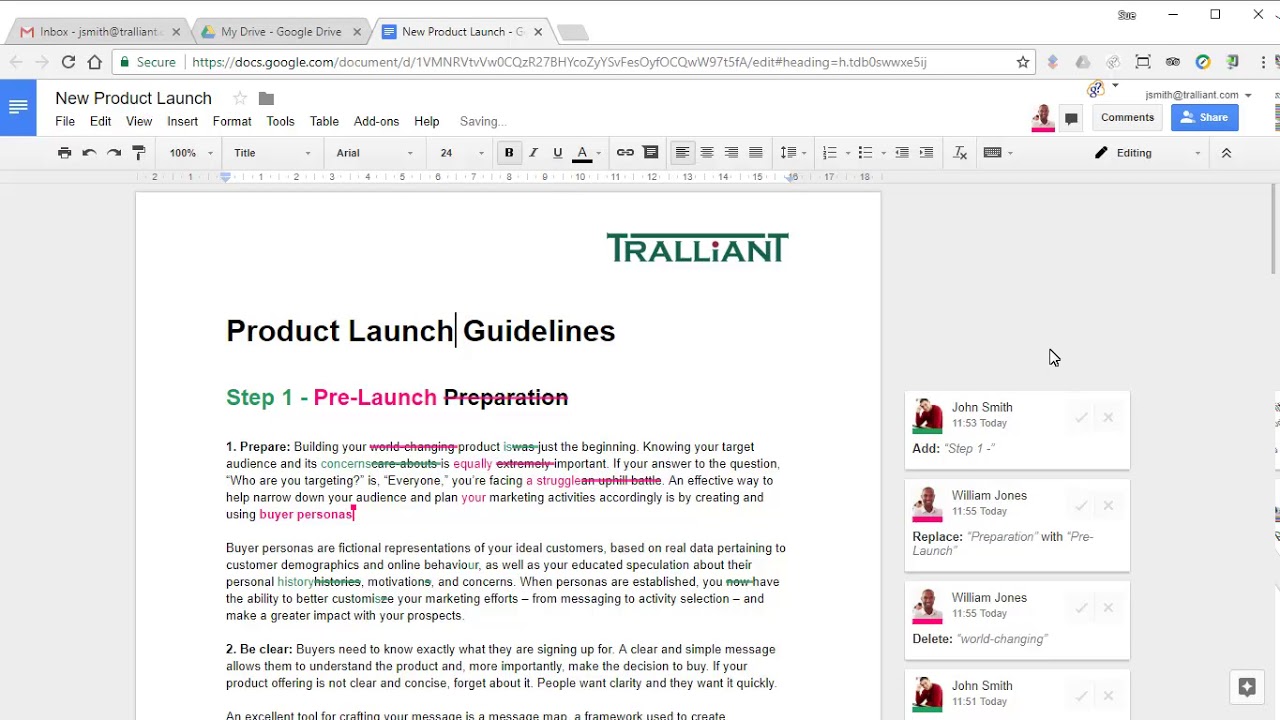
Google Docs make it even easier to collaborate on documents, view changes made by colleagues, and view the revised or original version of the document. For more information about how you can use G Suite to boost productivity and collaboration in your organisation, click here - https://hubs.ly/H0fDFFX0.
You can specify a name for any version of your document, allowing you to view or restore that version more easily in the future.
If you have suggested editing enabled, you can quickly preview "clean" versions of your document, without any markup, to see how it would look if all changes were accepted or rejected.
You can also quickly accept or reject all changes in a document in one step, without the need to select each change and act on it individually.
You can specify a name for any version of your document, allowing you to view or restore that version more easily in the future.
If you have suggested editing enabled, you can quickly preview "clean" versions of your document, without any markup, to see how it would look if all changes were accepted or rejected.
You can also quickly accept or reject all changes in a document in one step, without the need to select each change and act on it individually.
Tags and Topics
Browse our collection to discover more content in these categories.
Video Information
Views
9.1K
Likes
18
Duration
1:27
Published
Nov 23, 2017
User Reviews
3.9
(1) Related Trending Topics
LIVE TRENDSRelated trending topics. Click any trend to explore more videos.
No specific trending topics match this video yet.
Explore All Trends