Boost Your Android Gaming Performance 🎮
Learn quick tips to enhance gaming on your Android phone, including enabling 4x MSAA for smoother gameplay. Subscribe for more!
Tech Babo Vai
212.6K views • May 18, 2023
About this video
.................Place💕Subscribe💕Now................
How To Improve Gaming Performance On Your Android Phone #shorts
Force 4x MSAA:
4x MSAA or 4 times multi-sample anti-aliasing is a resolution boosting method that balances a game's graphics and performance. By enabling 4x MSAA you'll be able to enjoy the game at an almost similar graphics level with improved processing speed.
Warning
Do note that this mode is not the normal setting for your phone, and enabling it for long periods of time could shorten your phone life, and is thus not recommended for more than 2 hours of gaming at a tin requires more graphics power and will pr drain your battery a bit faster. Turn this off after gaming. Enabling 4x MSAA feature may not be safe if your device is heating up quickly.
★Users should know that this function is only recommended for devices that have GPU capable of native MSAA support.
To enable this mode:
1) Enable developer options.
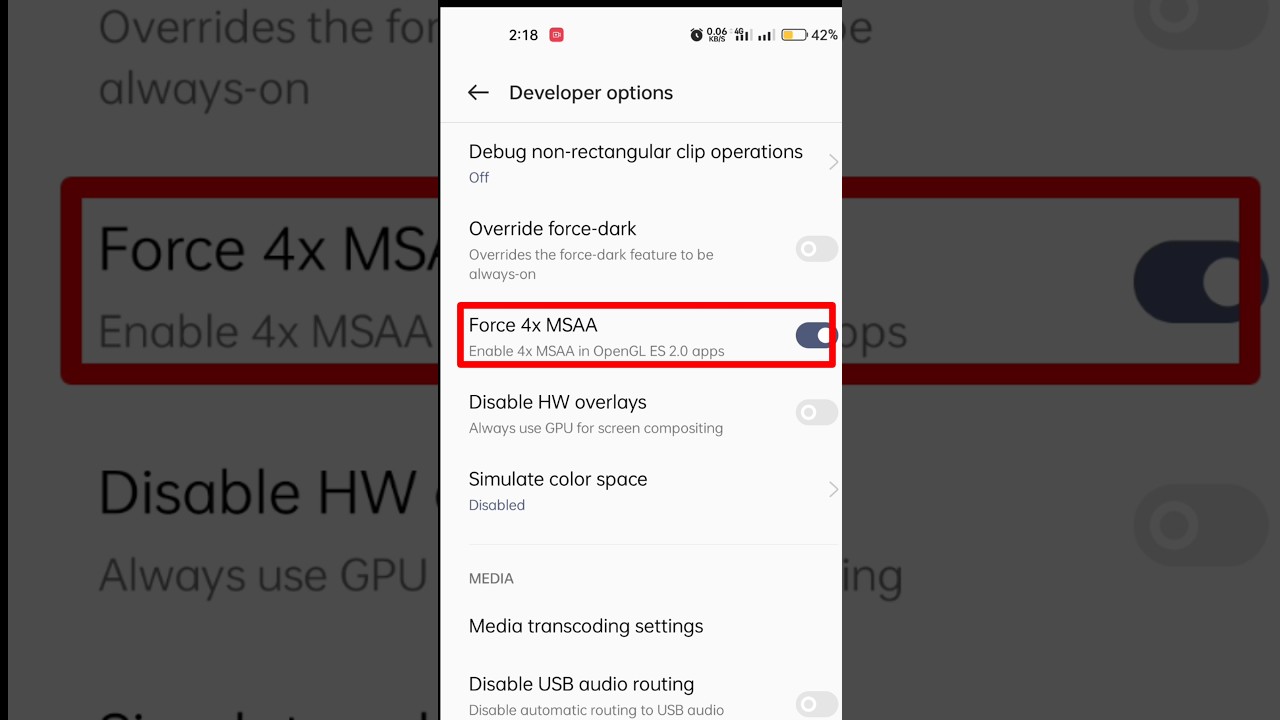
2) Enter the Developer Options tab and find the Force 4x MSAA option. Simply enable it and you're done.
How To Improve Gaming Performance On Your Android Phone #shorts
Force 4x MSAA:
4x MSAA or 4 times multi-sample anti-aliasing is a resolution boosting method that balances a game's graphics and performance. By enabling 4x MSAA you'll be able to enjoy the game at an almost similar graphics level with improved processing speed.
Warning
Do note that this mode is not the normal setting for your phone, and enabling it for long periods of time could shorten your phone life, and is thus not recommended for more than 2 hours of gaming at a tin requires more graphics power and will pr drain your battery a bit faster. Turn this off after gaming. Enabling 4x MSAA feature may not be safe if your device is heating up quickly.
★Users should know that this function is only recommended for devices that have GPU capable of native MSAA support.
To enable this mode:
1) Enable developer options.
2) Enter the Developer Options tab and find the Force 4x MSAA option. Simply enable it and you're done.
Tags and Topics
Browse our collection to discover more content in these categories.
Video Information
Views
212.6K
Likes
1.2K
Duration
0:09
Published
May 18, 2023
User Reviews
4.2
(42) Related Trending Topics
LIVE TRENDSRelated trending topics. Click any trend to explore more videos.