How to Enable Merge / Combine Shapes in PowerPoint 2010 Tutorial?
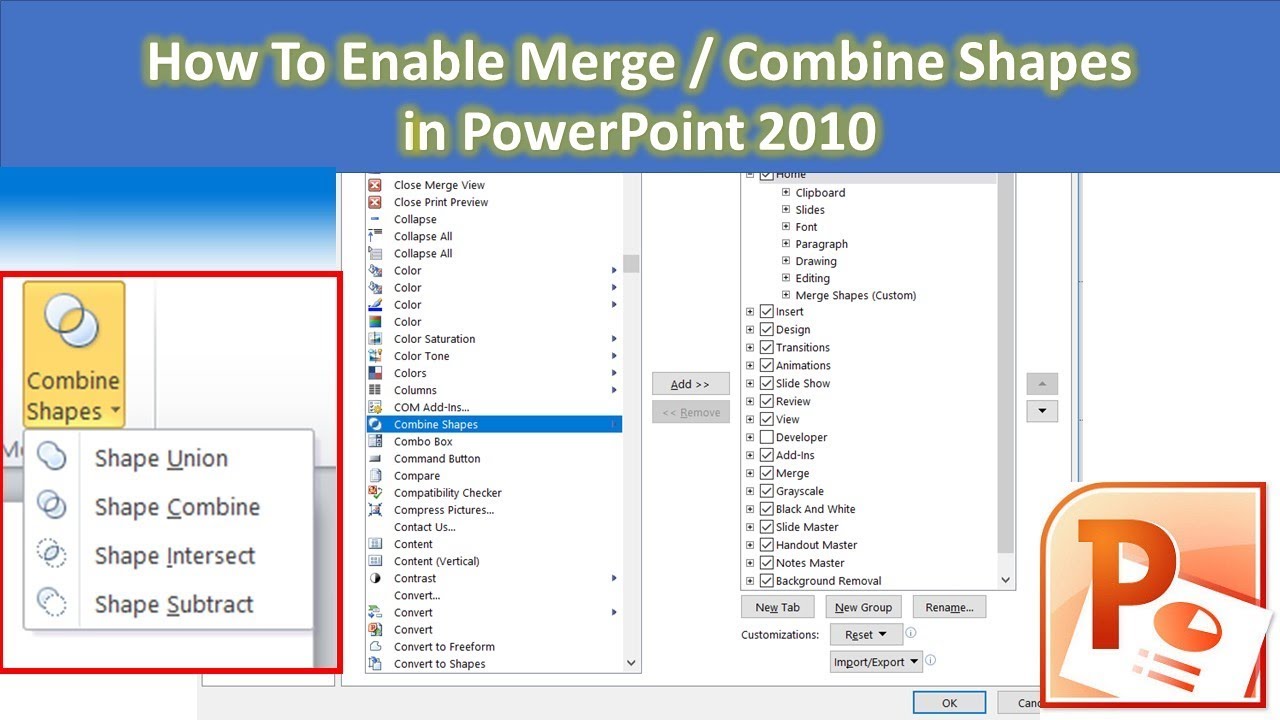
Join Rajiv in this illuminating tutorial as he reveals the secret to activating the Merge Shapes command in Microsoft PowerPoint 2010. With this mystical too...

The Teacher
348.4K views • Mar 29, 2019
About this video
Join Rajiv in this illuminating tutorial as he reveals the secret to activating the Merge Shapes command in Microsoft PowerPoint 2010. With this mystical tool, you'll unlock the power of Boolean Geometry Principles and watch as shapes seamlessly merge into captivating creations, setting your presentations aglow with innovation.
Key Points:
- Discover the art of enabling the Merge Shapes command within the mystical Office Ribbon or the enchanted Quick Access Toolbar.
- Unveil the hidden potential of Boolean Geometry Principles for crafting awe-inspiring shapes.
- Customize your very own magical Ribbon, adding these essential commands to your wizard's toolkit.
- Gain access to advanced shape manipulation techniques, as if wielding a wand.
- Follow Rajiv's step-by-step incantations for enabling Merge Shapes in PowerPoint 2010.
Background Music:
🎶 Enjoy this enchanting tutorial accompanied by the soothing melodies of "Pink Horizon" by Chris Haugen.
Follow Us:
🐦 Twitter: https://www.twitter.com/TheTeacherPoint
📘 Facebook: https://www.facebook.com/TheTeacherPoint
📸 Instagram: https://www.instagram.com/TheTeacherPoint
📌 Pinterest: https://in.pinterest.com/TheTeacherPoint
#powerpointtutorial #powerpoint #animation #powerpointanimation
🌟 Unleash the full potential of PowerPoint with this enchanting tutorial, brought to you by The Teacher. Don't forget to like, share, and subscribe to embark on this magical journey! 🌟
Key Points:
- Discover the art of enabling the Merge Shapes command within the mystical Office Ribbon or the enchanted Quick Access Toolbar.
- Unveil the hidden potential of Boolean Geometry Principles for crafting awe-inspiring shapes.
- Customize your very own magical Ribbon, adding these essential commands to your wizard's toolkit.
- Gain access to advanced shape manipulation techniques, as if wielding a wand.
- Follow Rajiv's step-by-step incantations for enabling Merge Shapes in PowerPoint 2010.
Background Music:
🎶 Enjoy this enchanting tutorial accompanied by the soothing melodies of "Pink Horizon" by Chris Haugen.
Follow Us:
🐦 Twitter: https://www.twitter.com/TheTeacherPoint
📘 Facebook: https://www.facebook.com/TheTeacherPoint
📸 Instagram: https://www.instagram.com/TheTeacherPoint
📌 Pinterest: https://in.pinterest.com/TheTeacherPoint
#powerpointtutorial #powerpoint #animation #powerpointanimation
🌟 Unleash the full potential of PowerPoint with this enchanting tutorial, brought to you by The Teacher. Don't forget to like, share, and subscribe to embark on this magical journey! 🌟
Tags and Topics
Browse our collection to discover more content in these categories.
Video Information
Views
348.4K
Likes
3.3K
Duration
3:02
Published
Mar 29, 2019
User Reviews
4.4
(69) Related Trending Topics
LIVE TRENDSRelated trending topics. Click any trend to explore more videos.
Trending Now