How to Create a Database, Add Tables and Import Data in MySQL Workbench
@MattMacarty #mysql #mysql_workbench #sqltutorial #dataengineering **Guide to getting your data from a CSV or Excel file directly into a MySQL database u...

Matt Macarty
733.4K views • Aug 31, 2020
About this video
@MattMacarty
#mysql #mysql_workbench #sqltutorial #dataengineering
**Guide to getting your data from a CSV or Excel file directly into a MySQL database using MySQL Workbench!**
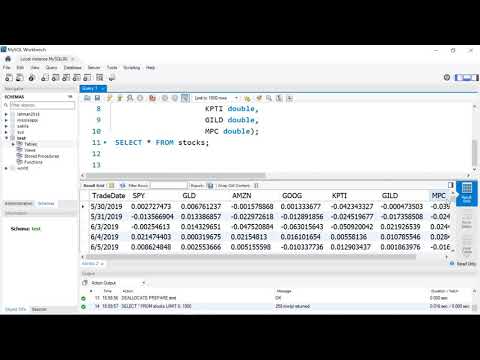
This step-by-step tutorial covers the entire workflow: from creating your database (schema) to defining table structures and using the **Table Data Import Wizard** to load stock data in minutes.
You will learn both the traditional **SQL syntax** and the quick **Wizard method** for data import, ensuring you master data setup and cleaning.
### 🛠️ **Key MySQL Skills You Will Master:**
* **Database Creation:** Use the `CREATE DATABASE` and `USE` commands.
* **Table Definition:** Define tables and specify data types (VARCHAR, DOUBLE) using `CREATE TABLE` syntax [0:02:26].
* **Importing Data:** Use the Table Data Import Wizard to load CSV files quickly [0:06:54].
* **Data Type Conversion:** Learn how to fix common import errors, specifically transforming date strings into proper MySQL Date format using the `STR_TO_DATE` function [0:10:21].
* **Schema Cleanup:** Use the `ALTER TABLE` command to modify column names and data types after import [0:13:41].
---
### ⏱️ Video Chapters / Timestamps
0:00 - Introduction to the Database Creation Workflow
0:32 - **Connecting to MySQL Server in Workbench**
1:05 - Creating a New Database (Schema) using `CREATE DATABASE`
1:46 - Deleting a Database using the `DROP DATABASE` command
2:10 - Using the `USE` command to activate a database
2:21 - **Method 1: Creating a Table using SQL Syntax**
3:04 - Reviewing the source CSV data file
3:59 - Defining column names and data types (VARCHAR vs. DATE)
5:50 - Checking the empty table with `SELECT * FROM table`
6:54 - **Method 2: Importing Data using the Wizard**
7:39 - Selecting the target table for import
8:15 - Executing the import and checking for record counts
9:19 - Viewing the imported data (as strings)
10:21 - **Data Cleaning: Transforming Strings to Date Format** using `STR_TO_DATE`
11:43 - **Method 3: Creating a NEW Table via the Import Wizard**
12:10 - Allowing the Wizard to define the column types (and fixing the date issue)
13:41 - **Fixing the Date/Time Issue** using the `ALTER TABLE` command
14:48 - Final check of the cleaned data
---
### 🔗 Resources
* **Data File (data.csv):** [https://github.com/mjmacarty/mysql.git](https://github.com/mjmacarty/mysql.git)
* **MySQL Workbench Download:** [https://alphabench.com/data/mysql-create-database.html](https://alphabench.com/data/mysql-create-database.html)
#mysql #mysql_workbench #sqltutorial #dataengineering
**Guide to getting your data from a CSV or Excel file directly into a MySQL database using MySQL Workbench!**
This step-by-step tutorial covers the entire workflow: from creating your database (schema) to defining table structures and using the **Table Data Import Wizard** to load stock data in minutes.
You will learn both the traditional **SQL syntax** and the quick **Wizard method** for data import, ensuring you master data setup and cleaning.
### 🛠️ **Key MySQL Skills You Will Master:**
* **Database Creation:** Use the `CREATE DATABASE` and `USE` commands.
* **Table Definition:** Define tables and specify data types (VARCHAR, DOUBLE) using `CREATE TABLE` syntax [0:02:26].
* **Importing Data:** Use the Table Data Import Wizard to load CSV files quickly [0:06:54].
* **Data Type Conversion:** Learn how to fix common import errors, specifically transforming date strings into proper MySQL Date format using the `STR_TO_DATE` function [0:10:21].
* **Schema Cleanup:** Use the `ALTER TABLE` command to modify column names and data types after import [0:13:41].
---
### ⏱️ Video Chapters / Timestamps
0:00 - Introduction to the Database Creation Workflow
0:32 - **Connecting to MySQL Server in Workbench**
1:05 - Creating a New Database (Schema) using `CREATE DATABASE`
1:46 - Deleting a Database using the `DROP DATABASE` command
2:10 - Using the `USE` command to activate a database
2:21 - **Method 1: Creating a Table using SQL Syntax**
3:04 - Reviewing the source CSV data file
3:59 - Defining column names and data types (VARCHAR vs. DATE)
5:50 - Checking the empty table with `SELECT * FROM table`
6:54 - **Method 2: Importing Data using the Wizard**
7:39 - Selecting the target table for import
8:15 - Executing the import and checking for record counts
9:19 - Viewing the imported data (as strings)
10:21 - **Data Cleaning: Transforming Strings to Date Format** using `STR_TO_DATE`
11:43 - **Method 3: Creating a NEW Table via the Import Wizard**
12:10 - Allowing the Wizard to define the column types (and fixing the date issue)
13:41 - **Fixing the Date/Time Issue** using the `ALTER TABLE` command
14:48 - Final check of the cleaned data
---
### 🔗 Resources
* **Data File (data.csv):** [https://github.com/mjmacarty/mysql.git](https://github.com/mjmacarty/mysql.git)
* **MySQL Workbench Download:** [https://alphabench.com/data/mysql-create-database.html](https://alphabench.com/data/mysql-create-database.html)
Tags and Topics
Browse our collection to discover more content in these categories.
Video Information
Views
733.4K
Likes
7.7K
Duration
15:05
Published
Aug 31, 2020
User Reviews
4.5
(146) Related Trending Topics
LIVE TRENDSRelated trending topics. Click any trend to explore more videos.
No specific trending topics match this video yet.
Explore All Trends