How to Convert Numbers Stored as Text to Numbers 🔢 #excel
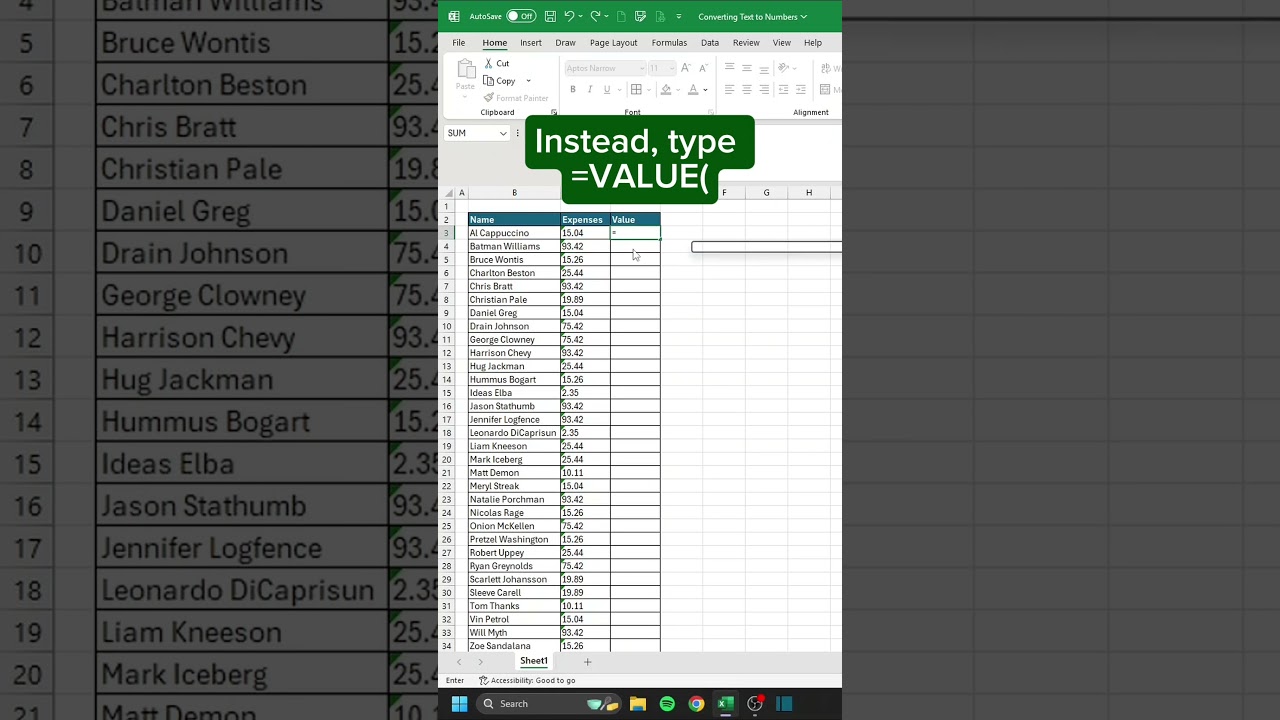
How to Convert Numbers Stored as Text to Numbers 🔢 Step 1. Type =VALUE( Step 2. Select the number stored as text and press enter. Step 3. Autofill down as ...

CheatSheets
185.3K views • May 26, 2025
About this video
How to Convert Numbers Stored as Text to Numbers 🔢
Step 1. Type =VALUE(
Step 2. Select the number stored as text and press enter.
Step 3. Autofill down as necessary (double-click the lower right corner of the formula cell.
🗂️ Don’t forget to save this post!
🎁 Get your FREE Excel Shortcuts Cheat Sheet PDF at linktr.ee/CheatSheets
🎯 Follow us on Threads, Instagram, YouTube, TikTok, and more at linktr.ee/CheatSheets
#excel #exceltips #exceltricks #spreadsheets #corporate #accounting #finance #workhacks #tutorials
Step 1. Type =VALUE(
Step 2. Select the number stored as text and press enter.
Step 3. Autofill down as necessary (double-click the lower right corner of the formula cell.
🗂️ Don’t forget to save this post!
🎁 Get your FREE Excel Shortcuts Cheat Sheet PDF at linktr.ee/CheatSheets
🎯 Follow us on Threads, Instagram, YouTube, TikTok, and more at linktr.ee/CheatSheets
#excel #exceltips #exceltricks #spreadsheets #corporate #accounting #finance #workhacks #tutorials
Video Information
Views
185.3K
Duration
0:19
Published
May 26, 2025
User Reviews
3.9
(37) Related Trending Topics
LIVE TRENDSRelated trending topics. Click any trend to explore more videos.
No specific trending topics match this video yet.
Explore All Trends