Check Hard Drive Storage on Windows 🖥️
Learn how to check your hard drive space on Windows by opening 'My PC' and right-clicking the C: drive for details.

EvilComp
146.8K views • Feb 17, 2023
About this video
steps
1-Double-click the "My PC" icon. It's the computer monitor icon likely found on your desktop.
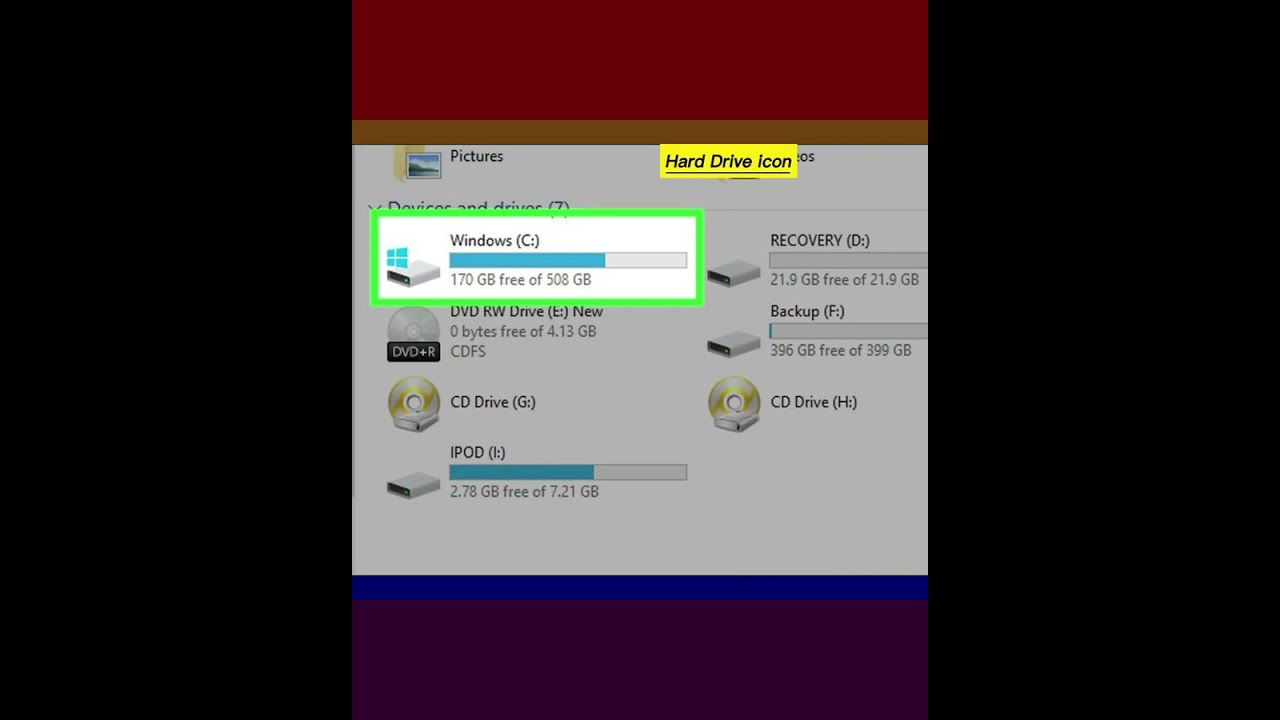
2-Right-click the C: hard drive icon. It's under the "Devices and drives" heading in the middle of the "My Computer" page.
3-Click Properties. This option is at the bottom of the right-click menu.
4-Click the General tab. You'll see this option at the top of the "Properties" window. Doing so will open the hard drive's "General" page, which lists attributes such as total storage.
5-Review your hard drive's storage. The "Used space" section displays how many gigabytes of your hard drive are taken up by your files, while the "Free space" shows you the number of gigabytes left on your hard drive.
#windows11 #windows7 #harddrive #storagespace
1-Double-click the "My PC" icon. It's the computer monitor icon likely found on your desktop.
2-Right-click the C: hard drive icon. It's under the "Devices and drives" heading in the middle of the "My Computer" page.
3-Click Properties. This option is at the bottom of the right-click menu.
4-Click the General tab. You'll see this option at the top of the "Properties" window. Doing so will open the hard drive's "General" page, which lists attributes such as total storage.
5-Review your hard drive's storage. The "Used space" section displays how many gigabytes of your hard drive are taken up by your files, while the "Free space" shows you the number of gigabytes left on your hard drive.
#windows11 #windows7 #harddrive #storagespace
Tags and Topics
Browse our collection to discover more content in these categories.
Video Information
Views
146.8K
Likes
1.6K
Duration
0:33
Published
Feb 17, 2023
User Reviews
4.5
(29) Related Trending Topics
LIVE TRENDSRelated trending topics. Click any trend to explore more videos.
No specific trending topics match this video yet.
Explore All Trends