How to Change Your cPanel Password
Learn the steps to change your password in cPanel hosting by visiting VodaHost. This guide provides essential information for managing your cPanel account securely.
Brad Costello
467 views • Apr 27, 2011
About this video
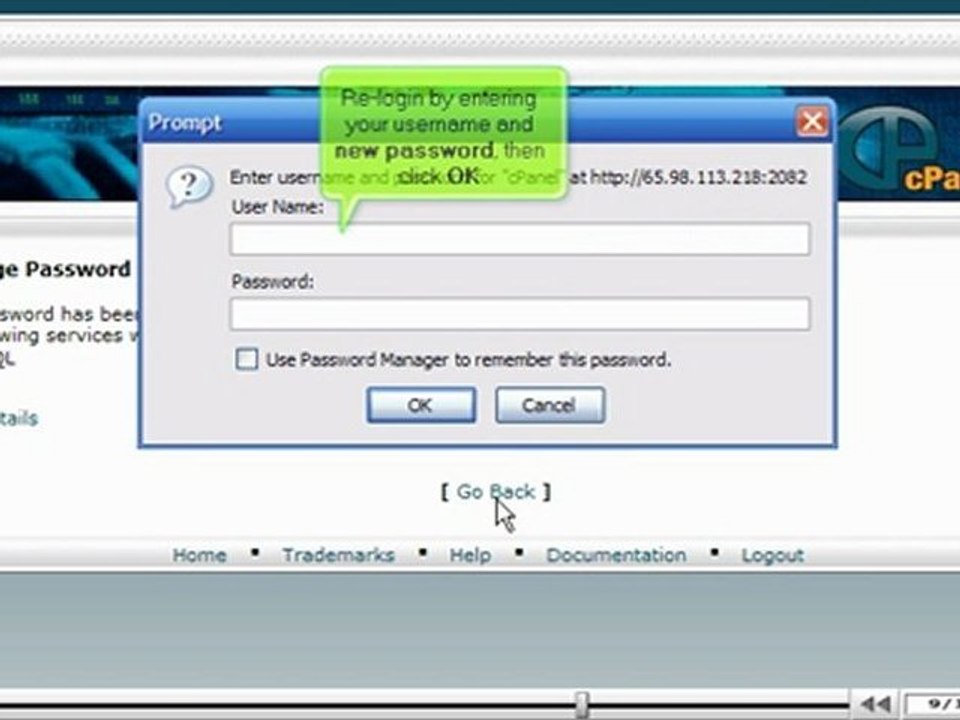
http://www.vodahost.com/web-hosting-what-is-cpanel-hosting.html<br /><br />Visit VodaHost web hosting to learn how to change your password in cPanel hosting.<br /><br />For the purpose of this video, we'll presume that you're currently in your cPanel hosting. Select the Change Password under the Preferences category. When you change the password here your cPanel, FTP, and FrontPage passwords will all be changed.<br /><br />First type your present password in the Old Password box under Change Password. Next type your new password and re-enter your new password in the available boxes. Then select Change Password. Your password has now been modified.<br /><br />Select Go Back to return to the Change Password page. An automatic Prompt will appear to login in again with your username and new password before you can work in your cPanel. <br /><br />Select the Home icon on the top left of the screen to return to the main page of the cPanel hosting screen. Through VodaHost hosting you are now aware how to change a password in cPanel hosting.
Video Information
Views
467
Duration
1:42
Published
Apr 27, 2011
Related Trending Topics
LIVE TRENDSRelated trending topics. Click any trend to explore more videos.
No specific trending topics match this video yet.
Explore All Trends