Reset Windows 11 PC to Factory Settings 🔄
Learn how to factory reset your Windows 11 PC to resolve issues and restore it to original settings easily.

Britec09
315.4K views • Jan 12, 2025
About this video
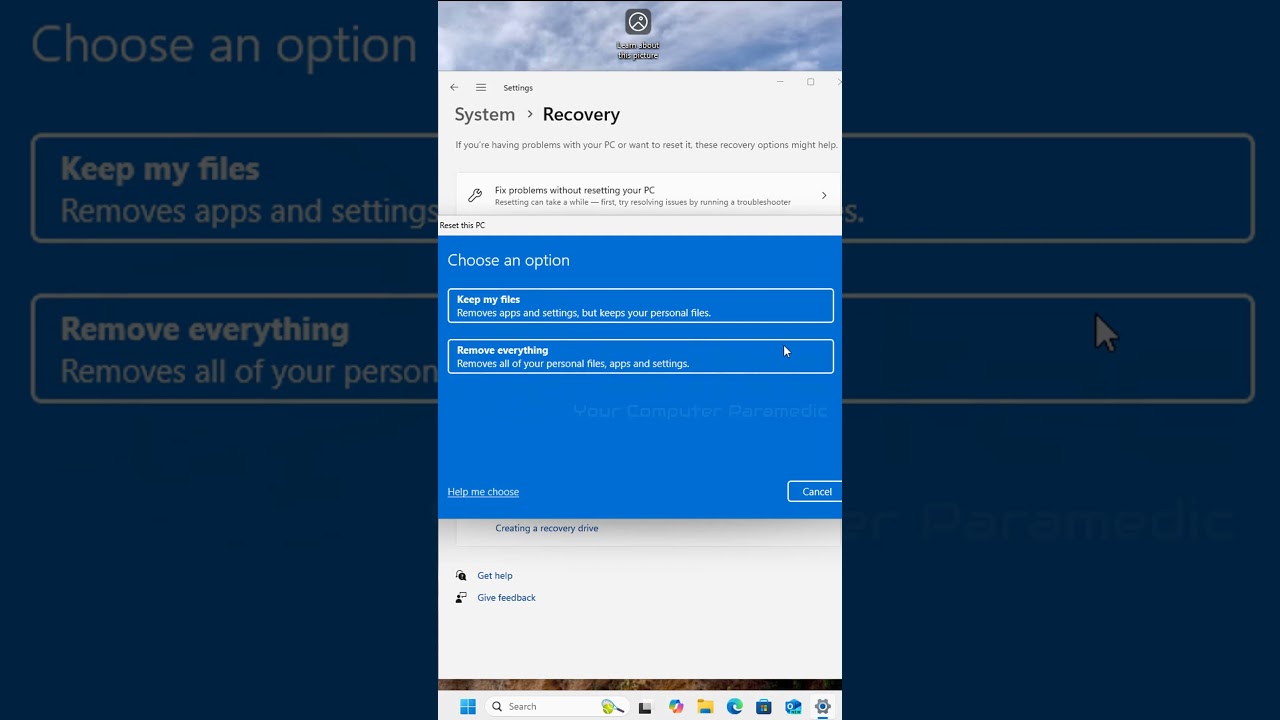
Today we take a look at how to factory RESET Windows 11 PC. if you are having problems with your computer and what to reset the pc back to factory settings, then using factory reset is the best option.
Open the Start menu and click the Settings app
Select System / Recovery
Under Reset this PC, click Reset PC
Choose your preferred option for keeping or removing files
Follow the prompts to complete the reset
Open the Start menu and click the Settings app
Select System / Recovery
Under Reset this PC, click Reset PC
Choose your preferred option for keeping or removing files
Follow the prompts to complete the reset
Video Information
Views
315.4K
Likes
4.9K
Duration
0:59
Published
Jan 12, 2025
User Reviews
4.7
(63) Related Trending Topics
LIVE TRENDSRelated trending topics. Click any trend to explore more videos.
No specific trending topics match this video yet.
Explore All Trends