ESP32 S3 Timer Switch with Touchscreen & Encoder
Create a timer switch relay using ESP32 S3, touchscreen, and encoder with SquareLine Studio and LVGL. Early access code & resources available. ⚙️
Electronic Clinic
4.8K views • Sep 21, 2025
About this video
ESP32 S3 Timer Switch Relay with Touchscreen & Encoder | SquareLine Studio and LVGL
Download Code & Resources: "Patrons' early access"
https://www.patreon.com/posts/esp32-s3-timer-1-139396749
Read the Article:
https://www.electroniclinic.com/esp32-timer-switch-relay-with-touch-display-encoder-matouch-1-28-review/
Related Videos:
ESP32-S3 GUI Setup with SquareLine Studio
https://youtu.be/qk07w-M2Fus
Create a digital and an Analog Clock UI with Custom Graphics
https://youtu.be/dJkDekZKjCU
Control Loads & Monitor Temperature
https://youtu.be/0gjDKmbgJfs
Smart bracelet for couples
https://youtu.be/uGiCRqA0f0I
Project Description:
*****
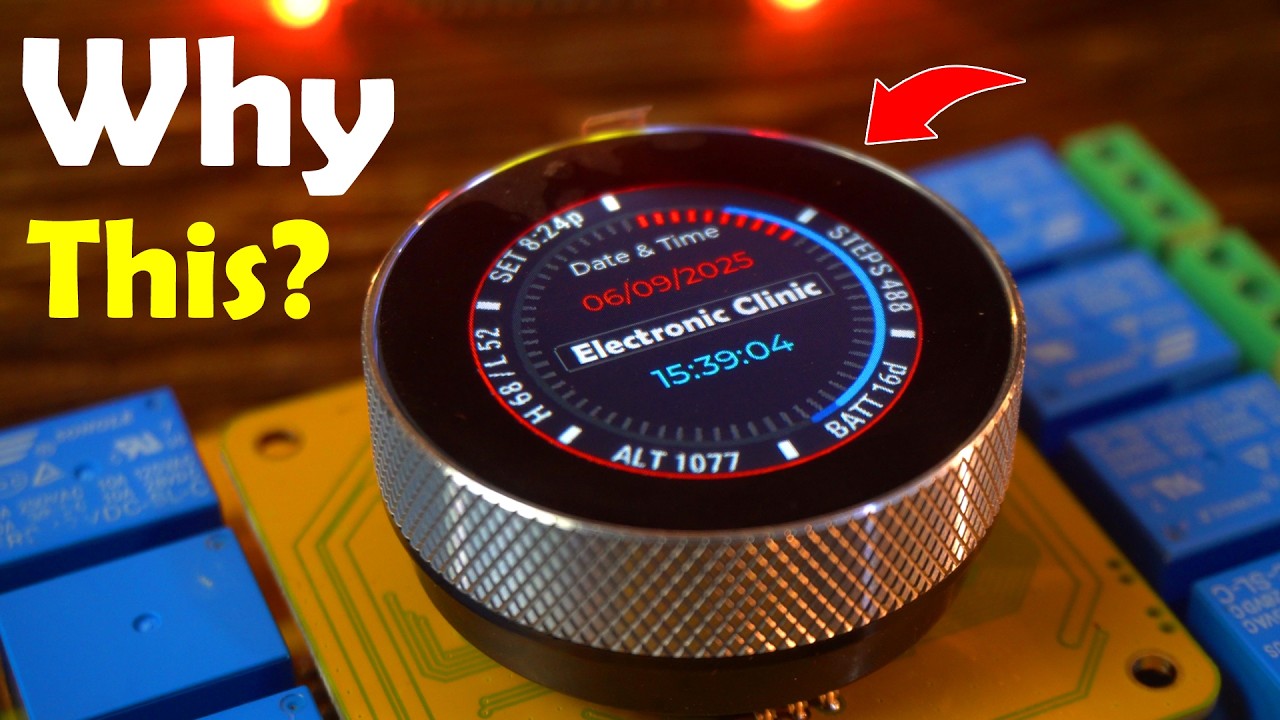
Say goodbye to traditional switchboards and step into the future of smart control with the ESP32-S3 Timer Switch Relay featuring a 1.28” Touchscreen and Rotary Encoder.
In this video, I will show you how this powerful Makerfabs MaTouch development board can control up to 8 relays, schedule automatic ON/OFF timers, and let you switch loads with just a tap or a simple twist of the encoder. Whether you’re building a home automation system, IoT project, or smart energy controller, this board makes it simple and professional.
The best part? You don’t need dozens of switches anymore; everything is managed right from the touchscreen UI. And with the encoder + pushbutton, you can adjust values, scroll menus, and control loads easily; even with gloves on.
What you will see in this video:
Hands-on demo of relay switching (manual + automatic)
Timer setup for scheduling devices (heaters, lights, appliances)
Using the encoder for fast, glove-friendly navigation
Custom UI design with SquareLine Studio + LVGL
Complete Arduino IDE setup for the ESP32-S3
Step-by-step guide to uploading your own firmware
This board is not just a relay controller; it’s a complete ESP32-S3 IoT development platform with WiFi, Bluetooth, RTC, vibration motor, USB-C, and expansion headers for sensors & modules.
If you’re into DIY home automation, Arduino projects, or ESP32 development, this video will give you endless ideas to upgrade your setup.
*****
Product Links:
*****************
Visit the Product Official Page:
https://www.makerfabs.com/matouch-1-28-toolset-timer-switch-relay.html
DISCLAIMER: This video and description contain affiliate links, which means that if you click on one of the product links, I will receive a small commission. This helps support the channel and allows me to continue to make videos like this. Thank you for your support!
****************
For more Projects and Tutorials visit my Websites
https://www.electroniclinic.com/
Follow me on Instagram:
https://www.instagram.com/electroniclinic/
Follow my Facebook Page Electronic Clinic:
https://web.facebook.com/profile.php?id=100063900156958
Follow my Facebook Group, Arduino Projects:
https://web.facebook.com/groups/190031841821771
Email:
stu_engineering@yahoo.com
#esp32s3 #timerswitch #esp32project
Download Code & Resources: "Patrons' early access"
https://www.patreon.com/posts/esp32-s3-timer-1-139396749
Read the Article:
https://www.electroniclinic.com/esp32-timer-switch-relay-with-touch-display-encoder-matouch-1-28-review/
Related Videos:
ESP32-S3 GUI Setup with SquareLine Studio
https://youtu.be/qk07w-M2Fus
Create a digital and an Analog Clock UI with Custom Graphics
https://youtu.be/dJkDekZKjCU
Control Loads & Monitor Temperature
https://youtu.be/0gjDKmbgJfs
Smart bracelet for couples
https://youtu.be/uGiCRqA0f0I
Project Description:
*****
Say goodbye to traditional switchboards and step into the future of smart control with the ESP32-S3 Timer Switch Relay featuring a 1.28” Touchscreen and Rotary Encoder.
In this video, I will show you how this powerful Makerfabs MaTouch development board can control up to 8 relays, schedule automatic ON/OFF timers, and let you switch loads with just a tap or a simple twist of the encoder. Whether you’re building a home automation system, IoT project, or smart energy controller, this board makes it simple and professional.
The best part? You don’t need dozens of switches anymore; everything is managed right from the touchscreen UI. And with the encoder + pushbutton, you can adjust values, scroll menus, and control loads easily; even with gloves on.
What you will see in this video:
Hands-on demo of relay switching (manual + automatic)
Timer setup for scheduling devices (heaters, lights, appliances)
Using the encoder for fast, glove-friendly navigation
Custom UI design with SquareLine Studio + LVGL
Complete Arduino IDE setup for the ESP32-S3
Step-by-step guide to uploading your own firmware
This board is not just a relay controller; it’s a complete ESP32-S3 IoT development platform with WiFi, Bluetooth, RTC, vibration motor, USB-C, and expansion headers for sensors & modules.
If you’re into DIY home automation, Arduino projects, or ESP32 development, this video will give you endless ideas to upgrade your setup.
*****
Product Links:
*****************
Visit the Product Official Page:
https://www.makerfabs.com/matouch-1-28-toolset-timer-switch-relay.html
DISCLAIMER: This video and description contain affiliate links, which means that if you click on one of the product links, I will receive a small commission. This helps support the channel and allows me to continue to make videos like this. Thank you for your support!
****************
For more Projects and Tutorials visit my Websites
https://www.electroniclinic.com/
Follow me on Instagram:
https://www.instagram.com/electroniclinic/
Follow my Facebook Page Electronic Clinic:
https://web.facebook.com/profile.php?id=100063900156958
Follow my Facebook Group, Arduino Projects:
https://web.facebook.com/groups/190031841821771
Email:
stu_engineering@yahoo.com
#esp32s3 #timerswitch #esp32project
Tags and Topics
Browse our collection to discover more content in these categories.
Video Information
Views
4.8K
Likes
127
Duration
13:24
Published
Sep 21, 2025
User Reviews
4.6
(4) Related Trending Topics
LIVE TRENDSRelated trending topics. Click any trend to explore more videos.
No specific trending topics match this video yet.
Explore All Trends