Easily Export WhatsApp Chat History on Android 📱
Learn simple steps to back up your WhatsApp conversations, whether individual or group chats, directly from your Android device. Keep your memories safe and accessible!

DataEssence
214.1K views • Nov 9, 2020
About this video
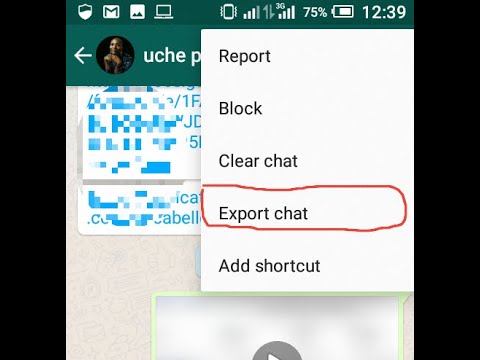
In this tutorial, we are going to learn how to export a copy of our WhatsApp chat history from an individual or group chat.
Step1: Open the individual or group chat
Step2: Tap More options ⁝
Step3: Click More
Step4: Export chat
Step5: Choose whether to Export with media or Without media
Step6: Choose where to send the chat to so as to access chat history
Medium post: https://alaguvauchenna.medium.com/how-to-export-whatsapp-chat-history-for-android-aa94245d24ab
Step1: Open the individual or group chat
Step2: Tap More options ⁝
Step3: Click More
Step4: Export chat
Step5: Choose whether to Export with media or Without media
Step6: Choose where to send the chat to so as to access chat history
Medium post: https://alaguvauchenna.medium.com/how-to-export-whatsapp-chat-history-for-android-aa94245d24ab
Video Information
Views
214.1K
Likes
486
Duration
0:14
Published
Nov 9, 2020
User Reviews
4.0
(42) Related Trending Topics
LIVE TRENDSRelated trending topics. Click any trend to explore more videos.
No specific trending topics match this video yet.
Explore All Trends