Easily Decrypt Your Hard Drive & Turn Off BitLocker Using PowerShell 🔓
Learn simple step-by-step commands to decrypt your hard drive and disable BitLocker security with Windows PowerShell. Protect your data or regain access effortlessly!
Technical Shakeel
1.5K views • Jan 22, 2021
About this video
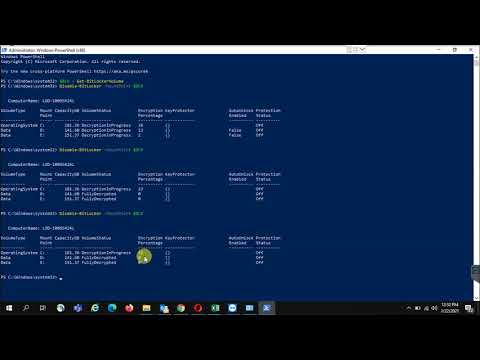
How to Decrypt Hard Disk Drives | Turn off Bit locker with Windows PowerShell Command
Command 1:
$BLV = Get-BitLockerVolume
Command 2:
Disable-BitLocker -MountPoint $BLV
Hi viewers, "Technical Shakeel" YouTube channel is a technical informative channel where you can find different computer & IT related issues and their solutions of daily routine work.
Subscribe Channel and stay updated.
Thank You
Command 1:
$BLV = Get-BitLockerVolume
Command 2:
Disable-BitLocker -MountPoint $BLV
Hi viewers, "Technical Shakeel" YouTube channel is a technical informative channel where you can find different computer & IT related issues and their solutions of daily routine work.
Subscribe Channel and stay updated.
Thank You
Tags and Topics
Browse our collection to discover more content in these categories.
Video Information
Views
1.5K
Likes
5
Duration
10:22
Published
Jan 22, 2021
User Reviews
3.9
(1) Related Trending Topics
LIVE TRENDSRelated trending topics. Click any trend to explore more videos.
No specific trending topics match this video yet.
Explore All Trends