Customize Your Android Home Screen with Nova Launcher
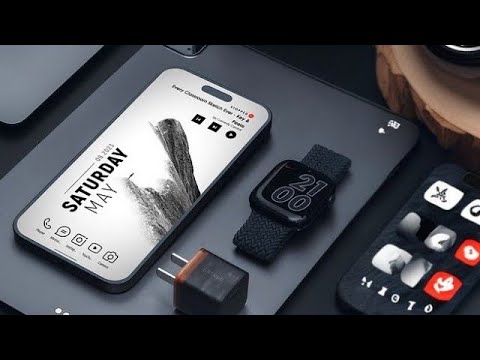
Learn how to create a sleek black-and-white home screen with Nova Launcher in this step-by-step tutorial. 🎨

Nova Launcher Setups
60.7K views • Feb 11, 2025
About this video
Welcome back to Nova Launcher Setup! In this video, I’ll show you how to create a stunning, minimalist black-and-white home screen setup using Nova Launcher. This step-by-step tutorial covers everything from applying the perfect wallpaper to customizing the Vanilla KWGT widget and using the sleek Black Line icon pack. Whether you’re new to Nova Launcher or a customization pro, this setup is perfect for anyone looking to refresh their Android home screen.
What You’ll Learn:
✅ How to apply a clean, abstract wallpaper for a minimalist look.
✅ How to install and use the Black Line icon pack for sharp, uniform icons.
✅ How to add and customize the Vanilla KWGT widget to display time, date, weather, and more.
✅ Tips for adjusting Nova Launcher settings, including grid size and gesture controls.
✅ Bonus: How to add finishing touches to make your home screen both beautiful and functional.
---
### **Download Links:**
🔗 Wallpaper: https://t.me/novalauncher_setups (pin-32)
🔗 Black Line Icon Pack: play store
🔗 Vanilla KWGT Widget: search on Google
& Minimal kwgt widget
🔗 Nova Launcher Prime: play store
🔗 KWGT Pro Key: Playplay store
---
Timestamps:
0:00 - Intro
0:24 - finish Setup
0:44 - Apply the Wallpaper
1:00 - Install & Apply Black Line Icon Pack
1:23 - Add & Customize Vanilla KWGT Widget
1:46 - Adjust Nova Launcher Settings
---
Follow Me for More:
📸 Instagram: @novalaumcher_setup
🐦 Twitter: @novalaunchers
---
Let’s Connect!
If you enjoyed this video, don’t forget to:
👍 Give it a thumbs up
💬 Leave a comment (What’s your favorite part of this setup?)
🔔 Subscribe and hit the bell icon for more Android customization tutorials!
---
Tags:
#NovaLauncher #AndroidCustomization #MinimalistSetup #KWGTWidget #BlackLineIcons #HomeScreenSetup #AndroidTips #NovaLauncher2025
What You’ll Learn:
✅ How to apply a clean, abstract wallpaper for a minimalist look.
✅ How to install and use the Black Line icon pack for sharp, uniform icons.
✅ How to add and customize the Vanilla KWGT widget to display time, date, weather, and more.
✅ Tips for adjusting Nova Launcher settings, including grid size and gesture controls.
✅ Bonus: How to add finishing touches to make your home screen both beautiful and functional.
---
### **Download Links:**
🔗 Wallpaper: https://t.me/novalauncher_setups (pin-32)
🔗 Black Line Icon Pack: play store
🔗 Vanilla KWGT Widget: search on Google
& Minimal kwgt widget
🔗 Nova Launcher Prime: play store
🔗 KWGT Pro Key: Playplay store
---
Timestamps:
0:00 - Intro
0:24 - finish Setup
0:44 - Apply the Wallpaper
1:00 - Install & Apply Black Line Icon Pack
1:23 - Add & Customize Vanilla KWGT Widget
1:46 - Adjust Nova Launcher Settings
---
Follow Me for More:
📸 Instagram: @novalaumcher_setup
🐦 Twitter: @novalaunchers
---
Let’s Connect!
If you enjoyed this video, don’t forget to:
👍 Give it a thumbs up
💬 Leave a comment (What’s your favorite part of this setup?)
🔔 Subscribe and hit the bell icon for more Android customization tutorials!
---
Tags:
#NovaLauncher #AndroidCustomization #MinimalistSetup #KWGTWidget #BlackLineIcons #HomeScreenSetup #AndroidTips #NovaLauncher2025
Video Information
Views
60.7K
Likes
596
Duration
2:27
Published
Feb 11, 2025
User Reviews
4.4
(12) Related Trending Topics
LIVE TRENDSRelated trending topics. Click any trend to explore more videos.
No specific trending topics match this video yet.
Explore All Trends