Set Up IPsec VPN Tunnel in Packet Tracer 🔒
Learn to create an IPsec VPN tunnel on Cisco routers using IOS CLI for CCNA Security in Packet Tracer.
danscourses
368.7K views • Feb 22, 2018
About this video
http://danscourses.com - Learn how to create an IPsec VPN tunnel on Cisco routers using the Cisco IOS CLI. CCNA security topic.
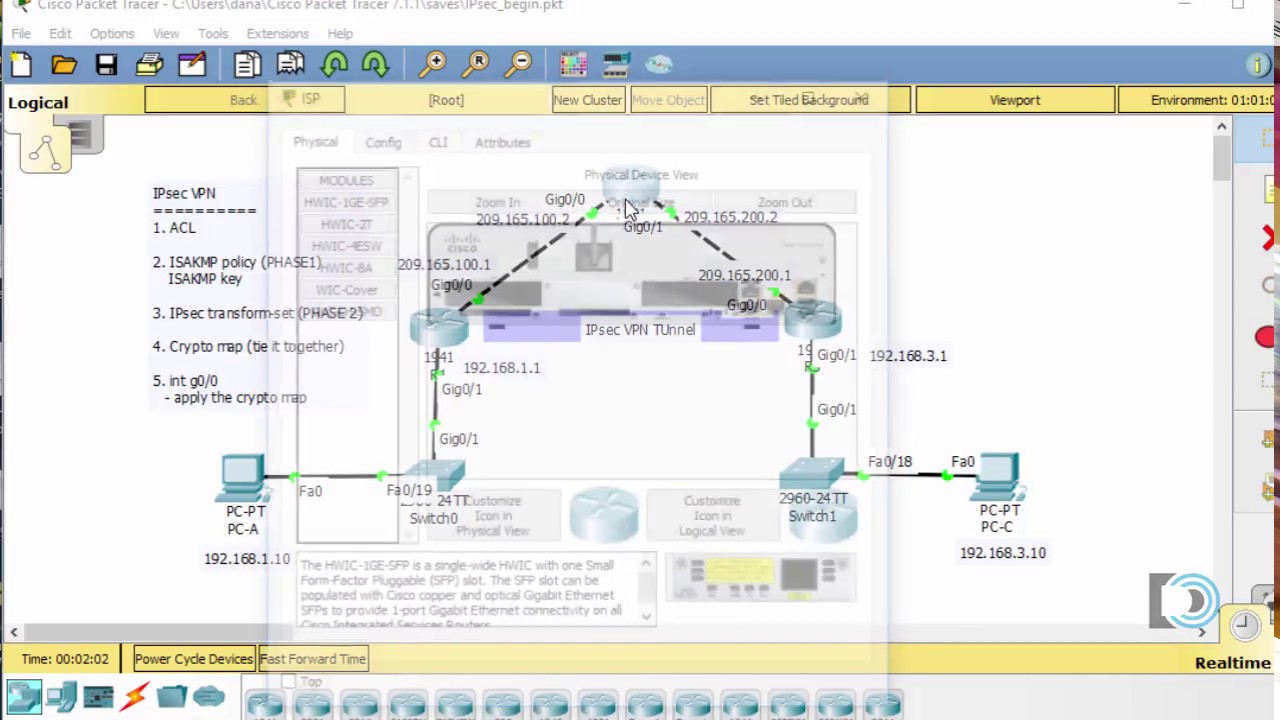
1. Starting configurations for R1, ISP, and R3. Paste to global config mode :
hostname R1
interface g0/1
ip address 192.168.1.1 255.255.255.0
no shut
interface g0/0
ip address 209.165.100.1 255.255.255.0
no shut
exit
ip route 0.0.0.0 0.0.0.0 209.165.100.2
hostname ISP
interface g0/1
ip address 209.165.200.2 255.255.255.0
no shut
interface g0/0
ip address 209.165.100.2 255.255.255.0
no shut
exit
hostname R3
interface g0/1
ip address 192.168.3.1 255.255.255.0
no shut
interface g0/0
ip address 209.165.200.1 255.255.255.0
no shut
exit
ip route 0.0.0.0 0.0.0.0 209.165.200.2
2. Make sure routers have the security license enabled:
license boot module c1900 technology-package securityk9
3. Configure IPsec on the routers at each end of the tunnel (R1 and R3)
!R1
crypto isakmp policy 10
encryption aes 256
authentication pre-share
group 5
!
crypto isakmp key secretkey address 209.165.200.1
!
crypto ipsec transform-set R1-R3 esp-aes 256 esp-sha-hmac
!
crypto map IPSEC-MAP 10 ipsec-isakmp
set peer 209.165.200.1
set pfs group5
set security-association lifetime seconds 86400
set transform-set R1-R3
match address 100
!
interface GigabitEthernet0/0
crypto map IPSEC-MAP
!
access-list 100 permit ip 192.168.1.0 0.0.0.255 192.168.3.0 0.0.0.255
!R3
crypto isakmp policy 10
encryption aes 256
authentication pre-share
group 5
!
crypto isakmp key secretkey address 209.165.100.1
!
crypto ipsec transform-set R3-R1 esp-aes 256 esp-sha-hmac
!
crypto map IPSEC-MAP 10 ipsec-isakmp
set peer 209.165.100.1
set pfs group5
set security-association lifetime seconds 86400
set transform-set R3-R1
match address 100
!
interface GigabitEthernet0/0
crypto map IPSEC-MAP
!
access-list 100 permit ip 192.168.3.0 0.0.0.255 192.168.1.0 0.0.0.255
1. Starting configurations for R1, ISP, and R3. Paste to global config mode :
hostname R1
interface g0/1
ip address 192.168.1.1 255.255.255.0
no shut
interface g0/0
ip address 209.165.100.1 255.255.255.0
no shut
exit
ip route 0.0.0.0 0.0.0.0 209.165.100.2
hostname ISP
interface g0/1
ip address 209.165.200.2 255.255.255.0
no shut
interface g0/0
ip address 209.165.100.2 255.255.255.0
no shut
exit
hostname R3
interface g0/1
ip address 192.168.3.1 255.255.255.0
no shut
interface g0/0
ip address 209.165.200.1 255.255.255.0
no shut
exit
ip route 0.0.0.0 0.0.0.0 209.165.200.2
2. Make sure routers have the security license enabled:
license boot module c1900 technology-package securityk9
3. Configure IPsec on the routers at each end of the tunnel (R1 and R3)
!R1
crypto isakmp policy 10
encryption aes 256
authentication pre-share
group 5
!
crypto isakmp key secretkey address 209.165.200.1
!
crypto ipsec transform-set R1-R3 esp-aes 256 esp-sha-hmac
!
crypto map IPSEC-MAP 10 ipsec-isakmp
set peer 209.165.200.1
set pfs group5
set security-association lifetime seconds 86400
set transform-set R1-R3
match address 100
!
interface GigabitEthernet0/0
crypto map IPSEC-MAP
!
access-list 100 permit ip 192.168.1.0 0.0.0.255 192.168.3.0 0.0.0.255
!R3
crypto isakmp policy 10
encryption aes 256
authentication pre-share
group 5
!
crypto isakmp key secretkey address 209.165.100.1
!
crypto ipsec transform-set R3-R1 esp-aes 256 esp-sha-hmac
!
crypto map IPSEC-MAP 10 ipsec-isakmp
set peer 209.165.100.1
set pfs group5
set security-association lifetime seconds 86400
set transform-set R3-R1
match address 100
!
interface GigabitEthernet0/0
crypto map IPSEC-MAP
!
access-list 100 permit ip 192.168.3.0 0.0.0.255 192.168.1.0 0.0.0.255
Tags and Topics
Browse our collection to discover more content in these categories.
Video Information
Views
368.7K
Likes
4.6K
Duration
18:28
Published
Feb 22, 2018
User Reviews
4.6
(73) Related Trending Topics
LIVE TRENDSRelated trending topics. Click any trend to explore more videos.
No specific trending topics match this video yet.
Explore All Trends