Create a Personal RAG Assistant with Streamlit & Ollama 🔥
Learn to build a local AI assistant that chats with your private documents using Streamlit, Ollama, and Langchain. Practical LLM application!

MLWorks
414 views • Jan 4, 2026
About this video
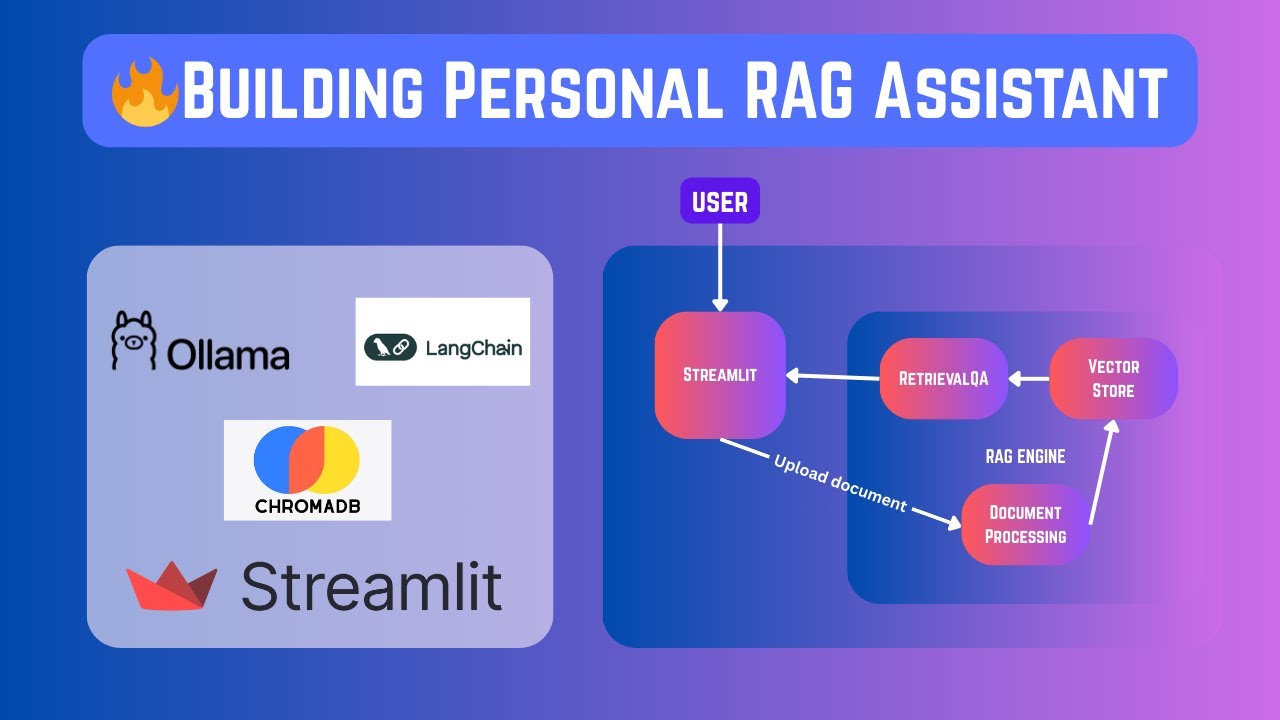
Building a local AI assistant that can chat with your private documents is one of the most practical ways to use Large Language Models today. This video walks you through the entire process of building a Personal RAG (Retrieval-Augmented Generation) Assistant from scratch using the most popular open-source tools in the ecosystem.
In this tutorial, we dive deep into the "why" and "how" of local AI, comparing Streamlit with other UI frameworks and showing you how to orchestrate the entire pipeline with LangChain and Ollama.
🚀 What You’ll Learn
- Local LLMs with Ollama: How to run powerful models like Llama 3 or Mistral locally on your machine.
- The RAG Pipeline: Understanding Document Loading, Chunking, Embeddings, and Vector Storage.
- Orchestration with LangChain: Connecting your local model to your data for context-aware responses.
- UI Framework Showdown: Exploring Streamlit
- Privacy First: Building a system that works 100% offline with no API keys or data leaving your computer.
Github Link: https://github.com/Mayurji/Exploring-UI-Frameworks/tree/main/streamlit-apps/personal_rag_assistant
🛠️ Tech Stack
Frontend: Streamlit
Orchestration: LangChain
Local LLM Engine: Ollama
Vector Database: ChromaDB (or FAISS)
Language: Python 3.10+
📂 Resources & Code
GitHub Repository: [Link to your Repo]
Ollama Download: https://ollama.com/
LangChain Documentation: https://python.langchain.com/
Streamlit Docs: https://docs.streamlit.io/
🕒 Timestamps
0:00 - Introduction to UI Frameworks
1:00 - Quick start with Streamlit
2:00 - Introduction to Personal RAG Assistant
3:45 - Set up Details - Configs, Packages, and Ollama Models
6:00 - Building RAG Engine
10:00 - Building Streamlit UI
16:45 - Testing the Assistant with PDFs
💡 Prerequisites
Python installed on your system.
Ollama installed and running.
Basic knowledge of Python and Virtual Environments.
If you found this helpful, please give it a 👍 and Subscribe for more local AI tutorials!
#LocalAI #RAG #Ollama #LangChain #Streamlit #Python #GenerativeAI #AIAssistant
In this tutorial, we dive deep into the "why" and "how" of local AI, comparing Streamlit with other UI frameworks and showing you how to orchestrate the entire pipeline with LangChain and Ollama.
🚀 What You’ll Learn
- Local LLMs with Ollama: How to run powerful models like Llama 3 or Mistral locally on your machine.
- The RAG Pipeline: Understanding Document Loading, Chunking, Embeddings, and Vector Storage.
- Orchestration with LangChain: Connecting your local model to your data for context-aware responses.
- UI Framework Showdown: Exploring Streamlit
- Privacy First: Building a system that works 100% offline with no API keys or data leaving your computer.
Github Link: https://github.com/Mayurji/Exploring-UI-Frameworks/tree/main/streamlit-apps/personal_rag_assistant
🛠️ Tech Stack
Frontend: Streamlit
Orchestration: LangChain
Local LLM Engine: Ollama
Vector Database: ChromaDB (or FAISS)
Language: Python 3.10+
📂 Resources & Code
GitHub Repository: [Link to your Repo]
Ollama Download: https://ollama.com/
LangChain Documentation: https://python.langchain.com/
Streamlit Docs: https://docs.streamlit.io/
🕒 Timestamps
0:00 - Introduction to UI Frameworks
1:00 - Quick start with Streamlit
2:00 - Introduction to Personal RAG Assistant
3:45 - Set up Details - Configs, Packages, and Ollama Models
6:00 - Building RAG Engine
10:00 - Building Streamlit UI
16:45 - Testing the Assistant with PDFs
💡 Prerequisites
Python installed on your system.
Ollama installed and running.
Basic knowledge of Python and Virtual Environments.
If you found this helpful, please give it a 👍 and Subscribe for more local AI tutorials!
#LocalAI #RAG #Ollama #LangChain #Streamlit #Python #GenerativeAI #AIAssistant
Tags and Topics
Browse our collection to discover more content in these categories.
Video Information
Views
414
Duration
22:02
Published
Jan 4, 2026
Related Trending Topics
LIVE TRENDSRelated trending topics. Click any trend to explore more videos.
No specific trending topics match this video yet.
Explore All Trends