AI Agents and Power BI Integration 🤖📊
Discover how to connect AI agents with Power BI for smarter dashboards in CodeVisium’s Lightning-Fast Automations! ⚡

CodeVisium
2.7K views • Oct 10, 2025
About this video
Welcome to CodeVisium’s “Lightning-Fast Automations”, where data meets intelligence! ⚡
In this video, we’ll explore how to integrate AI agents with Power BI to create chat-based, conversational dashboards — where your data answers your questions in real time.
This is one of the most trending automations in the data world right now — combining the power of AI Agents (like LangChain, OpenAI GPT, or LlamaIndex) with Microsoft Power BI for dynamic, interactive business insights.
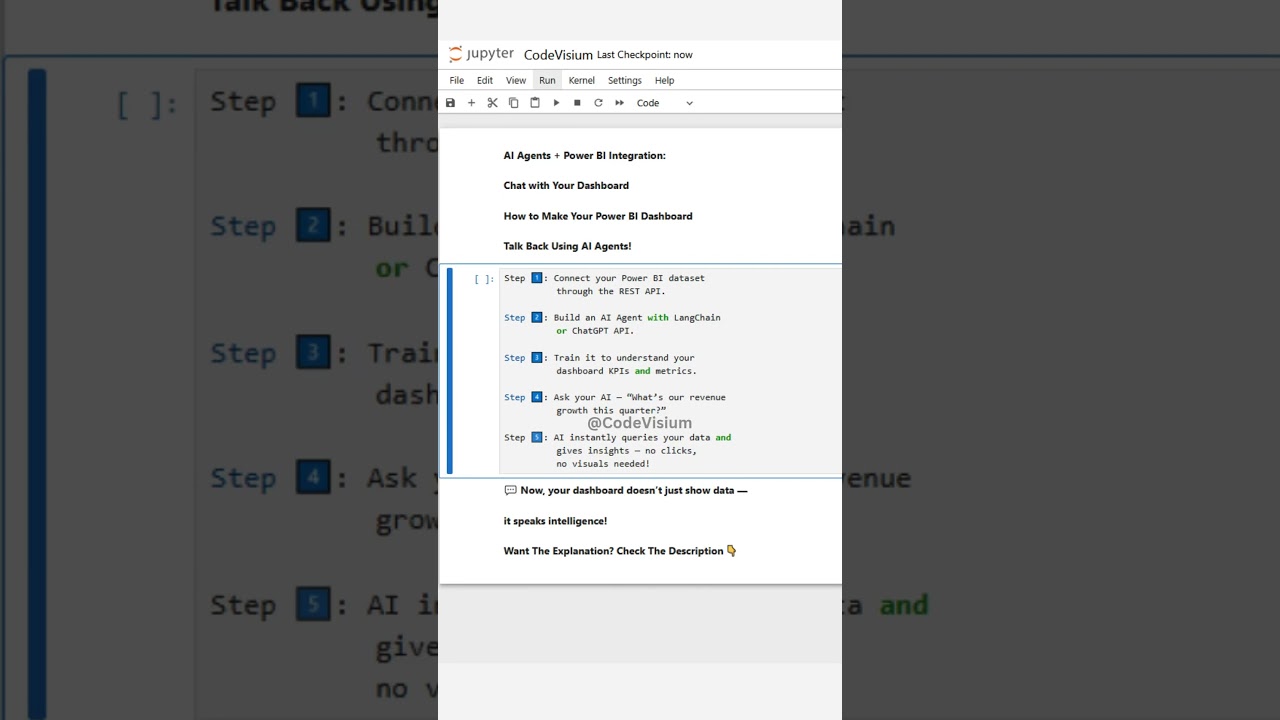
🚀 Step-by-Step Breakdown:
🔹 Step 1: Connect Power BI Dataset
Start by generating your Power BI REST API token or using Azure Active Directory Authentication.
This token lets your AI agent securely fetch data from Power BI dashboards, reports, or datasets.
Example:
import requests
url = "https://api.powerbi.com/v1.0/myorg/datasets"
headers = {"Authorization": "Bearer YOUR_TOKEN"}
response = requests.get(url, headers=headers)
This gives your AI programmatic access to live analytics.
🔹 Step 2: Build an AI Agent
Now use LangChain, ChatGPT API, or LlamaIndex to create an intelligent agent.
This agent can process your natural language queries like:
“Show me top-performing regions by profit in Q2.”
You define tools (functions) in LangChain that query Power BI using the REST API — allowing the AI to retrieve metrics dynamically.
🔹 Step 3: Teach Your Agent the KPIs
Train your agent with the schema or metadata of your Power BI dataset.
It should know what each table and column represents — for example:
“Revenue” = Total_Sales_Amount
“Profit Margin” = Profit / Revenue * 100
“Customer Growth” = (New_Customers / Total_Customers)
This contextual understanding lets the AI respond intelligently and precisely.
🔹 Step 4: Interact with Your Dashboard
Now you can ask AI questions in plain English:
“What’s our customer growth this month?”
“Which product category gave us the highest profit margin last year?”
AI fetches results using Power BI’s API and returns a clear, text-based summary — even plotting visual charts using Matplotlib or Plotly if you want!
No need to open the dashboard — your AI assistant acts as a personal data analyst.
🔹 Step 5: Automate Everything
Combine this setup with Power Automate or Zapier.
You can trigger reports via email, Slack, or Teams automatically when metrics cross thresholds — e.g.,
“Alert me if sales drop by more than 10%.”
Your AI agent monitors KPIs, detects anomalies, and sends instant alerts with recommendations — a complete autonomous analytics ecosystem.
💡 Why It’s Game-Changing:
This automation bridges the gap between data dashboards and natural language AI.
Instead of manually exploring charts, teams can converse with their dashboards.
It saves time, simplifies analysis, and empowers decision-makers with on-demand insights.
From C-suite executives to data scientists, this approach transforms how we use BI tools:
No more searching through visuals
No need for technical SQL skills
Just ask your AI and get actionable insights instantly
🧠 Bonus Tip:
Integrate ChatGPT 4 or GPT-4o with Power BI using the LangChain “API Wrapper” — and embed it directly into your Power BI dashboard using an HTML viewer visual.
Now, you can chat with your dashboard inside Power BI itself! 🤯
🔧 Tools & Technologies to Explore:
Power BI REST API
LangChain
ChatGPT API (OpenAI)
Azure OpenAI Service
Power Automate
Zapier
Python Requests & Flask API
Streamlit / Gradio UI for chat interface
🎯 Use Cases:
Real-time business Q&A
Automated data reporting
Slack or Teams insights bots
Self-service analytics for non-technical teams
AI-powered executive dashboards
⚡ Join CodeVisium
Follow @CodeVisium for more AI-powered automation shorts — from data pipelines and MLOps to dashboard intelligence and agent-based automations.
We’re turning everyday workflows into Lightning-Fast Automations! ⚙️💡
In this video, we’ll explore how to integrate AI agents with Power BI to create chat-based, conversational dashboards — where your data answers your questions in real time.
This is one of the most trending automations in the data world right now — combining the power of AI Agents (like LangChain, OpenAI GPT, or LlamaIndex) with Microsoft Power BI for dynamic, interactive business insights.
🚀 Step-by-Step Breakdown:
🔹 Step 1: Connect Power BI Dataset
Start by generating your Power BI REST API token or using Azure Active Directory Authentication.
This token lets your AI agent securely fetch data from Power BI dashboards, reports, or datasets.
Example:
import requests
url = "https://api.powerbi.com/v1.0/myorg/datasets"
headers = {"Authorization": "Bearer YOUR_TOKEN"}
response = requests.get(url, headers=headers)
This gives your AI programmatic access to live analytics.
🔹 Step 2: Build an AI Agent
Now use LangChain, ChatGPT API, or LlamaIndex to create an intelligent agent.
This agent can process your natural language queries like:
“Show me top-performing regions by profit in Q2.”
You define tools (functions) in LangChain that query Power BI using the REST API — allowing the AI to retrieve metrics dynamically.
🔹 Step 3: Teach Your Agent the KPIs
Train your agent with the schema or metadata of your Power BI dataset.
It should know what each table and column represents — for example:
“Revenue” = Total_Sales_Amount
“Profit Margin” = Profit / Revenue * 100
“Customer Growth” = (New_Customers / Total_Customers)
This contextual understanding lets the AI respond intelligently and precisely.
🔹 Step 4: Interact with Your Dashboard
Now you can ask AI questions in plain English:
“What’s our customer growth this month?”
“Which product category gave us the highest profit margin last year?”
AI fetches results using Power BI’s API and returns a clear, text-based summary — even plotting visual charts using Matplotlib or Plotly if you want!
No need to open the dashboard — your AI assistant acts as a personal data analyst.
🔹 Step 5: Automate Everything
Combine this setup with Power Automate or Zapier.
You can trigger reports via email, Slack, or Teams automatically when metrics cross thresholds — e.g.,
“Alert me if sales drop by more than 10%.”
Your AI agent monitors KPIs, detects anomalies, and sends instant alerts with recommendations — a complete autonomous analytics ecosystem.
💡 Why It’s Game-Changing:
This automation bridges the gap between data dashboards and natural language AI.
Instead of manually exploring charts, teams can converse with their dashboards.
It saves time, simplifies analysis, and empowers decision-makers with on-demand insights.
From C-suite executives to data scientists, this approach transforms how we use BI tools:
No more searching through visuals
No need for technical SQL skills
Just ask your AI and get actionable insights instantly
🧠 Bonus Tip:
Integrate ChatGPT 4 or GPT-4o with Power BI using the LangChain “API Wrapper” — and embed it directly into your Power BI dashboard using an HTML viewer visual.
Now, you can chat with your dashboard inside Power BI itself! 🤯
🔧 Tools & Technologies to Explore:
Power BI REST API
LangChain
ChatGPT API (OpenAI)
Azure OpenAI Service
Power Automate
Zapier
Python Requests & Flask API
Streamlit / Gradio UI for chat interface
🎯 Use Cases:
Real-time business Q&A
Automated data reporting
Slack or Teams insights bots
Self-service analytics for non-technical teams
AI-powered executive dashboards
⚡ Join CodeVisium
Follow @CodeVisium for more AI-powered automation shorts — from data pipelines and MLOps to dashboard intelligence and agent-based automations.
We’re turning everyday workflows into Lightning-Fast Automations! ⚙️💡
Tags and Topics
Browse our collection to discover more content in these categories.
Video Information
Views
2.7K
Likes
29
Duration
0:10
Published
Oct 10, 2025
User Reviews
4.3
(2) Related Trending Topics
LIVE TRENDSRelated trending topics. Click any trend to explore more videos.
Trending Now