7 Audacity Input Levels Setup 🎚️
Learn how to set input levels in Audacity with this comprehensive video guide, including tutorials and resources at andrewmercer.ca.
Andrew Mercer
16.5K views • May 21, 2020
About this video
Find the full Video Guide to Audacity with all the tutorials, projects and teacher resources at http://www.andrewmercer.ca
Lesson 7
7. How to Adjust Input Levels in Audacity
Resource Type:
Tutorial Video
Duration:
3 minutes
Outcomes:
Learners are expected to:
SO 3.5. adjust the input levels in Audacity
Evaluation:
Learners can be evaluated through the completion of the following activities:
My First Recording
Make Your Voice Sound Like a Chipmunk
Multitrack Recording in Audacity
Interview a Superhero
Radio Play
Procedure:
The quality of your recording depends on many things and the input level is one of the most important. If your input level is too high your recording will ‘clip’ and cause distortion. If your input level is too low then background noise will be heard.
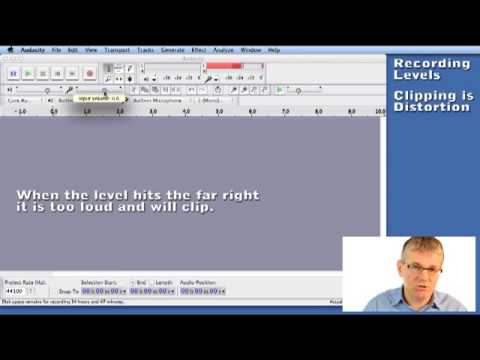
Audacity provides an input level meter to help you set your levels. To turn on the input level meter you need to click on it. If your microphone is configured properly you will begin to see the input level meter indicate your input level. You can adjust the input level by moving the Input Volume slider to the left (down) or right (up). By watching your meter and speaking or playing into your microphone your meter will show your level. Make adjustments to the Input Volume slider until your signal never goes above 2/3 of the way up the meter.
Now that your level is set you can do a test recording to see how it looks in the track waveform. You need to try and get a thick waveform that does not touch the top or bottom limits of the track.
Lesson 7
7. How to Adjust Input Levels in Audacity
Resource Type:
Tutorial Video
Duration:
3 minutes
Outcomes:
Learners are expected to:
SO 3.5. adjust the input levels in Audacity
Evaluation:
Learners can be evaluated through the completion of the following activities:
My First Recording
Make Your Voice Sound Like a Chipmunk
Multitrack Recording in Audacity
Interview a Superhero
Radio Play
Procedure:
The quality of your recording depends on many things and the input level is one of the most important. If your input level is too high your recording will ‘clip’ and cause distortion. If your input level is too low then background noise will be heard.
Audacity provides an input level meter to help you set your levels. To turn on the input level meter you need to click on it. If your microphone is configured properly you will begin to see the input level meter indicate your input level. You can adjust the input level by moving the Input Volume slider to the left (down) or right (up). By watching your meter and speaking or playing into your microphone your meter will show your level. Make adjustments to the Input Volume slider until your signal never goes above 2/3 of the way up the meter.
Now that your level is set you can do a test recording to see how it looks in the track waveform. You need to try and get a thick waveform that does not touch the top or bottom limits of the track.
Video Information
Views
16.5K
Likes
75
Duration
2:32
Published
May 21, 2020
User Reviews
4.0
(3) Related Trending Topics
LIVE TRENDSRelated trending topics. Click any trend to explore more videos.
No specific trending topics match this video yet.
Explore All Trends