3.1.11 - Hide File With OpenStego
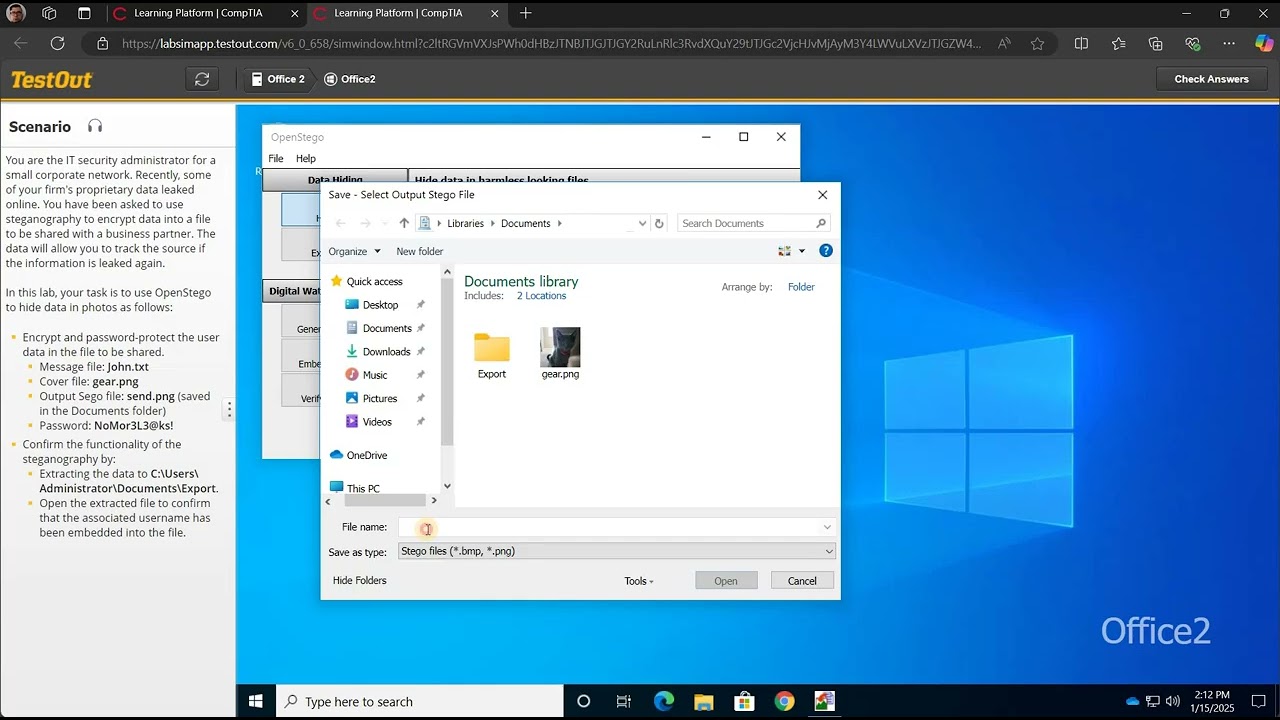
**Mission: Encrypt the Data and Save the World... or At Least Your Files** 1. **Encrypt the user data like you're hiding state secrets.** Open your tru...

Beaird IT
10.7K views • Jan 15, 2025
About this video
**Mission: Encrypt the Data and Save the World... or At Least Your Files**
1. **Encrypt the user data like you're hiding state secrets.**
Open your trusty search bar (no, not for the meaning of life, just OpenStego) and type in **OpenStego**. It’s the first match, like that one friend who always shows up early to the party. Select it.
2. **Choose your files wisely.**
Select the **Message**, **Cover**, and **Output Stego** files, because you’re going to need them for this top-secret operation.
- For the **Message File**, select the ellipses [...] (those little three dots are like your secret decoder ring).
- Double-click **John.txt** (because who wouldn’t want to read a thrilling file about John?).
3. **For the Cover File**, click those mysterious ellipses again, and double-click **gear.png** (because what's more undercover than a gear?).
4. **Output Stego File**: Enter **send.png** like you’re sending a message in a bottle to a pirate. Then hit **Open**.
5. **Time to password-protect it, because even your computer needs a secret handshake.**
In the **Password** field, enter **NoMor3L3@ks!** (because security is no joke, and that’s a very serious password). Confirm it in the next field, and repeat after me: **NoMor3L3@ks!**.
6. **Hide Data** like it’s your only job.
Hit **Hide Data**, then select **OK**—you’re all set to go deep undercover.
7. **Now for the extraction process: No, this is not a movie plot.**
Under **Data Hiding**, select **Extract Data** (just like opening a treasure chest full of secrets).
- For **Input Stego File**, click the ellipses and choose **send.png** (your encrypted masterpiece).
- For **Output Folder**, click the ellipses and choose **Export** (because you’re exporting all the secret intel). Then hit **Select Folder**.
8. **Let’s verify that everything’s been decrypted like magic.**
Open **File Explorer** from the taskbar (you know, where all the magic happens).
- Double-click **Documents**, because who doesn’t have a secret folder in there?
- Double-click **Export**, because you’re officially in the secret lair now.
- And finally, double-click **John.txt** to reveal the encrypted treasure… I mean, file.
---
And there you go! Mission complete, world saved, and John’s secrets are now safe. Well, unless you forget the password. 😜
1. **Encrypt the user data like you're hiding state secrets.**
Open your trusty search bar (no, not for the meaning of life, just OpenStego) and type in **OpenStego**. It’s the first match, like that one friend who always shows up early to the party. Select it.
2. **Choose your files wisely.**
Select the **Message**, **Cover**, and **Output Stego** files, because you’re going to need them for this top-secret operation.
- For the **Message File**, select the ellipses [...] (those little three dots are like your secret decoder ring).
- Double-click **John.txt** (because who wouldn’t want to read a thrilling file about John?).
3. **For the Cover File**, click those mysterious ellipses again, and double-click **gear.png** (because what's more undercover than a gear?).
4. **Output Stego File**: Enter **send.png** like you’re sending a message in a bottle to a pirate. Then hit **Open**.
5. **Time to password-protect it, because even your computer needs a secret handshake.**
In the **Password** field, enter **NoMor3L3@ks!** (because security is no joke, and that’s a very serious password). Confirm it in the next field, and repeat after me: **NoMor3L3@ks!**.
6. **Hide Data** like it’s your only job.
Hit **Hide Data**, then select **OK**—you’re all set to go deep undercover.
7. **Now for the extraction process: No, this is not a movie plot.**
Under **Data Hiding**, select **Extract Data** (just like opening a treasure chest full of secrets).
- For **Input Stego File**, click the ellipses and choose **send.png** (your encrypted masterpiece).
- For **Output Folder**, click the ellipses and choose **Export** (because you’re exporting all the secret intel). Then hit **Select Folder**.
8. **Let’s verify that everything’s been decrypted like magic.**
Open **File Explorer** from the taskbar (you know, where all the magic happens).
- Double-click **Documents**, because who doesn’t have a secret folder in there?
- Double-click **Export**, because you’re officially in the secret lair now.
- And finally, double-click **John.txt** to reveal the encrypted treasure… I mean, file.
---
And there you go! Mission complete, world saved, and John’s secrets are now safe. Well, unless you forget the password. 😜
Video Information
Views
10.7K
Likes
132
Duration
3:01
Published
Jan 15, 2025
User Reviews
4.4
(2) Related Trending Topics
LIVE TRENDSRelated trending topics. Click any trend to explore more videos.
No specific trending topics match this video yet.
Explore All Trends